Gamma App Overview
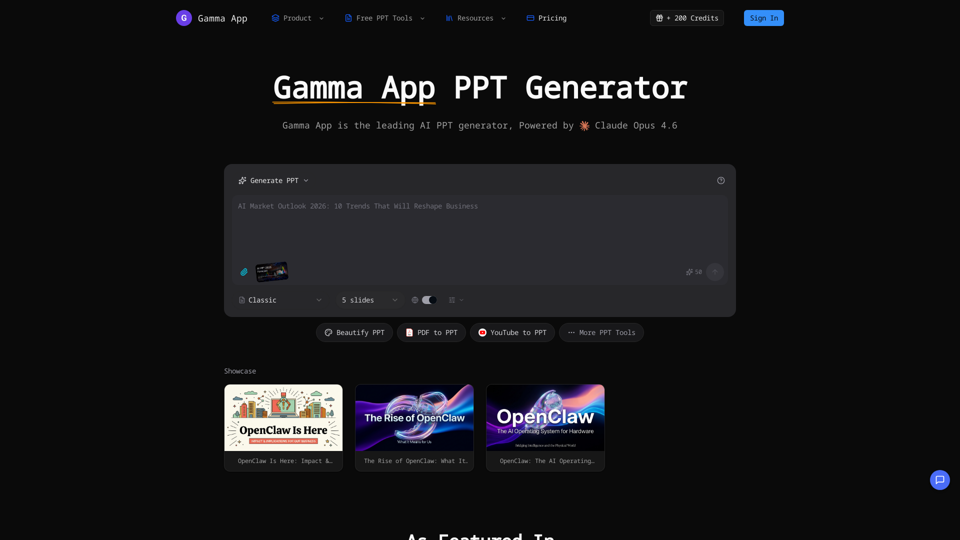
Gamma App is an advanced AI-powered presentation maker that transforms ideas into polished presentations, documents, and webpages. It leverages cutting-edge artificial intelligence, specifically Claude Opus 4.6, to automate design, layout, and content structuring, significantly reducing the time and effort required for creation.
Main Purpose
To provide a fast, efficient, and intelligent solution for generating, beautifying, and enhancing professional presentations, documents, and webpages using AI. It aims to eliminate the manual effort of design and formatting.
Target User Group
Businesses, educators, content creators, marketing professionals, and anyone who needs to create professional-looking presentations, documents, or webpages quickly and efficiently without extensive design skills.
Function Details and Operations
-
AI PPT Generation
- Text-to-Slides: Users describe their presentation topic in plain text, and Gamma App's AI generates a complete slide deck with professional layouts and compelling content.
- AI PPT Generator: Creates presentations from text prompts, analyzing requirements to produce designs comparable to those made by professional designers.
-
AI PowerPoint Beautification
- AI Beautify PPT: Upload existing presentations, and Gamma App enhances the design, fixes layouts, and applies professional styling to transform ordinary slides into stunning visuals.
-
Content Conversion & Enhancement Tools
- PDF to PPT: Converts PDF files into editable PowerPoint presentations.
- YouTube to PPT: Transforms YouTube videos into presentations.
- Word to PPT: Converts Word documents into slide decks.
- Text to PPT: Converts plain text into structured slides.
- HTML to PPT: Converts web pages into presentations.
- Markdown to PPT: Converts Markdown files into presentations.
- Excel to PPT: Converts Excel data into presentations.
- PPT Reverse Prompt: Extracts prompts or outlines from existing presentations.
- AI Speech Notes from PPT: Automatically generates detailed speaker notes and talking points for each slide.
- Generate Speech from PPT: Creates speech from presentation content.
- Compress PPTX: Reduces the file size of PowerPoint presentations.
- Merge PPT: Combines multiple PowerPoint presentations.
- PPT to JPG: Converts presentation slides into JPG images.
- PPT to Word: Converts presentations into Word documents.
-
Design Automation & Smart Features
- Smart Layouts: AI automatically selects the best layout for each slide based on content type.
- Chart Generation: Automatically creates charts and graphs from data with professional styling.
- Image Suggestions: Provides relevant image suggestions for each slide to enhance visual appeal.
- Consistent Branding: Ensures brand consistency across presentations.
-
Real-time Preview & Editing
Users can preview their presentation in the browser and make edits on the fly. -
Export & Compatibility
- Export to PPTX: Download presentations as standard PowerPoint files, compatible with Microsoft PowerPoint, Google Slides, and Keynote.
-
Multi-language Support
Create presentations in multiple languages with proper formatting and typography.
User Benefits
- Time-Saving: Creates complete presentation decks in minutes, significantly faster than manual methods.
- Professional Quality: Delivers professional-looking designs and layouts without requiring design expertise.
- Ease of Use: Intuitive interface makes editing as simple as editing a document.
- Versatility: Supports various input formats (text, PDF, YouTube, Word, HTML, Markdown, Excel) and output options.
- Enhanced Delivery: Speaker notes generation helps users deliver confident and well-prepared presentations.
- Global Reach: Multi-language support caters to diverse user bases and global teams.
Compatibility and Integration
- Output Compatibility: Exports to PPTX, ensuring compatibility with major presentation software like Microsoft PowerPoint, Google Slides, and Keynote.
- AI Engine: Powered by Claude Opus 4.6 for advanced AI capabilities.
Customer Feedback and Case Studies
- Featured in "5 New & Trending AI Tools" by Superhuman AI.
- Listed among top AI tools for marketing professionals by The AI Marketing Newsletter.
- Highlighted by AiNews.com, Daily AI Wire, and INAI Wiki for its ability to generate professional presentations from text or existing slides.
- Positive reviews from various social media platforms (LinkedIn, YouTube) praising its efficiency, beautification capabilities, and ease of use.
Access and Activation Method
- Users can sign in to access the platform.
- A free tier is available, offering 200 credits to start.
- Pricing plans are available for more extensive usage.