Overview
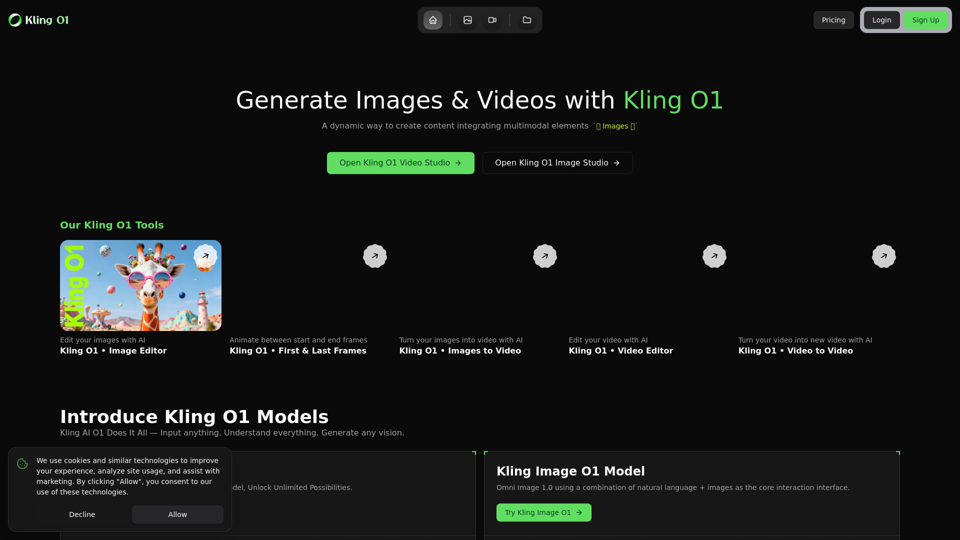
Kling O1 is an advanced AI-powered platform designed for generating and editing images and videos. It leverages multimodal AI models to enable users to create dynamic content by integrating various elements. The platform offers a browser-based workspace, Kling O1 Studio, which streamlines the content creation workflow from reference asset upload to final generation and iteration.
Main Purpose and Target User Group
The main purpose of Kling O1 is to provide a comprehensive and intuitive tool for creating high-quality AI-generated images and videos. It aims to empower users with advanced AI capabilities for content creation, offering flexibility and control over the creative process.
- Content Creators: Individuals and teams looking to produce engaging visual content efficiently.
- Marketers: Professionals needing dynamic and customizable visual assets for campaigns.
- Designers: Those who want to leverage AI for image and video manipulation and generation.
- Businesses: Companies seeking to integrate AI into their content production workflows for various needs, including advertising, social media, and internal communications.
Function Details and Operations
-
AI-Powered Content Generation:
- Kling Video O1 Model: The world's first unified multimodal video model for generating videos from various inputs.
- Kling Image O1 Model: Omni Image 1.0, utilizing natural language and images as the core interaction interface for image generation.
- Reference-Intelligent Models: Natively understands
@Imageand@Elementtokens to maintain consistency of characters, props, and motion cues across outputs.
-
Comprehensive Video Endpoints:
- Reference-to-Video: Generate videos based on uploaded reference images or elements.
- Video-to-Video: Transform existing videos into new ones with AI.
- Edit: AI-powered video editing capabilities.
- First & Last Frames: Animate transitions between specified start and end frames.
-
Image Editing with AI:
- Kling O1 Image Editor: AI tools for editing and enhancing images.
- Images to Video: Convert static images into dynamic video content.
-
Workflow and Studio Features:
- Kling O1 Studio: A browser-based workspace for composing AI videos and images.
- Reference Composer: Upload images/elements, auto-generate
@Image/@Elementtokens, and easily integrate them into prompts. - Guided Uploads: Ensures proper formatting, duration hints, and inline upload progress for all assets.
- Results Canvas & Asset Library: Instantly view renders, download files, and pin assets to a shared library for future use and team collaboration.
-
Four-Step Workflow:
- Upload Reference Assets: Add hero portraits, product elements, or short clips/frame pairs.
- Compose the Prompt: Describe the scene, lighting, and motion beats using reference assets via
@Image1 / @Element1. - Select Mode & Settings: Choose Kling Image or Video endpoints, set duration, resolution, audio preferences, or lock first/last frames.
- Generate & Iterate: Generate content, inspect results, download files, or queue new variations.
User Benefits
- Efficiency: Rapid generation of high-quality images and videos, significantly reducing production time.
- Consistency: Maintain character, prop, and motion consistency across different outputs using reference-intelligent models.
- Creative Control: Extensive options for editing, animating, and transforming content with AI.
- Flexibility: Supports various content creation needs, from image editing to complex video generation.
- Professional Output: No watermarks on paid exports, ensuring production-ready assets.
- Commercial Rights: Full commercial rights granted with paid plans, allowing for broadcast, client delivery, and monetized campaigns.
- User-Friendly Interface: Browser-based studio with a guided workflow for ease of use.
Compatibility and Integration
- Browser-Based: Accessible through any web browser, eliminating the need for software installations.
- Cloud-Powered: All generations run on Kling O1's family of models, continuously updated with the newest fidelity and physics improvements.
- Asset Library: Facilitates team collaboration and reuse of assets within the platform.
Customer Feedback and Case Studies
- Credit Refund Policy: Automatic credit return for failed or clearly broken renders. Support available for system-related creative misses.
- Continuous Model Upgrades: Users always get the newest fidelity and physics improvements without switching tools.
- Fast Generation Times: Most 5-second clips complete in 30–60 seconds; 10-second clips in 1–2 minutes. Priority queues for paid plans ensure predictable wait times.
Access and Activation Method
- Website Access: Users can access the platform via kling-o1.pro.
- Login/Sign Up: Requires user account creation to access the Kling O1 Studio.
- Subscription/Credit Packs: Generation is credit-based. Users can subscribe to plans for monthly credit allotments or purchase one-time credit packs.
- Cancellation Policy: Subscriptions can be canceled anytime from the Billing dashboard, with active plans remaining until the end of the current cycle and unused credits retained.