Overview
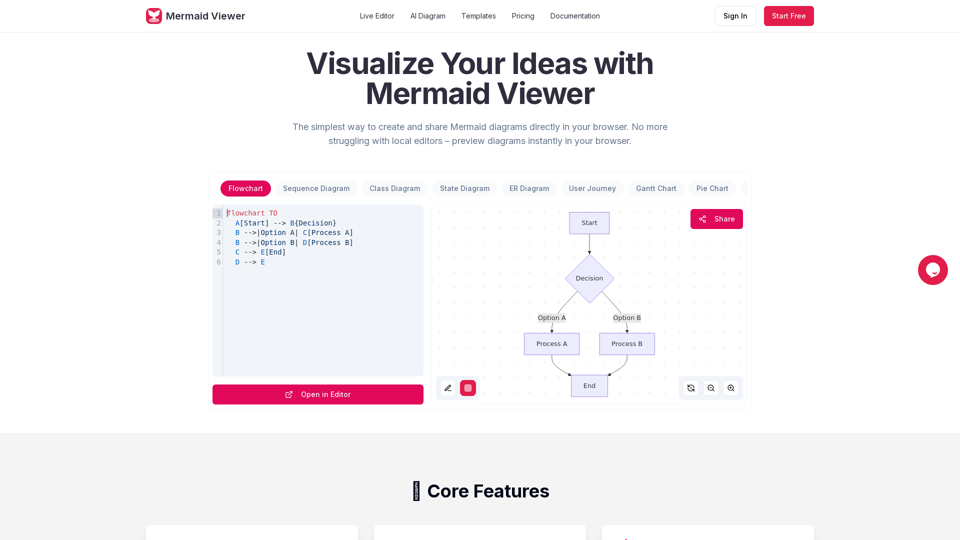
MermaidViewer is an online diagram editor designed to simplify the creation and sharing of Mermaid diagrams directly within a web browser. It eliminates the need for local editors by providing instant, real-time previews of diagrams as users type.
Main Purpose and Target User Group
- Main Purpose: To provide a user-friendly, efficient, and accessible platform for creating, visualizing, and sharing Mermaid diagrams.
- Target User Group: Developers, technical writers, project managers, educators, and anyone who needs to visualize ideas, processes, or data using Mermaid syntax. This includes individuals, teams, and enterprises.
Function Details and Operations
- Live Preview: Instantly visualizes changes to the Mermaid code as it's typed, eliminating the need for a separate "Render" button.
- AI-Assisted Coding: Features a "Generate with GPT-4" button to convert natural language text descriptions into Mermaid code.
- Smart Export: Allows saving diagrams in various formats (SVG, PNG, Markdown) with customizable DPI settings and support for dark/light themes.
- Enterprise Integration: Offers Docker private deployment and role-based access control for enterprise environments.
- Smart Debugging: Provides syntax error highlighting and auto-correction suggestions to help users fix issues quickly.
- Real-time Collaboration: Enables sharing editor links with team members for co-editing diagrams.
- Recommended Templates: Offers a library of pre-built charts for various use cases (e.g., Flowchart, Timeline, Governance Committee Decision Flow, Course Lifecycle, Wireframe Collaboration Flow) to facilitate quick starts.
- Supported Diagram Types:
- Flowchart
- Sequence Diagram
- Class Diagram
- State Diagram
- ER Diagram
- User Journey
- Gantt Chart
- Pie Chart
- Requirement Diagram
- Git Graph
- C4 Diagram
- Mind Map
- Timeline
- No Signup Required (for basic use): Users can start creating diagrams instantly without registration.
- Privacy First: Data stays in the user's browser; no diagram data is stored on MermaidViewer servers.
- Version History: (Available in Starter and Pro plans) Tracks changes to diagrams, allowing users to revert to previous versions.
- Personal Notes & Annotations: (Available in Pro plan) Allows users to add personal notes and annotations to diagrams.
User Benefits
- Increased Efficiency: Real-time preview and AI assistance significantly speed up diagram creation.
- Ease of Use: Simple interface and no installation required make it accessible to a wide range of users.
- Improved Collaboration: Real-time sharing and co-editing streamline team workflows.
- High-Quality Output: Flexible export options ensure professional-looking diagrams for various purposes.
- Reduced Errors: Smart debugging helps users quickly identify and correct syntax issues.
- Cost-Effective: Free tier available for basic use, with affordable paid plans for advanced features.
- Data Privacy: Ensures user data remains private and is not stored externally.
Compatibility and Integration
- Browser-Based: Works directly in any modern web browser.
- Export Formats: SVG, PNG, Markdown, JPG, PDF (JPG/PDF in Pro plan).
- Enterprise Deployment: Docker private deployment option for integration into corporate infrastructures.
Access and Activation Method
- Website Access: Directly accessible via mermaidviewer.com.
- Free Tier: Users can start creating diagrams immediately without registration.
- Paid Plans (Starter, Pro): Subscriptions available monthly or annually, offering additional features like more diagrams, AI conversations, high-res exports, version history, and advanced sharing. Activation involves subscribing to a chosen plan.