Music to Video AI

Music to Video AI - AI Music Video Generator & AI Video Creation for Music Visualization

Music to Video AI

Music to Video AI -Introduction

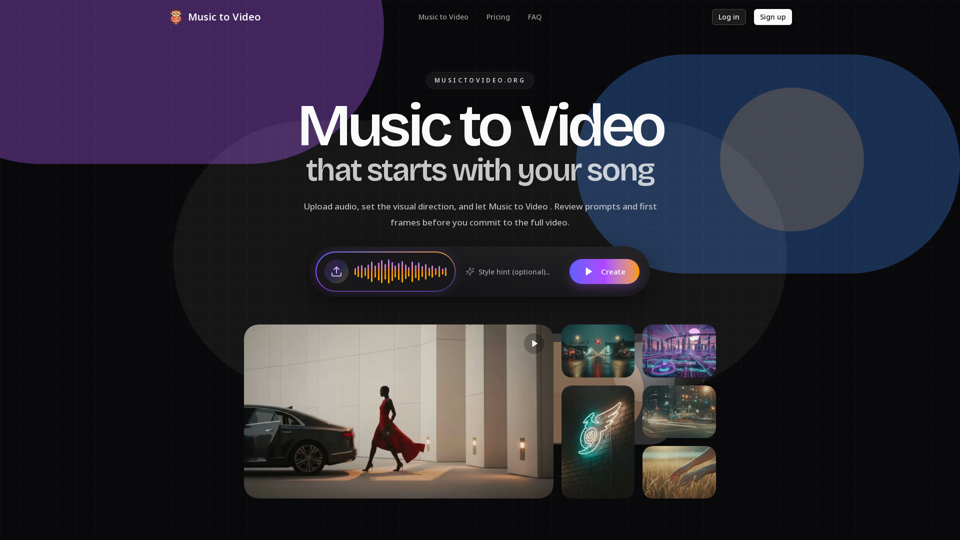
Music to Video AI is an innovative platform designed to transform your audio tracks into compelling music videos. This tool empowers artists, labels, and content creators to visualize their music with unprecedented control and efficiency. By bridging the gap between sound and sight, Music to Video AI offers a streamlined process for bringing your musical narratives to life, ensuring that the visual output resonates deeply with the essence of your songs.

Music to Video AI -Features

Music to Video AI

Overview

Music to Video AI is an innovative AI-powered platform designed to transform audio tracks into engaging music videos. It distinguishes itself from other AI video tools by offering a unique "reviewable control layer," allowing users to guide the AI's creative process and make adjustments before committing to a final render. This approach provides more control and confidence in the output, reducing the need for costly and time-consuming rerenders.

Main Purpose and Target User Group

Main Purpose
To generate high-quality, customizable music videos from audio tracks with a focus on creative control and alignment with the song's mood and energy. It aims to solve the problem of "black-box rendering" in AI video generation by providing intermediate feedback and editing capabilities.

Target User Group

  • Independent Musicians: For creating their first music videos efficiently.
  • Labels and Agencies: For artist pre-visualization, creative review workflows, and stakeholder alignment.
  • Content Creators: For producing lyric videos, visualizers for platforms like Spotify, YouTube, and Apple Music.
  • Social Media Teams: For generating vertical promotional cuts for TikTok, Instagram Reels, and YouTube Shorts.
  • Teams seeking speed of AI generation without sacrificing creative control.

Function Details and Operations

Audio Upload and Briefing
Users upload their audio file and provide a text brief describing the desired mood, story cues, styling, or camera language.

AI-Powered Generation Flow Preparation

  • Audio-Aware Segmentation: The AI analyzes the song, segments it into meaningful sections (e.g., verses, choruses, bridges), and identifies energy changes and narrative turns.
  • Scene Direction Generation: The system writes scene directions based on the audio analysis and user brief.
  • First-Frame Coverage for Review: Before full rendering, the AI generates initial visual coverage (first frames) for each segment, allowing users to preview the direction.

Controlled Rendering and Adjustment

  • Editable Scene Prompts: Users can review and adjust prompts for each segment, rewriting them or modifying shot language as needed.
  • Segment-Specific Regeneration: If a particular scene or segment doesn't meet expectations, users can regenerate only that specific part without re-rendering the entire video.
  • Final Video Composition: Once satisfied with the segment previews and adjustments, users can proceed to full image and video generation to compose the final output.

Output Formats
Supports both widescreen (16:9) and vertical (9:16) formats, adapting the generation pipeline for various platforms.

User Benefits

  • Enhanced Creative Control: Users maintain control over the visual direction, mood, and pacing of the video, ensuring it aligns with their artistic vision.
  • Reduced Rerender Costs and Time: By allowing adjustments and previews before full rendering, the platform minimizes the need for costly and time-consuming blind rerenders.
  • Faster Iteration and Feedback: Provides a quicker way to iterate on visual concepts and gather feedback from stakeholders with concrete visual examples.
  • Versatile Output for Various Platforms: Generates content suitable for traditional music videos, social media (TikTok, Instagram Reels, YouTube Shorts), and streaming platform visualizers (Spotify Canvas).
  • Pre-Production Visualization: Acts as a powerful tool for artist pre-visualization, creative direction, and generating visual storyboards before committing to full-scale production.
  • Cost-Effective Solution: Offers a more affordable alternative to traditional music video production, especially for independent artists and frequent content creators.

Compatibility and Integration

Audio File Compatibility
Supports various audio file formats for upload.

Output Platform Optimization
Generates videos optimized for platforms like TikTok, Instagram Reels, YouTube Shorts, Spotify Canvas, YouTube, and Apple Music.

Access and Activation Method

Web-Based Platform
Accessible via a web browser at MusicToVideo.org.

Account Creation
Users need to log in or sign up to access the service.

Subscription-Based Pricing
Offers tiered monthly or yearly subscription plans (Starter, Creator, Studio) based on credit allowances, which dictate the amount of video generation possible.

Credit System
Operations are credit-based, with approximately 100 credits equaling one core 5-second generation run. Credits expire 30 days after issuance.

Cancellation Policy
Users can cancel anytime and retain access until the end of their billing period.
Music to Video AI -Frequently Asked Questions

How does Music to Video AI help me create music videos?

Music to Video AI allows you to upload your audio track, describe the visual direction you want, and then uses AI to prepare a generation flow. You can review prompts and first frames before committing to the full video, giving you more control over the final output.

Why is Music to Video AI different from other AI music video generators?

Unlike many tools that offer "one-click" output, Music to Video AI focuses on providing a smarter, more controllable process. It breaks your song into segments, generates initial visual coverage and prompt directions for each, and allows you to adjust or rewrite prompts for specific scenes before the final render. This reduces guesswork and wasted time on full rerenders.

What audio files can I upload to Music to Video AI?

The website states you can "Upload audio" but does not specify supported file types. It is generally safe to assume common audio formats like MP3, WAV, and AAC are supported. For specific details, you may need to refer to the platform after signing up or contact their support.

What exactly do I get after uploading my audio to Music to Video AI?

After uploading your audio and brief, the AI system reads the song, splits it into segments, writes scene directions, and prepares first-frame coverage for your review. This allows you to see the visual direction and prompts for each segment before generating the full video.

Can I make changes before the final video is generated with Music to Video AI?

Yes, absolutely. Music to Video AI is designed for this. You can adjust prompts where needed, rewrite scene language, and regenerate only the segments that require improvement, all before committing to the full video generation.

Does Music to Video AI support vertical music videos and short-form promo cuts?

Yes, Music to Video AI can generate 9:16 vertical music videos optimized for platforms like TikTok, Instagram Reels, YouTube Shorts, and Spotify Canvas. It's ideal for creating release teasers, lyric snippets, and other promotional assets.

Is Music to Video AI best for final videos or for pre-production?

Music to Video AI is versatile and can be used for both. It's excellent for pre-production, allowing artists and labels to translate a finished track into a reviewable video direction, create visual storyboards, and align stakeholders before full production. It also helps in generating final videos with more confidence and control.

Who is Music to Video AI built for?

Music to Video AI is built for teams and individuals who want the speed of AI music video generation without sacrificing creative control. This includes independent musicians, labels, content creators, and social media teams looking to produce music videos, lyric videos, visualizers, and vertical promo cuts.

Music to Video AI Login

Music to Video AI Login Link

https://musictovideo.org/Log%20in

Music to Video AI Sign up

Music to Video AI Sign up Link

https://musictovideo.org/Sign%20up

Music to Video AI -Data Analysis

Latest Traffic Information

  • Monthly Visits

    -

  • Bounce Rate

    0.00%

  • Pages Per Visit

    0.00

  • Visit Duration

    00:00:00

  • Global Rank

    -

  • Country Rank

    -

Visits Over Time

Traffic Sources

  • direct:
    0.00%
  • referrals:
    0.00%
  • social:
    0.00%
  • mail:
    0.00%
  • search:
    0.00%
  • paidReferrals:
    0.00%
More data

Music to Video AI - Alternative

Wondershare Filmora - Easy-to-use video editing software

Wondershare Filmora is a simple video editor that allows you to edit videos and audio on Windows and Mac. Download Filmora to create stunning videos with titles, transitions, and creative visual effects.

--
FlexClip

Flexclip.com: Create stunning videos effortlessly with FlexClip, the free online video editor and maker. Easily add text, music, animations, and effects without any video editing skills needed. Try it now!

--
Fliki AI

Fliki.ai: Transform your ideas into stunning videos effortlessly with Fliki AI, the leading AI Video Generator. Our user-friendly Text to Video editor allows you to create engaging content with realistic voiceovers and dynamic AI clips. Experience seamless video creation like never before with Fliki AI, your go-to solution for all your video production needs.

--
More Tags about: Music to Video AI