SciDraw: Overview
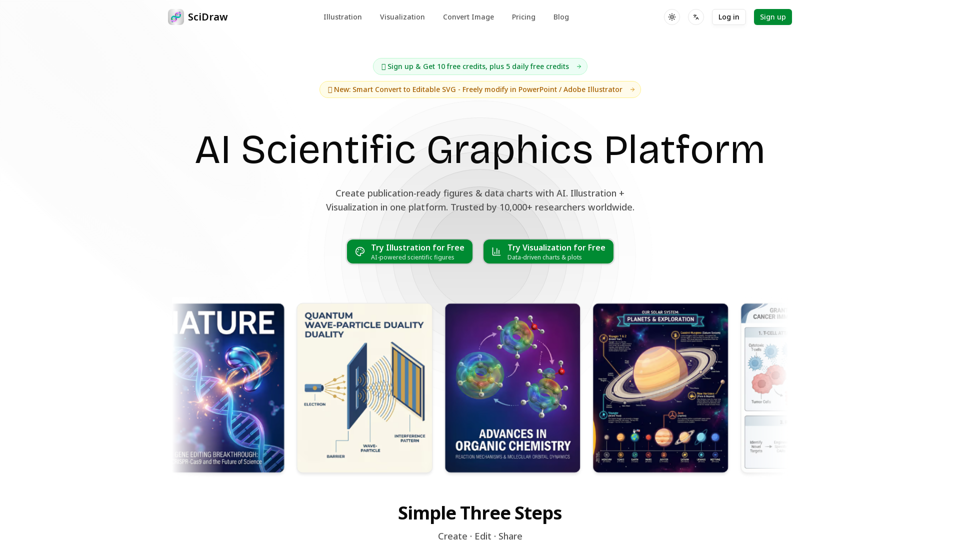
SciDraw is an AI-powered scientific graphics platform designed to create publication-ready figures and data charts. It combines illustration and data visualization capabilities, leveraging artificial intelligence to streamline the creation of complex scientific visuals. The platform aims to save researchers significant time and cost while improving the quality and acceptance rate of their scientific publications.
Main Purpose and Target User Group
The main purpose of SciDraw is to empower researchers, PhD students, and scientific professionals to generate high-quality, professional scientific illustrations and data visualizations without requiring extensive design skills or expensive software.
Target User Group
- Researchers (Postdoctoral Researchers, Research Scientists, Principal Investigators, Lab Directors)
- Academics (Associate Professors, Department Chairs)
- PhD Candidates and Graduate Students
- Scientific Officers in BioTech and R&D
- Anyone needing publication-ready scientific figures for journals, grant proposals, presentations, and textbooks.
Function Details and Operations
AI Scientific Illustrations
- Text to Image: Generate professional scientific illustrations by describing concepts in natural language.
- Sketch / Image Edit: Upload rough sketches or reference images, and AI transforms them into polished, professional visuals.
- Multi-round AI Optimization: Refine generated images through iterative AI adjustments based on user feedback.
- SVG Vector Export: Export illustrations as editable SVG files, allowing for further modification in software like Adobe Illustrator, Inkscape, or Figma.
- Editable Elements: Independently adjust color, position, and size of elements within the vector graphics.
- Infinite Scaling: Vector graphics maintain clarity and quality at any scale.
- Editable Text: Directly select and copy text within the generated illustrations.
- Multiple AI Generation Modes: Offers 3 distinct AI generation modes for varied needs.
- Visual Styles: Provides 6+ visual styles including Flat, 3D, photorealistic, schematic, and scientific illustration.
AI Data Visualization
- Smart Data Charts: Upload CSV/Excel data to generate publication-ready charts and plots.
- Automatic Code Generation: Automatically generates Python matplotlib/seaborn code for data charts.
- 10+ Chart Types: Supports various chart types including Box plots, Violin plots, Scatter plots, Heatmaps, and Regression charts.
- Journal Style Presets: One-click formatting to adapt charts to standards of Nature, Science, Cell, PLOS, ACS, and more.
- Colorblind-Friendly Palettes: Built-in Okabe-Ito and other accessible color palettes for universal readability.
- Multi-Format Export: Export charts as PNG, PDF, EPS, or TIFF to meet diverse journal requirements.
Workflow
- Create: Start with a template or describe your idea using text or sketches.
- Edit: Refine the generated visuals with multi-round AI optimization.
- Share: Download and use the final figures in your research.
Templates
- 7+ professional templates for TOC graphics, journal covers, workflows, mechanism diagrams, and pathways.
User Benefits
- Significant Time Savings: Reduces drawing time by up to 90% (e.g., from hours to minutes).
- Cost Reduction: Cuts illustration costs by up to 95%, eliminating the need for expensive designers or software.
- Improved Paper Acceptance Rate: Professional, high-quality figures enhance reviewer impressions and meet SCI journal standards.
- Zero Learning Curve: Intuitive conversational interface with real-time preview allows instant start without design experience.
- Publication-Ready Quality: Ensures all generated figures and charts meet the stringent requirements of scientific journals.
- Consistency: Helps maintain a consistent visual style across all publications from a lab or individual.
- Flexibility: Credit-based system and various pricing tiers cater to different usage needs.
- Accessibility: Colorblind-friendly options ensure broader audience readability.
Compatibility and Integration
- SVG Vector Export: Compatible with vector graphics software like Adobe Illustrator, Inkscape, and Figma for local editing.
- Data Input: Accepts CSV/Excel data for visualization.
- Output Formats: Exports in multiple formats (PNG, PDF, EPS, TIFF) suitable for various journal submissions.
- PowerPoint / Adobe Illustrator Integration: Smart Convert to Editable SVG allows free modification in these popular tools.
Access and Activation Method
- Web-based Platform: Accessible online via a web browser.
- Free Tier: Offers 10 free credits upon registration and 5 daily free credits, including access to templates, styles, and SVG vector conversion.
- Paid Subscriptions: Basic, Standard, and Premium plans available monthly or yearly, offering increased credits, permanent history retention, priority support, and faster image generation.
- Credit-based System: Flexible pay-as-you-go model to avoid waste.