AI Photo Editor

AI Photo Editor - Online AI Image Enhancer, Remover & Retoucher

AI Photo Editor

AI Photo Editor -Introduction

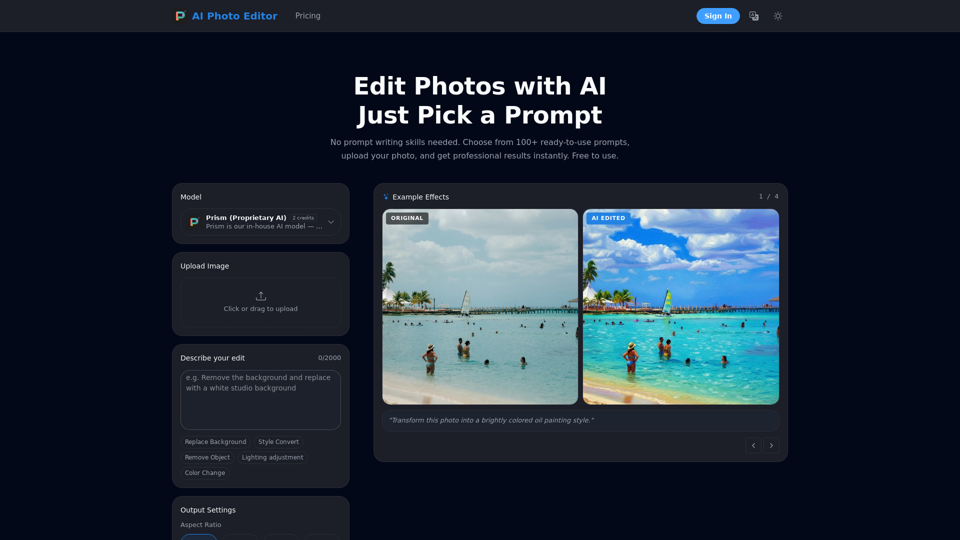
Discover the future of image editing with AI Photo Editor, your go-to online platform for transforming photos effortlessly. This innovative AI image editor empowers users to achieve professional-quality results instantly, without needing any prior design skills or complex prompt writing. Simply choose from a wide selection of ready-to-use prompts, upload your image, and let the artificial intelligence work its magic. AI Photo Editor makes advanced photo manipulation accessible and straightforward, allowing you to bring your visual ideas to life with unparalleled ease and speed.

AI Photo Editor -Features

AI Photo Editor Features

Overview

The AI Photo Editor is an advanced online image editing tool powered by artificial intelligence. It transforms photos using simple text commands or pre-defined prompts, leveraging a proprietary AI model called "Prism" for fast, lightweight, and optimized everyday photo edits. It delivers professional-quality results without requiring design skills.

Target User Groups

  • E-Commerce Sellers: For professional product photography at scale, including background removal and lighting correction.
  • Content Creators: For enhancing visuals for social media and other platforms.
  • Professional Photographers: To speed up retouching workflows.
  • Marketing Teams: To create compelling campaign visuals efficiently.
  • General Users: For easily enhancing personal photos, creating headshots, restoring old photos, or applying creative styles.

Function Details and Operations

Core Functionality
  • Prompt-Based Editing: Users describe desired edits in plain language or choose from over 100 ready-to-use prompts.
  • Proprietary AI Model (Prism): Ensures fast, lightweight, and optimized performance for various editing tasks.
Specific Editing Capabilities
  • Background Remover AI: Replace or remove backgrounds with precision edge detection.
  • Style Convert: Transform photos into various artistic styles (e.g., oil painting, cinematic, vintage film, anime).
  • Object Removal: Seamlessly remove unwanted objects or people.
  • Lighting Adjustment: Change photo lighting to different modes (e.g., night mode).
  • Color Change: Modify colors within the image.
  • E-Commerce & Product Photography: Create professional product photos by removing backgrounds, correcting lighting, and preparing images for marketplaces.
  • Business & Professional Headshots: Generate studio-quality headshots.
  • Travel Photography Enhancement: Remove crowds, clean up backgrounds, and restore scenes.
  • AI Age Transformation: Realistically adjust facial features to show older or younger versions.
  • Old Photo Restoration & Colorization: Repair damaged, faded, and scratched old photos, enhance details, and colorize black-and-white images.
Operation Steps
  1. Upload Your Photo: Drag and drop or click to upload JPG, PNG, or WebP images up to 25MB.
  2. Describe Your Edit: Type what you want in plain language.
  3. Download the Result: Get the edited image in high resolution within seconds.
Output Settings
  • Aspect Ratio: Auto, 1:1, 3:4, 4:3, 16:9, 9:16.
  • Output Format: Auto, JPG, PNG.

User Benefits

  • No Design Skills Required: Edit photos like a professional by simply describing changes.
  • Professional-Quality Results: Achieve high-quality outcomes for personal, commercial, or client work.
  • Speed and Efficiency: Edits are completed within seconds.
  • Cost-Effective: Offers daily free credits and a pay-as-you-go model for additional credits, avoiding subscriptions.
  • Versatility: A wide range of editing tools caters to diverse needs.
  • High Accuracy: Features precision edge detection for complex elements.
  • Privacy-Focused: Uploaded images and edited results are not permanently stored on servers.
  • Commercial Use Rights: All edited images are fully owned by the user for any purpose.
  • Batch Processing: (Available via API for Enterprise users) Edit multiple images quickly with consistent results.

Compatibility and Integration

  • Supported Image Formats: JPG, PNG, and WebP for uploads.
  • Maximum Upload Size: 25MB per image.
  • API Access: Available for developers and businesses requiring high-volume processing, custom integrations, and batch editing capabilities (Enterprise Plan).

Access and Activation Method

  • Online Access: Accessible directly through its website.
  • Free Plan: Includes 5 daily credits, access to all editing tools, standard quality output, and basic support.
  • One-Time Credit Packs: Purchase credit packs (e.g., 70, 300, 700 credits) via a one-time payment; credits never expire.
  • Enterprise Plan: Custom solutions for teams and businesses with high-volume needs, offering custom credit packages, priority processing, dedicated account manager, API access, custom integrations, and an SLA guarantee.
  • Account Creation: Users can sign in or sign up to start editing.
AI Photo Editor -Frequently Asked Questions

What is AI Photo Editor and how does it work?

AI Photo Editor is an advanced online photo editor powered by AI, designed to transform and enhance your images with simple text commands. You just upload a photo, describe the desired changes (e.g., "remove the background" or "change lighting"), and our AI automatically applies the edits in seconds, providing professional-quality results.

Is AI Photo Editor free to use?

Yes! Every user gets free credits daily to try all editing tools. For heavier usage, you can purchase additional credits on a pay-as-you-go basis — no subscription or monthly fees required.

How does the credit system work?

Free users receive daily credits that reset every 24 hours. Purchased credits never expire — use them at your own pace.

What image formats and sizes are supported?

We support JPG, PNG, and WebP formats. Maximum upload size is 25MB per image.

How fast is the AI photo editing process?

Most edits are completed within seconds. Our optimized AI inference pipeline ensures fast generation without long waiting times.

How accurate is the background removal and edge detection?

Our Background Remover AI utilizes high-precision edge detection technology, ensuring professional-grade accuracy even with complex details like hair, fur, and semi-transparent objects.

Does AI Photo Editor save or store my photos?

We take your privacy seriously. Uploaded images and AI-edited results are not permanently stored on our servers.

What makes AI Photo Editor different from other AI photo editors?

AI Photo Editor stands out by delivering professional-grade results through natural text commands. It offers comprehensive features including Background Remover AI, object cleanup, Photo Retouching AI for portraits, style conversion, and more, all without requiring design skills.

Can I use edited images for commercial purposes?

Absolutely. All images you edit are yours to use for any purpose — personal, commercial, or client work.

Is there an API for batch processing?

Yes, we offer an API for developers and businesses who need to process images at scale. Contact us for API access and documentation.

How can I contact customer support?

For customer service and support, please contact us via the email provided on our website's contact page, or directly at [email protected].

AI Photo Editor -Data Analysis

Latest Traffic Information

  • Monthly Visits

    -

  • Bounce Rate

    0.00%

  • Pages Per Visit

    0.00

  • Visit Duration

    00:00:00

  • Global Rank

    -

  • Country Rank

    -

Visits Over Time

Traffic Sources

  • direct:
    0.00%
  • referrals:
    0.00%
  • social:
    0.00%
  • mail:
    0.00%
  • search:
    0.00%
  • paidReferrals:
    0.00%
More data

AI Photo Editor - Alternative

Glossi

Glossi - Effortlessly Create Studio-Quality Product Visuals for E-Commerce with Real-Time Content Creation

--
Godinabox.co:GPT-3.5 AI Chatbot on Whatsapp | God In A Box

Godinabox.co:Experience the power of ChatGPT/GPT-3 on Whatsapp with our innovative and user-friendly bot, always updated with the latest model, offering unparalleled conversational AI capabilities at an affordable price, as the pioneering paid ChatGPT on Whatsapp service.

--
GoEnhance AI - Video to video, Image enhancer and upscaler

Video to animation Platform, transform your videos into a variety of animated styles, including pixel and flat anime. Enhance and upscale images to extreme detail by AI.

--
Gooey.AI - The best of private & open source AI

Gooey.AI showcases the best of private & open source AI with one billing account and discoverable workflows.

--
More Tags about: AI Photo Editor