Overview
Google Nano Banana Pro AI, powered by Gemini 3.0 Pro, is an advanced AI tool designed for instant image creation and editing. It offers a sleek user interface and leverages the powerful Nano Banana Pro model to generate new visuals from text prompts or transform existing photos with artistic effects, style transfer, and intelligent editing capabilities.
Main Purpose and Target User Group
The primary purpose of Google Nano Banana Pro AI is to provide a versatile platform for generating and editing high-quality images using AI. It caters to a broad audience including:
- Artists and Designers: For creating unique artwork, experimenting with styles, and generating visual concepts.
- Marketers: For producing striking campaign artwork, branded visuals, and product images efficiently.
- E-commerce Businesses: For generating and enhancing product shots for catalogs and online listings.
- Content Creators: For making unique art, comics, or profile visuals with full creative control.
- Anyone looking to push creative boundaries with AI: Users who want to explore AI's potential in visual creation and transformation.
Function Details and Operations
- Text-to-Image Generation: Users can produce stunning images directly from descriptive text prompts, supporting a wide range of artistic styles.
- Intelligent Photo Editing: Allows for editing, enhancing, or remixing images using simple instructions. This includes changing scenes, adding/removing objects, and applying smart fixes.
- Artistic Style Transfer: Transforms photos by applying trending or custom art styles, from digital painting to pop art.
- Identity & Element Consistency: Maintains consistency of characters or objects across multiple edits and batches, ensuring cohesive creative assets.
- Mix & Merge Creativity: Enables combining content from several images or prompts to generate unique and innovative results.
- Logical Scene Creation: The Pro model intelligently understands context, delivering plausible and story-rich visual outcomes.
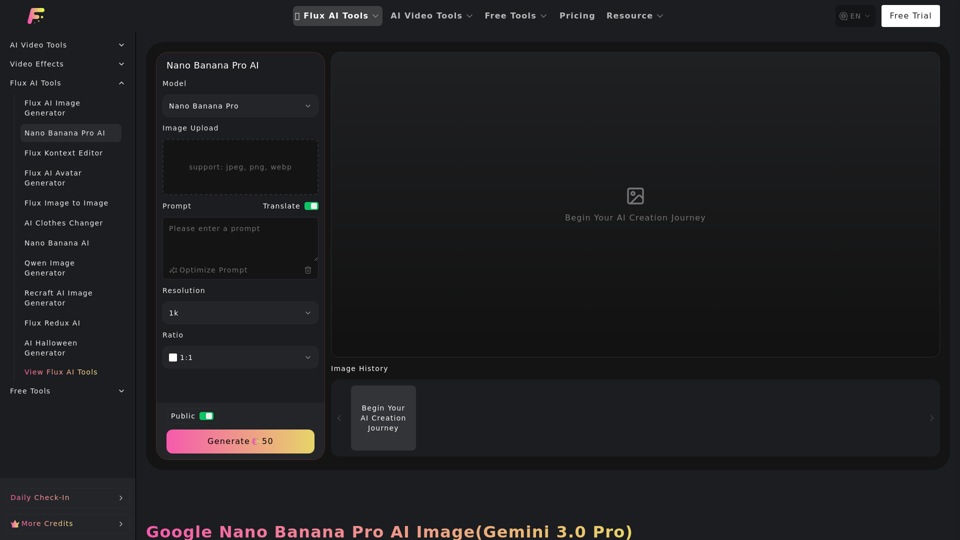
- User Interface: Features a sleek UI with options for prompt input, image upload (JPEG, PNG, WebP), resolution selection (1k, 2k, 4k), and aspect ratio control (1:1, 3:2, 2:3, 3:4, 4:3, 4:5, 5:4, 9:16, 16:9, 21:9, Auto Ratio).
- Operation Steps:
- Type your image idea or prompt.
- Upload one or more images (optional).
- Click "Generate" and download your HD result.
User Benefits
- Quick and Precise Image Generation: Experience rapid and accurate image creation.
- Creative Freedom: Generate and edit images with extensive creative control.
- Consistency & Cohesion: Preserve subject identity and coherent style across edits, even with changes in poses or backgrounds.
- Design-Grade Output: Achieve professional quality and originality with distinctive artistic styles and details.
- Versatility: Applicable across various scenarios, including creative projects, marketing, visual design, and e-commerce.
- Efficiency: Generate striking visuals and product mock-ups with minimal effort.
Compatibility and Integration
- Supported Image Formats for Upload: JPEG, PNG, WebP.
- Integration with Flux AI Tools: Part of a broader ecosystem of Flux AI tools, including Flux AI Image Generator, Flux AI Video Generator, Flux Kontext Editor, Flux AI Avatar Generator, and many more, suggesting potential for seamless workflow within the Fluxproweb platform.
Access and Activation Method
- Access: The tool is accessible via the Fluxproweb platform.
- Activation: Users can begin their AI creation journey by navigating to the Nano Banana Pro AI tool on the website and following the three-step generation process. A "Free Trial" option is also mentioned on the website, suggesting a potential free entry point.