MermaidViewer

MermaidViewer - Online Mermaid Diagram Editor & Visualization Tool

MermaidViewer

MermaidViewer -Introduction

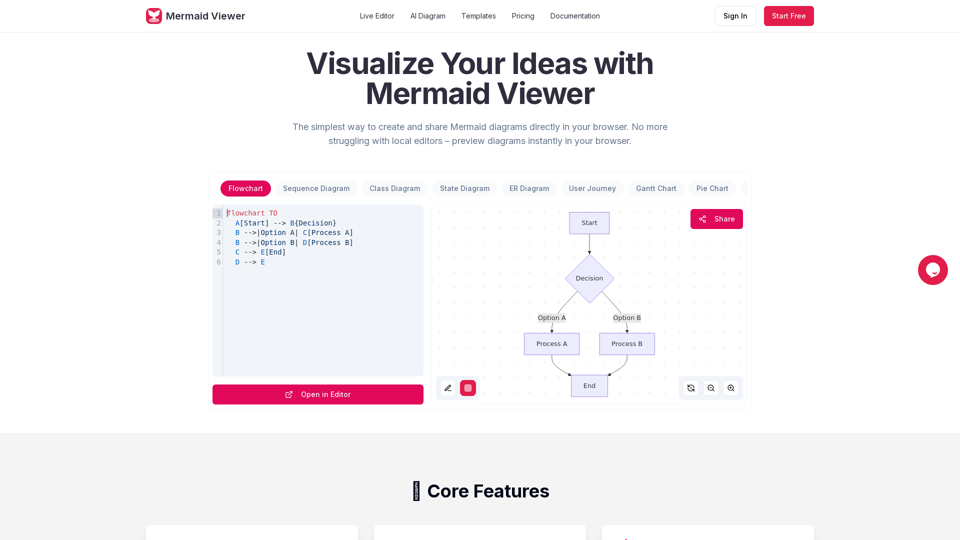
MermaidViewer is an intuitive online diagram editor designed to simplify the creation and sharing of Mermaid diagrams. It eliminates the need for local installations, allowing users to visualize their ideas directly within their browser. This platform offers a seamless experience for generating various diagram types, from flowcharts to mind maps, making complex data and processes easy to understand. With MermaidViewer, users can quickly transform textual descriptions into clear, shareable visual representations, fostering better communication and collaboration.

MermaidViewer -Features

Overview

MermaidViewer is an online diagram editor designed to simplify the creation and sharing of Mermaid diagrams directly within a web browser. It eliminates the need for local editors by providing instant, real-time previews of diagrams as users type.

Main Purpose and Target User Group

  • Main Purpose: To provide a user-friendly, efficient, and accessible platform for creating, visualizing, and sharing Mermaid diagrams.
  • Target User Group: Developers, technical writers, project managers, educators, and anyone who needs to visualize ideas, processes, or data using Mermaid syntax. This includes individuals, teams, and enterprises.

Function Details and Operations

  • Live Preview: Instantly visualizes changes to the Mermaid code as it's typed, eliminating the need for a separate "Render" button.
  • AI-Assisted Coding: Features a "Generate with GPT-4" button to convert natural language text descriptions into Mermaid code.
  • Smart Export: Allows saving diagrams in various formats (SVG, PNG, Markdown) with customizable DPI settings and support for dark/light themes.
  • Enterprise Integration: Offers Docker private deployment and role-based access control for enterprise environments.
  • Smart Debugging: Provides syntax error highlighting and auto-correction suggestions to help users fix issues quickly.
  • Real-time Collaboration: Enables sharing editor links with team members for co-editing diagrams.
  • Recommended Templates: Offers a library of pre-built charts for various use cases (e.g., Flowchart, Timeline, Governance Committee Decision Flow, Course Lifecycle, Wireframe Collaboration Flow) to facilitate quick starts.
  • Supported Diagram Types:
    • Flowchart
    • Sequence Diagram
    • Class Diagram
    • State Diagram
    • ER Diagram
    • User Journey
    • Gantt Chart
    • Pie Chart
    • Requirement Diagram
    • Git Graph
    • C4 Diagram
    • Mind Map
    • Timeline
  • No Signup Required (for basic use): Users can start creating diagrams instantly without registration.
  • Privacy First: Data stays in the user's browser; no diagram data is stored on MermaidViewer servers.
  • Version History: (Available in Starter and Pro plans) Tracks changes to diagrams, allowing users to revert to previous versions.
  • Personal Notes & Annotations: (Available in Pro plan) Allows users to add personal notes and annotations to diagrams.

User Benefits

  • Increased Efficiency: Real-time preview and AI assistance significantly speed up diagram creation.
  • Ease of Use: Simple interface and no installation required make it accessible to a wide range of users.
  • Improved Collaboration: Real-time sharing and co-editing streamline team workflows.
  • High-Quality Output: Flexible export options ensure professional-looking diagrams for various purposes.
  • Reduced Errors: Smart debugging helps users quickly identify and correct syntax issues.
  • Cost-Effective: Free tier available for basic use, with affordable paid plans for advanced features.
  • Data Privacy: Ensures user data remains private and is not stored externally.

Compatibility and Integration

  • Browser-Based: Works directly in any modern web browser.
  • Export Formats: SVG, PNG, Markdown, JPG, PDF (JPG/PDF in Pro plan).
  • Enterprise Deployment: Docker private deployment option for integration into corporate infrastructures.

Access and Activation Method

  • Website Access: Directly accessible via mermaidviewer.com.
  • Free Tier: Users can start creating diagrams immediately without registration.
  • Paid Plans (Starter, Pro): Subscriptions available monthly or annually, offering additional features like more diagrams, AI conversations, high-res exports, version history, and advanced sharing. Activation involves subscribing to a chosen plan.
MermaidViewer -Frequently Asked Questions

How can MermaidViewer help improve my diagramming process?

MermaidViewer provides a live editor for Mermaid diagrams, allowing you to visualize changes as you type. This eliminates the need for local editors and instantly previews your diagrams in the browser, streamlining the creation and sharing process.

Is it legal to use MermaidViewer for commercial projects?

Yes, MermaidViewer offers various plans, including Starter and Pro, which are suitable for professional and commercial use. These plans provide features like unlimited diagrams, advanced export options, and team collaboration.

How do I save my diagrams?

MermaidViewer allows you to save your diagrams by exporting them in various formats such as SVG, PNG, JPG, and PDF. For users with paid plans, diagrams can also be saved within the platform with version history.

How do I share diagrams with my team?

MermaidViewer enables real-time collaboration by allowing you to share editor links with team members. This facilitates co-editing and seamless teamwork on diagrams.

What types of diagrams are supported?

MermaidViewer supports a wide range of Mermaid diagram types, including Flowchart, Sequence Diagram, Class Diagram, State Diagram, ER Diagram, User Journey, Gantt Chart, Pie Chart, Requirement Diagram, Git Graph, C4 Diagram, Mind Map, and Timeline.

Do I need to install anything?

No, MermaidViewer is a web-based tool that runs directly in your browser. You do not need to install any software or plugins to use it.

How do I export high-quality diagrams?

MermaidViewer allows you to export diagrams as SVG, PNG, JPG, and PDF with custom DPI and dark/light themes. Paid plans offer high-resolution PNG export without watermarks and other advanced export options.

MermaidViewer -Data Analysis

Latest Traffic Information

  • Monthly Visits

    -

  • Bounce Rate

    0.00%

  • Pages Per Visit

    0.00

  • Visit Duration

    00:00:00

  • Global Rank

    -

  • Country Rank

    -

Visits Over Time

Traffic Sources

  • direct:
    0.00%
  • referrals:
    0.00%
  • social:
    0.00%
  • mail:
    0.00%
  • search:
    0.00%
  • paidReferrals:
    0.00%
More data

MermaidViewer - Alternative

HyperWrite | AI Writing Assistant

Your personal AI writing assistant for content generation, research, speeches, rewriting, and more. HyperWrite ensures the highest quality writing while helping you get more done. HyperWrite uses the world's most powerful artificial intelligence technology to help you work smarter, faster, and with ease. Hundreds of AI tools to transform your writing, communication, and research. Try our AI writer and new AI Personal Assistant to experience how AI can transform your work.

563.7 K
PenSpirit AI Writing - China's leading AI writing assistant | Official website, intelligent tools, free rewriting

iBiling AI Writing Official Website (ibiling.cn) - China's leading AI writing assistant and intelligent tool. Designed to improve writing efficiency, it provides free AI article rewriting, thesis assistance, business plan writing and other services. Whether it's academic writing or business copywriting, iBiling AI Writing can quickly generate high-quality content and simplify your writing process.

106.4 K
Free Icons, Clipart Illustrations, Photos, and Music

Download design elements for free: icons, photos, vector illustrations, and music for your videos. All the assets made by designers → consistent quality ⚡️

2.6 M
AI-Powered Illustration Platform - illostration

Illostration.com: Generate AI-created illustrations quickly with our platform.

625
More Tags about: MermaidViewer