Nodetool AI

Nodetool AI - AI-Powered Nodetool for Cassandra Management & Database Tools

Nodetool AI

Nodetool AI -Introduction

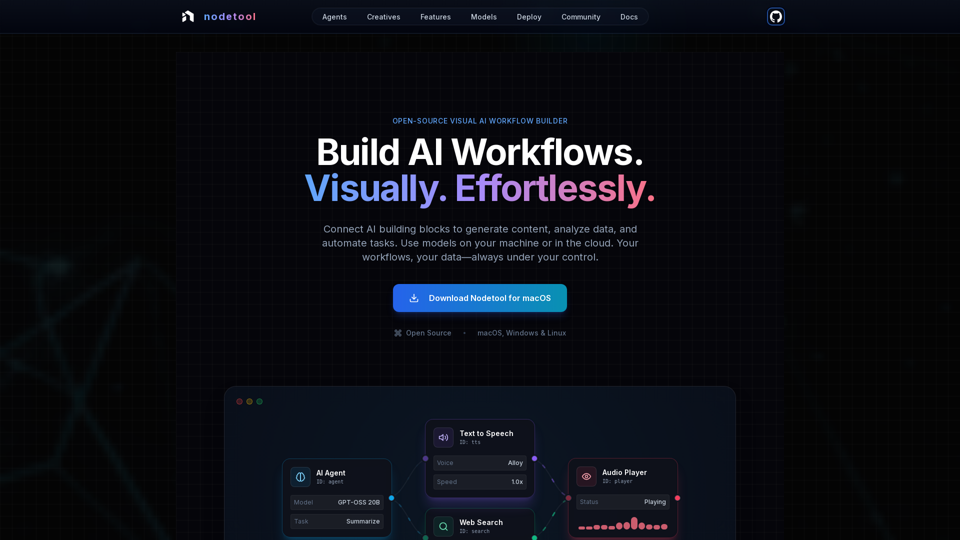
Nodetool AI is a unified visual AI workflow builder that combines the node-based flexibility of ComfyUI with the automation power of n8n. It allows users to build advanced LLM agents, RAG pipelines, and multimodal data flows directly on their local machine. Nodetool AI offers a visual orchestrator for AI workflows, enabling users to connect AI building blocks to generate content, analyze data, and automate tasks effortlessly. It supports local-first or cloud-augmented operations, ensuring privacy and control over data while providing the flexibility to integrate with cloud services.

Nodetool AI -Features

Product Features of Nodetool AI

Overview

Nodetool AI is an open-source, local-first, visual AI workflow builder for creating advanced LLM agents, RAG pipelines, and multimodal data flows. It combines node-based interfaces with powerful automation capabilities, specifically tailored for AI tasks, emphasizing privacy, local execution, and user control.

Main Purpose and Target User Group

  • Main Purpose: To provide a unified, visual, and code-free platform for building, running, and deploying complex AI workflows, from generative AI and media pipelines to autonomous agents and document intelligence.
  • Target User Group: AI developers, data scientists, researchers, creatives, and anyone looking to build and automate AI applications without extensive coding, with a strong preference for privacy, local control, and open-source solutions.

Function Details and Operations

  • Visual Workflow Automation:

    • Drag-and-drop canvas for orchestrating LLMs, data tools, and APIs.
    • Type-safe connections ensure workflow integrity.
    • Real-time execution monitoring and step-by-step inspection for transparency and debugging.
  • Generative AI & Media Pipelines:

    • Connect nodes for video generation, text analysis, image creation, and multimodal processing.
    • Supports models like Flux, SDXL, OpenAI Sora, Google Veo, and custom models.
  • Local-First RAG & Vector DBs:

    • Index documents and build semantic search pipelines entirely on the local machine.
    • Integrated ChromaDB for RAG.
  • Autonomous AI Agents:

    • Build agents capable of web searching, browsing, tool usage, and multi-agent systems for complex task solving.
  • Open Source & Privacy-First Architecture:

    • AGPL-3.0 licensed, allowing inspection, modification, and self-hosting.
    • Local-first processing ensures data privacy; no collection, no telemetry, opt-in cloud only.
    • Supports offline operation once models are downloaded.
  • Deployment Flexibility:

    • Run workflows locally for maximum privacy or deploy to cloud services (RunPod, Google Cloud, custom servers).
    • One-command deployment (nodetool deploy) to provision infrastructure, download models, and configure containers.
    • Scales to zero, paying only for active inference time.
  • Universal Model Support:

    • Local Inference:
      • MLX (Apple Silicon optimized for LLMs, audio, image generation).
      • Ollama (easy setup for local LLMs).
      • llama.cpp (cross-platform GGUF model inference on CPU/GPU).
      • vLLM (production-grade serving with PagedAttention).
      • Nunchaku (high-performance for Flux, Qwen, SDXL).
    • Cloud Providers:
      • Direct API key integration for OpenAI, Anthropic, Gemini, OpenRouter, Cerebras, Minimax, HuggingFace, Fal AI, Replicate, Kie.ai.
      • Mix and match providers within a single workflow.
    • Model Management: Search, download, and manage model weights from HuggingFace Hub directly within the app.
  • Multimodal Capabilities:
    Process text, image, audio, and video within a single workflow.

  • Extensive Building Blocks:
    1000+ ready-to-use components for AI models, data processing, file operations, computation, control, and more.

  • Chat Assistant:
    Interact with and run workflows through natural conversation.

  • Built-in Asset Manager:
    Centralized management for images, audio, video, documents (PNG, JPG, GIF, SVG, WebP, MP3, WAV, MP4, MOV, AVI, PDF, TXT, JSON, CSV, DOCX).

User Benefits

  • Accessibility: Build complex AI workflows without coding, making advanced AI approachable for everyone.
  • Transparency & Debuggability: Real-time execution and step-by-step inspection provide full visibility and confidence in workflow operation.
  • Privacy & Control: Keep data and models local, ensuring maximum privacy and ownership.
  • Flexibility: Run workflows locally or deploy to the cloud, using a wide range of local and cloud models.
  • Cost-Efficiency: Leverage local inference to reduce cloud costs and scale to zero for deployed workflows.
  • Versatility: Create a wide array of AI applications, from agents and RAG to creative pipelines and data processing.
  • Community Support: Open-source nature fosters community contributions, shared workflows, and direct access to developers.

Compatibility and Integration

  • Operating Systems: macOS, Windows, Linux.
  • Hardware Requirements: Nvidia GPU or Apple Silicon M1+ and at least 20GB free space for model downloads.
  • Cloud Deployment: RunPod, Google Cloud, and custom servers.
  • API Integrations: OpenAI, Anthropic, Gemini, OpenRouter, Cerebras, Minimax, HuggingFace, Fal AI, Replicate, Kie.ai.
  • Local Model Support: MLX, Ollama, llama.cpp, vLLM, Nunchaku.

Access and Activation Method

  • Download: Available for direct download on macOS, Windows, and Linux from the official website.
  • Open Source: Users can inspect, modify, and self-host the entire stack as it's open-source under AGPL-3.0.
Nodetool AI -Frequently Asked Questions

What is Nodetool AI?

Nodetool AI is a unified, visual AI workflow builder that combines the node-based flexibility of ComfyUI with the automation power of n8n. It allows users to build advanced LLM agents, RAG pipelines, and multimodal data flows on their local machine, offering a visual orchestrator for AI workflows.

How does Nodetool AI differ from n8n or ComfyUI?

Nodetool AI is a powerful alternative to n8n specifically for AI-centric tasks, offering visual workflow automation for LLMs, data tools, and APIs. Compared to ComfyUI, Nodetool AI extends beyond just images to include video generation, text analysis, and multimodal processing, all without requiring code.

Can I run Nodetool AI locally?

Yes, Nodetool AI is designed with a local-first architecture. All workflows, assets, and models can run on your machine for maximum privacy and control. You can even work offline once models are downloaded. It supports macOS, Windows, and Linux.

What kind of AI workflows can I build with Nodetool AI?

Nodetool AI provides the building blocks to create a wide range of powerful AI applications, including:

  • AI Agents & Automation

    Build multi-step agents that plan, execute, and adapt to automate complex workflows.
  • Document Intelligence

    Index documents, perform AI-powered searches, and answer questions grounded in your sources (RAG).
  • Image & Video Creation

    Generate visuals, transform media, and build creative pipelines using models like Flux and SDXL.
  • Data Processing

    Transform data, extract insights, and automate reports with AI.
  • Voice & Audio

    Transcribe, analyze, and generate speech for voice-first applications.
  • Smart Assistants

    Build AI assistants that understand your documents, emails, and notes.

Is Nodetool AI open-source?

Yes, Nodetool AI is open-source under the AGPL-3.0 license. This means you can inspect, modify, and self-host the entire stack.

What are the system requirements for Nodetool AI?

Nodetool AI requires an Nvidia GPU or Apple Silicon M1+ and at least 20GB of free space for model downloads.

Can Nodetool AI deploy workflows to the cloud?

Yes, Nodetool AI allows you to deploy your workflows to serverless GPUs with a single command (nodetool deploy). It supports providers like RunPod and Google Cloud, automatically provisioning infrastructure, downloading models, and configuring containers. Workflows can scale to zero, meaning you only pay for active inference time.

What models does Nodetool AI support?

Nodetool AI supports a wide array of models, both local and cloud-based:

  • Local Inference

    MLX (Apple Silicon optimized), Ollama, llama.cpp (GGUF models), vLLM (production-grade serving), Nunchaku (Flux, Qwen, SDXL).
  • Major Cloud Providers

    OpenAI (GPT-4o), Anthropic (Claude 3.5 Sonnet/Opus), Gemini, OpenRouter, Cerebras, Minimax, HuggingFace. You can also bring your own API keys for various providers without markup or middlemen.

How does Nodetool AI handle privacy?

Nodetool AI is designed with privacy in mind. Your data stays yours, as you can process everything locally or use your own API keys. There is no data collection, no telemetry, and cloud services are opt-in only.

How can I get support for Nodetool AI?

You can get in touch with the Nodetool AI team for questions, bug reports, or feature requests:

Where can I download Nodetool AI?

You can download Nodetool AI for macOS, Windows, and Linux from the official website: https://nodetool.ai.

Nodetool AI Support Email

Here is the Nodetool AI support email for customer service: [email protected].

Nodetool AI Login

Nodetool AI is a local-first application and does not have a traditional web-based login. You download and run the software on your machine.

Nodetool AI Sign up

Nodetool AI is an open-source, local-first application and does not require a sign-up process. You can download and start using it directly.

Nodetool AI -Data Analysis

Latest Traffic Information

  • Monthly Visits

    -

  • Bounce Rate

    0.00%

  • Pages Per Visit

    0.00

  • Visit Duration

    00:00:00

  • Global Rank

    -

  • Country Rank

    -

Visits Over Time

Traffic Sources

  • direct:
    0.00%
  • referrals:
    0.00%
  • social:
    0.00%
  • mail:
    0.00%
  • search:
    0.00%
  • paidReferrals:
    0.00%
More data

Nodetool AI - Alternative

Gemini AI Photo

Gemini AI Photo - Free AI Photo Editor & AI Image Generator

--
Gemoo - Your One-Stop Platform to Create, Edit, and Share Videos

Gemoo simplifies the workflow of video creating, editing, and sharing, to let everyone make videos and spread their creativity in minutes.

--
FocuSee | Screen Recording with Automatic Zoom In on the Video

You just focus on screen recording. FocuSee automatically polishes the video for you with zoom-in effects, cursor movement tracking, and nice background. No manual editing is required.

--
GEMPIX2

GEMPIX2 - Free Online Photo Editor & Image Editing Tool

--
More Tags about: Nodetool AI