Free AI Tools

Google Nano Banana Pro AI

Google Nano Banana Pro AI - Free Fluxproweb AI Model: Banana Pro AI Technology

Google Nano Banana Pro AI

Google Nano Banana Pro AI -Introduction

Discover Google Nano Banana Pro AI, an advanced AI-powered tool designed for seamless image creation and editing. Leveraging the powerful Nano Banana Pro model and Gemini 3.0 Pro, this platform allows you to generate stunning visuals from text or image prompts. Whether you're an artist, designer, marketer, or simply looking to explore creative boundaries, Google Nano Banana Pro AI offers an intuitive experience to bring your visual ideas to life.

Google Nano Banana Pro AI -Features

Overview

Google Nano Banana Pro AI, powered by Gemini 3.0 Pro, is an advanced AI tool designed for instant image creation and editing. It offers a sleek user interface and leverages the powerful Nano Banana Pro model to generate new visuals from text prompts or transform existing photos with artistic effects, style transfer, and intelligent editing capabilities.

Main Purpose and Target User Group

The primary purpose of Google Nano Banana Pro AI is to provide a versatile platform for generating and editing high-quality images using AI. It caters to a broad audience including:

  • Artists and Designers: For creating unique artwork, experimenting with styles, and generating visual concepts.
  • Marketers: For producing striking campaign artwork, branded visuals, and product images efficiently.
  • E-commerce Businesses: For generating and enhancing product shots for catalogs and online listings.
  • Content Creators: For making unique art, comics, or profile visuals with full creative control.
  • Anyone looking to push creative boundaries with AI: Users who want to explore AI's potential in visual creation and transformation.

Function Details and Operations

  • Text-to-Image Generation: Users can produce stunning images directly from descriptive text prompts, supporting a wide range of artistic styles.
  • Intelligent Photo Editing: Allows for editing, enhancing, or remixing images using simple instructions. This includes changing scenes, adding/removing objects, and applying smart fixes.
  • Artistic Style Transfer: Transforms photos by applying trending or custom art styles, from digital painting to pop art.
  • Identity & Element Consistency: Maintains consistency of characters or objects across multiple edits and batches, ensuring cohesive creative assets.
  • Mix & Merge Creativity: Enables combining content from several images or prompts to generate unique and innovative results.
  • Logical Scene Creation: The Pro model intelligently understands context, delivering plausible and story-rich visual outcomes.
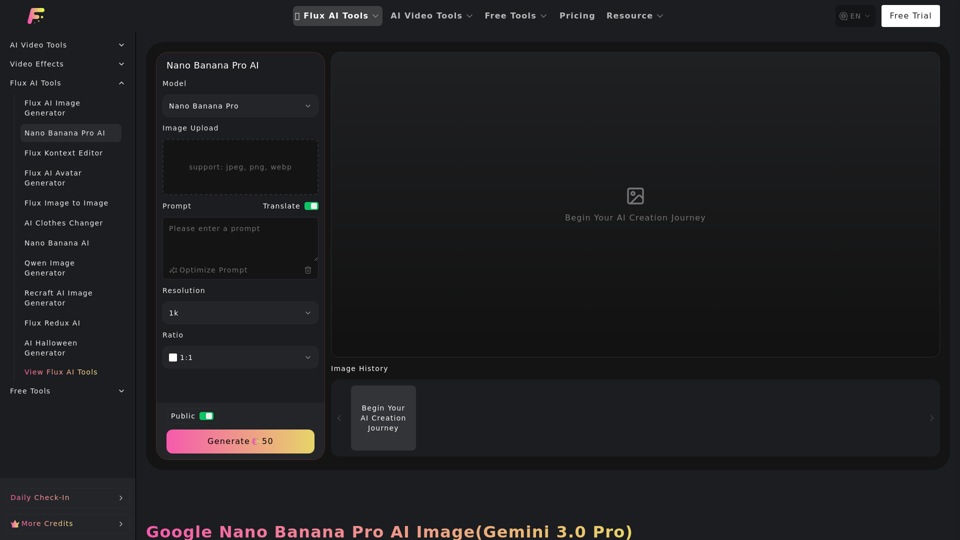
  • User Interface: Features a sleek UI with options for prompt input, image upload (JPEG, PNG, WebP), resolution selection (1k, 2k, 4k), and aspect ratio control (1:1, 3:2, 2:3, 3:4, 4:3, 4:5, 5:4, 9:16, 16:9, 21:9, Auto Ratio).
  • Operation Steps:
    1. Type your image idea or prompt.
    2. Upload one or more images (optional).
    3. Click "Generate" and download your HD result.

User Benefits

  • Quick and Precise Image Generation: Experience rapid and accurate image creation.
  • Creative Freedom: Generate and edit images with extensive creative control.
  • Consistency & Cohesion: Preserve subject identity and coherent style across edits, even with changes in poses or backgrounds.
  • Design-Grade Output: Achieve professional quality and originality with distinctive artistic styles and details.
  • Versatility: Applicable across various scenarios, including creative projects, marketing, visual design, and e-commerce.
  • Efficiency: Generate striking visuals and product mock-ups with minimal effort.

Compatibility and Integration

  • Supported Image Formats for Upload: JPEG, PNG, WebP.
  • Integration with Flux AI Tools: Part of a broader ecosystem of Flux AI tools, including Flux AI Image Generator, Flux AI Video Generator, Flux Kontext Editor, Flux AI Avatar Generator, and many more, suggesting potential for seamless workflow within the Fluxproweb platform.

Access and Activation Method

  • Access: The tool is accessible via the Fluxproweb platform.
  • Activation: Users can begin their AI creation journey by navigating to the Nano Banana Pro AI tool on the website and following the three-step generation process. A "Free Trial" option is also mentioned on the website, suggesting a potential free entry point.
Google Nano Banana Pro AI -Frequently Asked Questions

What is Google Nano Banana Pro AI?

Google Nano Banana Pro AI (Gemini 3.0 Pro) is an advanced AI-powered tool for instant image creation and editing. It allows users to generate new visuals or transform existing photos using text or image prompts, offering features like artistic effects, style transfer, and intelligent editing.

What are the core features of Google Nano Banana Pro AI?

The Google Nano Banana Pro AI offers several core features, including:

  • Text-to-Image Generation

    Create stunning images from descriptive text prompts.
  • Intelligent Photo Editing

    Edit, enhance, or remix images with simple instructions, such as changing scenes or adding/removing objects.
  • Artistic Style Transfer

    Apply trending or custom art styles to photos.
  • Identity & Element Consistency

    Maintain consistent characters or objects across multiple edits.

Why should I use Google Nano Banana Pro AI Image Generator?

Google Nano Banana Pro AI provides quick, precise, and creative image generation and editing. Its advantages include:

  • Consistency & Cohesion

    Preserves subject identity and style across edits.
  • Design-Grade Output

    Delivers professional-quality and original artistic styles.
  • Mix & Merge Creativity

    Combines content from multiple images or prompts for unique results.
  • Logical Scene Creation

    Intelligently understands context to create plausible visual outcomes.

What are the perfect uses for Google Nano Banana Pro AI Image Generator?

Google Nano Banana Pro AI is versatile for various scenarios, including:

  • Visual Promotions

    Generate striking campaign artwork and branded visuals.
  • Product Images & Prototypes

    Create and enhance product shots for catalogs and online listings.
  • Personal Creative Projects

    Make unique art, comics, or profile visuals.

How do I create stunning images with Google Nano Banana Pro AI?

You can create images in three simple steps:

  1. Type your image idea or prompt.
  2. Upload one or more images (optional).
  3. Click generate and download your HD result.

Must I upload an image to use Google Nano Banana Pro AI?

No, uploading an image is optional. You can generate images solely from text prompts.

What artistic styles does Google Nano Banana Pro AI support?

The Google Nano Banana Pro AI supports a wide range of artistic styles, from digital painting to pop art, and allows for custom art styles.

Can I edit or regenerate the same image repeatedly with Google Nano Banana Pro AI?

Yes, the tool enables both advanced generation and intuitive editing, suggesting you can edit and remix images using simple instructions.

Google Nano Banana Pro AI -Data Analysis

Latest Traffic Information

  • Monthly Visits

    -

  • Bounce Rate

    0.00%

  • Pages Per Visit

    0.00

  • Visit Duration

    00:00:00

  • Global Rank

    -

  • Country Rank

    -

Visits Over Time

Traffic Sources

  • direct:
    0.00%
  • referrals:
    0.00%
  • social:
    0.00%
  • mail:
    0.00%
  • search:
    0.00%
  • paidReferrals:
    0.00%
More data

Google Nano Banana Pro AI - Alternative

ImagineMyHouse

ImagineMyHouse - AI Home Design, Interior Decor Ideas & Architectural Visualization

--
Img2threejs converter online

Img2threejs converter online - Convert Image to 3D Model for Three.js Web Development

--
Image AI

Imgai.ai: Explore the free tools provided by Image AI, including face swap, stickers, style transformation, and text-to-image capabilities. Discover the AI-powered image generation platform for all your creative needs.

--
AI Image Generator - Create Stunning AI Designs with ImgCreator.AI

Imgcreator.ai: Create stunning AI-generated images with ImgCreator.AI. Our AI Image Generator offers a range of tools including AI Designer, AI Model, and AI Portrait Generator. Generate magic backgrounds, turn text into images, and explore Deepgram technology. Unlock the power of generative art and future tools with custom AI art, illustrations, and concept art. Customize your images with features like image reference factor, free form design, various canvas sizes, and output resolutions. Change backgrounds, fill images generatively, and remove watermarks effortlessly.

--
More Tags about: Google Nano Banana Pro AI