Fotools Online Tools
Overview
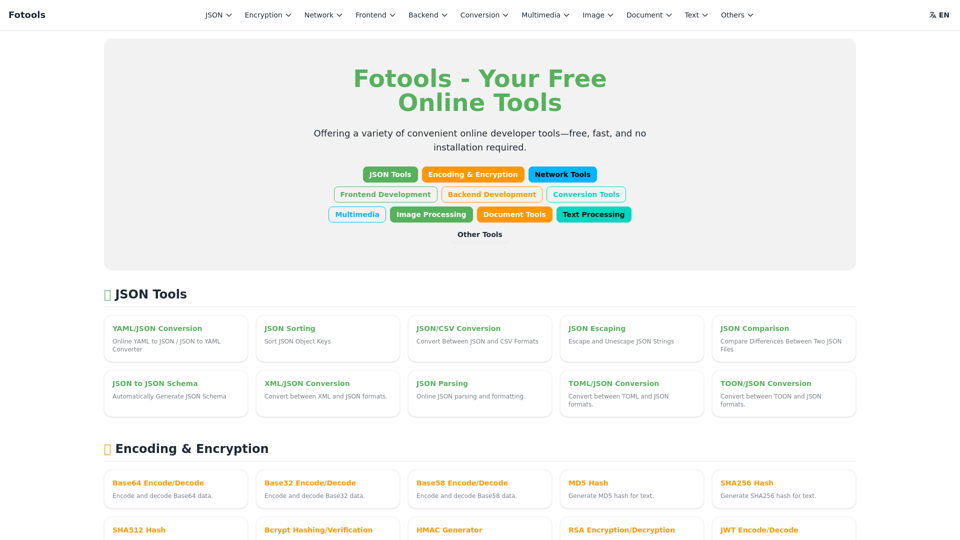
Fotools Online Tools is a comprehensive suite of free, fast, and convenient web-based utilities designed to assist users with a wide array of tasks across various domains. It eliminates the need for software installation, providing instant access to powerful tools directly through a web browser.
Main Purpose and Target User Group
The main purpose of Fotools is to offer a diverse collection of online tools that streamline common tasks for developers, designers, content creators, students, and general users. It aims to provide quick, accessible solutions for data manipulation, encoding, network analysis, web development, multimedia editing, document processing, and more. The target user group includes anyone who requires quick, on-demand utilities without the overhead of dedicated software.
Function Details and Operations
Fotools offers a vast array of tools categorized for easy navigation:
-
JSON Tools
- YAML/JSON Converter
- JSON Sort
- JSON/CSV Conversion
- JSON Escape
- JSON Compare
- JSON to JSON Schema
- XML/JSON Conversion
- JSON Parser
- TOML/JSON Conversion
- TOON/JSON Conversion
-
Encryption & Encoding
- Base64/32/58 Encode/Decode
- MD5/SHA256/SHA512 Hashing
- Bcrypt Hashing/Verification
- HMAC Generator
- RSA Encryption/Decryption
- JWT Encode/Decode
- Symmetric Encryption/Decryption
- URL Encode/Decode
- Unicode Encode/Decode
- Morse Code
- ASCII Encode/Decode
-
Network Tools
- URL Parser
- Browser Info Detector
- Subnet Mask Calculator (IPv4/IPv6)
- HTTP Status Code Lookup
- WebSocket Tester
- DNS Record Lookup
- SSL Certificate Lookup
- My IP Address
- IP Address Converter
-
Frontend Development
- JS/HTML/CSS Formatter/Compressor
- Color Value Converter
- Color Palette Collection
- Color Picker
- SVG Path Editor
- Keyboard Key Detection
- Various Chart Generators (Bar, Pie, Line, Scatter, Radar, Heatmap, Donut, Streamgraph, Calendar Pie, 3D Bar)
- Doodle Drawing Board
-
Backend Development
- Random Number Generator
- GUID/UUID Generator
- Chmod Permission Calculator
- Cron Expression Generator
- Online runners for multiple programming languages (Python, JavaScript, Go, Java, PHP, Rust, C, C++, C#, Kotlin, Node.js, Ruby, Swift, TypeScript, Objective-C, Scala, Perl, Lua, Haskell, R, Dart, Julia, Elixir, Erlang, F#, Groovy, Shell, SQLite)
-
Conversion Tools
- Unix Timestamp Converter
- Base Converter
- Date Calculator
- Various Unit Converters (Area, Weight, Length, Temperature, Calorie, Speed, Pressure, Power, Volume, Density, Time, Map Coordinate System, Latitude and Longitude Coordinate)
- ZIP Compression/Decompression
- Archive to ZIP/RAR/7Z/TAR
-
Multimedia
- Video Recorder
- Screen Recording
- Audio Recorder
- MP3 Volume Adjustment
- Audio Cutter
- Audio Compression
- Video Cutter
- Video Compression
- Various Audio/Video Format Converters (e.g., Audio to OGG/MP3/WAV/FLAC/AAC/M4A; Video to MP4/GIF/AVI/MKV/WebM/MOV/TS/M4V/MPG)
- Additional video tools: Extract Audio, Add/Remove Watermark, Aspect Ratio Adjustment, Flip, Speed Adjustment, Mute
-
Image Processing
- Image Text Recognition (OCR)
- Image Background Removal
- Image Color Picker
- GIF Animation Maker
- Image Cropper
- Image to Circle
- Image Watermark
- Image Blur
- Favicon Generator
- Image Grid Cutter
- Image Compression
- Image Base64 Conversion
- Image Generator
- Image Rotate & Flip
- Batch Image Resizer
- Various Image Format Converters (e.g., Image to AVIF/WebP/PNG/JPG/TGA/XBM/BMP/GIF/TIFF)
- Image Metadata Remover
-
Document Tools
- Markdown Editor
- Mermaid Editor
- PlantUML Editor
- Mind Map Editor
- Various Document to PDF Converters (Word, Excel, PPT, WPS, Image, TXT, EPUB)
- PDF to Image/Word/EPUB/MOBI
- PDF Merge
- PDF Encryption/Password Removal/Compression
- PDF Text Recognition (OCR)
-
Text Processing
- Word Count
- Sum of List of Numbers
- List Sorting
- Letter Case Conversion
- Full-width and Half-width Conversion
- Remove Duplicate Lines
- Text Comparison
- Variable Naming Conversion
- String Occurrence Counter
- Text Column Selection
-
Other Tools
- QR Code Generator
- Barcode Generator
- QR Code / Barcode Recognition
- Regular Expression Tester
- Emoji Collection
- Stopwatch Timer
- Currency Converter
- Password Generator
- Online Calculator
- My IP Address
- IP Information Lookup
- Various mathematical calculators (e.g., Polynomial Factorization, Prime Number Checker, GCD/LCM, Equation Solver)
User Benefits
- Free Access: All tools are available completely free of charge.
- No Installation Required: Tools are web-based, eliminating the need for software downloads or installations.
- Speed and Efficiency: Designed for quick operations, saving users time.
- Comprehensive Utility: A vast collection of tools covers a wide range of needs, from development to daily tasks.
- Convenience: Easily accessible from any device with an internet connection and a web browser.
- Multilingual Support: The interface is available in multiple languages, enhancing global usability.
Compatibility and Integration
Fotools Online Tools are entirely web-based, ensuring broad compatibility across all modern web browsers (e.g., Chrome, Firefox, Edge, Safari) and operating systems (Windows, macOS, Linux, Android, iOS). As a standalone online platform, it does not offer direct integration with other software or APIs.
Access and Activation Method
Users can access Fotools Online Tools directly by visiting the website (fotools.com) through any web browser. No registration, login, or activation is required to use the tools; they are immediately available upon navigating to the site.