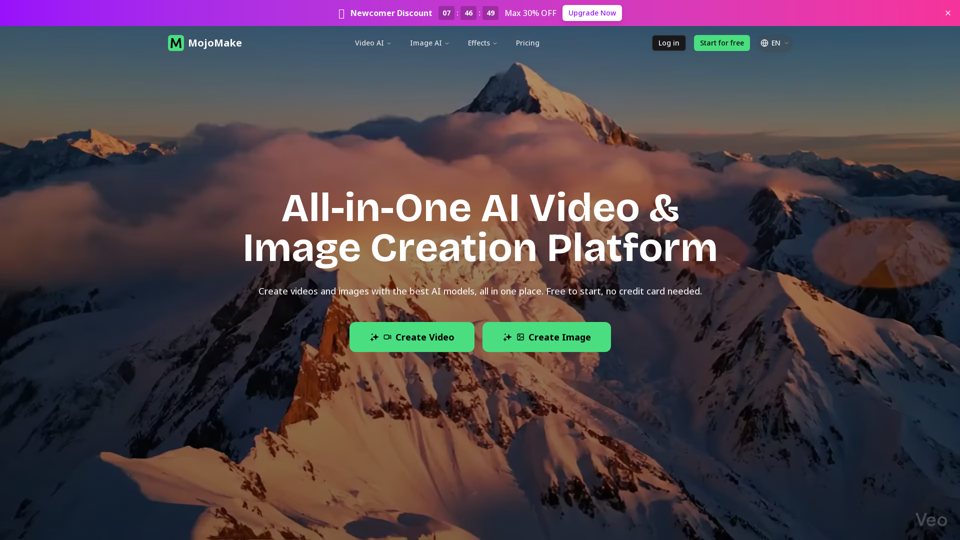
MojoMake AI Video & Image Studio

MojoMake AI Video & Image Studio - All-in-One AI Video Creation, AI Image Generator & Creative Tools

MojoMake AI Video & Image Studio

MojoMake AI Video & Image Studio -Introduction

MojoMake AI Video & Image Studio is an all-in-one platform designed to empower creators and businesses with cutting-edge artificial intelligence. It provides a seamless experience for generating high-quality videos and images, consolidating the power of leading AI models into a single, intuitive dashboard. Trusted by a global community, MojoMake allows users to unleash their creativity without needing prior design skills, transforming ideas into stunning visual content. With a focus on professional output and commercial rights, MojoMake simplifies the creative process, making advanced AI creative tools accessible for everyone looking to produce captivating visuals.

MojoMake AI Video & Image Studio -Features

Overview

MojoMake AI Video & Image Studio is an all-in-one AI-powered platform designed for creating high-quality videos and images. It consolidates access to over 10 leading AI models, including Veo, Sora, Kling, and Runway, into a single, intuitive dashboard. The platform aims to simplify the creative process, making advanced AI content generation accessible to everyone, regardless of their design skills. It offers a free-to-start option, allowing users to begin creating without a credit card.

Main Purpose and Target User Group

Main Purpose
To empower users to effortlessly create stunning videos and images using cutting-edge AI models from a single platform. It serves to unleash creativity, streamline content production, and provide commercial-ready assets.

Target User Group
MojoMake is designed for a broad audience, including:

  • Content Creators: TikTok creators, YouTubers, social media influencers.
  • Businesses & Marketers: E-commerce owners, digital marketers, small businesses needing ads and promotional content.
  • Designers & Artists: Freelance designers, artists looking to animate logos, restyle images, or generate conceptual art.
  • General Users: Anyone without design skills who wants to create professional-looking visual content quickly and efficiently.

Function Details and Operations

MojoMake offers a comprehensive suite of AI-powered tools for both video and image generation:

AI Video Creation Tools

  • AI Image to Video Generator: Transforms static images into dynamic videos with custom camera movements and zoom, preserving original details.
  • AI Text to Video Generator: Creates cinematic videos from simple text prompts, leveraging top models like Sora, Kling, and Veo.
  • AI Reference to Video Generator: Generates videos while maintaining character consistency and style based on reference images, ideal for AI movies and series.
  • Additional Video Tools: First & Last Frames to Video, Mimic Motion, Video Extender, AI Kissing Video Generator.

AI Image Generation Tools

  • AI Text to Image Generator: Produces realistic or artistic photos from text prompts, supporting generic and custom aspect ratios with 4K export.
  • AI Image to Image Generator: Restyles and reimagines existing photos, applies artistic filters, converts sketches to realistic images, and improves lighting while maintaining composition.
  • Additional Image Tools: Background Remover, Image Extender.

Operation
Users simply type text descriptions or upload images, and the AI models generate the desired content. The platform allows for easy switching between various AI models with a single click.

User Benefits

  • Efficiency & Convenience: Access to all top AI models in one place eliminates the need to juggle multiple subscriptions and logins, saving time and streamlining workflows.
  • Cost Savings: A single MojoMake subscription can replace multiple expensive professional accounts for individual AI tools, offering significant savings.
  • High-Quality Output: Generates professional-grade content with 4K image export and 1080P HD video export, suitable for social media and professional editing.
  • Commercial Rights: Users retain 100% commercial rights to their generated content, allowing free use for ads, YouTube, business, and other commercial purposes without watermarks on professional plans.
  • Ease of Use: Designed for everyone, requiring zero design skills. Simple text prompts or image uploads are enough to create professional-looking content.
  • Enhanced Creativity: Unleashes creative potential by making advanced AI generation accessible for storytelling, marketing, and artistic expression.
  • Data Security: Ensures enterprise-grade security with industry-standard encryption to protect user data and creations.

Compatibility and Integration

Integrated AI Models
Seamlessly integrates and provides access to a wide array of world-class AI models, including Veo 3.1, Kling AI (3.0), Sora, Runway, Seedance (2.0), Hailuo, Seedream (5 Lite), Grok, Flux, Qwen, Nano Banana 2 (Pro), Ideogram, and OpenAI.

Output Versatility
Generated content is compatible with various platforms and uses, including social media (TikTok, YouTube), advertising campaigns, professional video editing, web design, and AI movies/series.

Access and Activation Method

Free Tier
Users can start for free without needing a credit card, allowing them to explore the platform's capabilities.

Account Creation
Access typically involves logging in or signing up for a free account.

Paid Plans
Upgrades to professional plans are available to unlock full features, higher quality exports, and commercial rights, often with newcomer discounts.
MojoMake AI Video & Image Studio -Frequently Asked Questions

What is MojoMake AI Video & Image Studio?

MojoMake AI Video & Image Studio is an all-in-one AI platform designed for creating high-quality videos and images. It integrates over 10 top AI models, including Veo, Sora, and Kling, allowing users to generate professional content for various purposes like social media, ads, and storytelling, all without needing design skills.

Is MojoMake free to use?

Yes, MojoMake offers a free-to-start option that requires no credit card to begin. For advanced features and higher usage limits, premium plans are available, often with newcomer discounts.

How do I create AI videos and images with MojoMake?

Creating content with MojoMake is simple and requires zero design skills. You can generate AI videos from text prompts (Text-to-Video), animate static images (Image-to-Video), or use reference images to maintain consistency (Reference-to-Video). For images, you can create professional art from text (Text-to-Image) or restyle existing photos (Image-to-Image). Simply describe what you want, and MojoMake's AI creative tools bring it to life.

Which AI models are supported by MojoMake?

MojoMake provides access to over 10 world-class AI video and image models within a single dashboard. This includes leading models such as Veo, Sora, Kling, Runway, Seedance, Hailuo, Seedream, GrokFlux, QwenNano Banana 2, and Ideogram, allowing you to switch between them easily.

Do I need design skills to use MojoMake?

No, MojoMake is designed for everyone, regardless of their design experience. The platform's intuitive interface allows you to create professional-looking videos and images by simply typing text or uploading an image.

Can I use the videos & images created with MojoMake for commercial purposes?

Yes, MojoMake grants you 100% commercial rights to the content you generate. You are free to use your AI-created videos and images for advertisements, YouTube channels, business projects, and any other commercial applications.

How long does video generation take?

While the exact time can vary based on the complexity of the prompt and current server load, MojoMake is optimized for efficient content creation. Many users report generating short videos and images in just a few minutes.

What content is prohibited on MojoMake?

MojoMake maintains enterprise-grade security and privacy standards. Users are expected to adhere to the platform's Terms of Service and content policies, which typically prohibit the creation, upload, or distribution of illegal, harmful, abusive, or inappropriate content. For detailed guidelines, please refer to their official Terms of Service.

How can I contact MojoMake for support or refunds?

For customer service, support, or refund inquiries, you can contact MojoMake via email. A common support email format is [email protected]. Please check the "Contact" page on their website for the most accurate and up-to-date contact information.

MojoMake AI Video & Image Studio -Data Analysis

Latest Traffic Information

  • Monthly Visits

    -

  • Bounce Rate

    0.00%

  • Pages Per Visit

    0.00

  • Visit Duration

    00:00:00

  • Global Rank

    -

  • Country Rank

    -

Visits Over Time

Traffic Sources

  • direct:
    0.00%
  • referrals:
    0.00%
  • social:
    0.00%
  • mail:
    0.00%
  • search:
    0.00%
  • paidReferrals:
    0.00%
More data

MojoMake AI Video & Image Studio - Alternative

Podfy AI

Podfy AI - AI-powered Video Repurposing and Audio to Video Conversion

--
Pollo AI

Pollo AI - AI Video Generator for Realistic and Imaginary HD Videos

--
Predis AI

Predis.ai: Predis is an AI marketing tool for social media that helps businesses create captivating video and image content, along with offering AI-driven content analysis. Enhance your Social Media Marketing with Predis now!

--
Create Presentations, Documents, and Websites with AI - Prezo

Prezo.ai: Create stunning presentations, documents, and websites effortlessly with Prezo.ai. This AI-powered platform offers a wide range of interactive blocks to enhance your content. Share your creations with a single click and captivate your audience.

--
More Tags about: MojoMake AI Video & Image Studio