Free MP3 to Midi Converter

Free MP3 to Midi Converter - Convert MP3 to MIDI Online, Fast & Free MIDI Converter

Free MP3 to Midi Converter

Free MP3 to Midi Converter -Introduction

The Free MP3 to Midi Converter is an intuitive online tool designed to transform your audio files into editable MIDI data effortlessly. Whether you're a musician, producer, or enthusiast, this converter provides a seamless way to extract musical ideas from MP3s and other common audio formats. It empowers you to unlock new creative possibilities for music production, learning, arrangement, and remixing, all without any cost or complicated setup. Experience the simplicity of turning your recorded sounds into flexible, editable MIDI for your projects.

Free MP3 to Midi Converter -Features

Free MP3 to Midi Converter

Overview

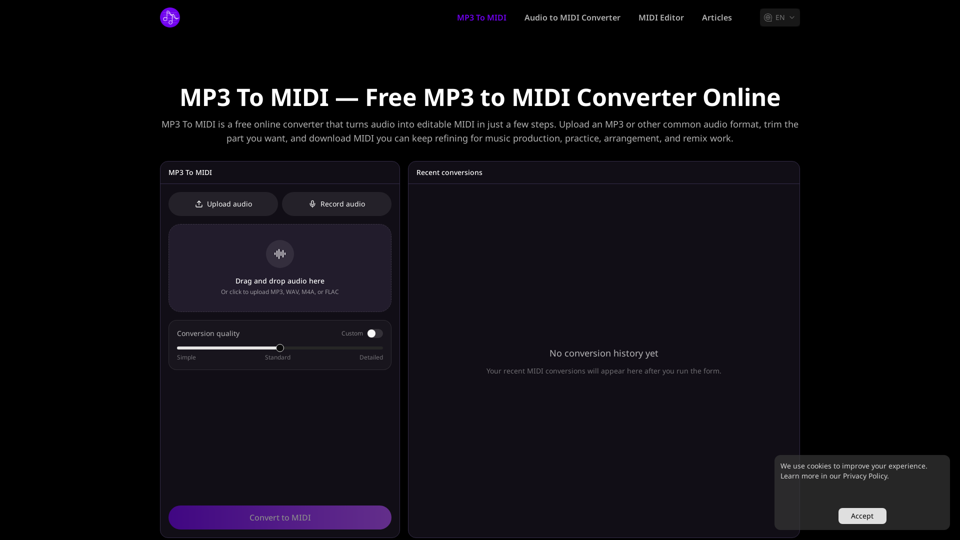
The Free MP3 to Midi Converter is a fast, 100% free, and online tool designed to transform audio files into editable MIDI data. It supports common audio formats like MP3, WAV, M4A, and FLAC, providing a straightforward workflow without requiring signup.

Main Purpose

To convert recorded audio (melodies, rhythms, note ideas) into editable MIDI files, enabling users to refine, reuse, and integrate musical concepts into their projects.

Target User Group

  • Music Producers & Arrangers: For extracting note ideas from songs, demos, or sketches for production and arrangement workflows.
  • Musicians & Learners: For studying melodies, transcription review, practice, or visual inspection in a MIDI editor.
  • Remixers & Experimenters: For converting source material into MIDI to experiment with new instruments, timing, and arrangements.
  • Composers & Songwriters: For capturing vocal lines, piano ideas, riffs, and simple musical phrases as MIDI for easier refinement.

Key Features

  • Supported Input Formats: Upload MP3, WAV, M4A, FLAC, and other common audio formats.
  • Audio Upload Methods: Supports drag-and-drop functionality or direct click-to-upload from your device.
  • Trim Before Conversion: Users can preview the uploaded audio and select a specific section to convert, ensuring only the most useful part is processed into MIDI.
  • Conversion Quality Options: Offers "Custom," "Simple," "Standard," and "Detailed" conversion quality settings to tailor the output.
  • Output Format: Converts audio into standard MIDI files.
  • Simple 3-Step Workflow:
    1. Upload Audio: Select and upload a supported audio file.
    2. Trim and Start Conversion: Choose the desired audio segment and initiate the conversion process.
    3. Download and Keep Editing: Save the generated MIDI file for further editing in a MIDI editor or Digital Audio Workstation (DAW).

User Benefits

  • Completely Free: No cost involved for converting audio to MIDI.
  • No Signup Required: Eliminates the need for account creation, offering immediate access.
  • Fast and Easy to Use: Streamlined interface and quick conversion process save time and effort.
  • Editable Output: Provides MIDI files that allow for easy modification of notes, timing, instrumentation, tempo, and arrangement.
  • Versatile Application: Useful for music production, learning, practice, transcription, remixing, and capturing musical ideas.
  • Efficient Workflow: The trimming feature allows users to focus on specific audio sections, optimizing conversion time and relevance.
  • Enhanced Creativity: Facilitates experimentation and refinement of musical ideas by transforming audio into a flexible, editable format.

Compatibility and Integration

  • Platform: Online web-based application, accessible through any standard web browser.
  • Input Compatibility: Supports widely used audio formats including MP3, WAV, M4A, and FLAC.
  • Output Compatibility: Generates standard MIDI files, which are universally compatible with virtually all MIDI editors, Digital Audio Workstations (DAWs), and music software.
  • Workflow Integration: Converted MIDI files can be seamlessly imported into personal music production environments for further manipulation.

Access and Usage

  • Access Method: The converter is accessed directly online via its website.
  • Activation: No activation, registration, or login is required. Users can immediately upload audio and begin the conversion process.
  • Cost: The service is 100% free to use.
Free MP3 to Midi Converter -Frequently Asked Questions

How accurate is the MIDI conversion?

The Free MP3 to MIDI Converter aims to accurately capture melodies, rhythms, and note ideas from your audio. You can choose from different conversion quality settings (Custom, Simple, Standard, Detailed) to optimize the output for your specific needs, making it suitable for refining in music production, practice, and arrangement.

Can I convert vocals to MIDI?

Yes, you can convert vocal lines to MIDI using the Free MP3 to MIDI Converter. It's designed to turn hummed melodies, vocal phrases, and other musical ideas from recorded audio into editable MIDI data.

Which audio formats are supported?

The Free MP3 to MIDI Converter supports common audio formats including MP3, WAV, M4A, and FLAC. You can upload any of these formats for conversion into MIDI.

Is it really completely free? Do I need to sign up?

Yes, the Free MP3 to MIDI Converter is 100% free to use. There is no signup required, no complicated setup, and no unnecessary steps. You can simply upload your audio, convert it, and download the MIDI result.

Can I edit the converted MIDI file?

Absolutely. The Free MP3 to MIDI Converter turns your audio into editable MIDI. Once converted, you can download the MIDI file and continue refining notes, timing, instrumentation, tempo, and arrangement in your preferred MIDI editor or Digital Audio Workstation (DAW).

Should I trim the audio before converting?

Yes, it is recommended to trim the audio before converting. The tool allows you to preview your audio and select only the specific section you need. This ensures that the MIDI conversion focuses on the most useful part of your file, rather than processing the entire audio.

What can I use the converted MIDI for?

The converted MIDI files are highly versatile. You can use them for:

Music Production and Arrangement:

Extract note ideas from songs, demos, and sketches for use in your compositions.

Learning and Practice:

Turn recorded material into note data for study, transcription review, or visual inspection.

Covers and Remixes:

Experiment with new instruments, timing, and arrangement ideas starting from recorded source material.

Melody Capture:

Easily reuse and refine vocal lines, piano ideas, riffs, and simple musical phrases.

Free MP3 to Midi Converter -Data Analysis

Latest Traffic Information

  • Monthly Visits

    -

  • Bounce Rate

    0.00%

  • Pages Per Visit

    0.00

  • Visit Duration

    00:00:00

  • Global Rank

    -

  • Country Rank

    -

Visits Over Time

Traffic Sources

  • direct:
    0.00%
  • referrals:
    0.00%
  • social:
    0.00%
  • mail:
    0.00%
  • search:
    0.00%
  • paidReferrals:
    0.00%
More data

Free MP3 to Midi Converter - Alternative

Wondershare Filmora - Easy-to-use video editing software

Wondershare Filmora is a simple video editor that allows you to edit videos and audio on Windows and Mac. Download Filmora to create stunning videos with titles, transitions, and creative visual effects.

--
Amped Studio

Ampedstudio.com: Make music online using Amped Studio: produce music, create beats, edit audio, record sounds, and mix your tracks all in a single convenient platform!

--
#1 AI Music Studio - AI Music Generator for Creators | Soundful

Explore Soundful: The leading AI Music Studio for creators. Innovate and elevate your music effortlessly with our advanced AI Music Generator.

--
More Tags about: Free MP3 to Midi Converter