Picture to Drawing

Picture to Drawing - Convert Photo to Sketch and AI Drawing Generator

Picture to Drawing

Picture to Drawing -Introduction

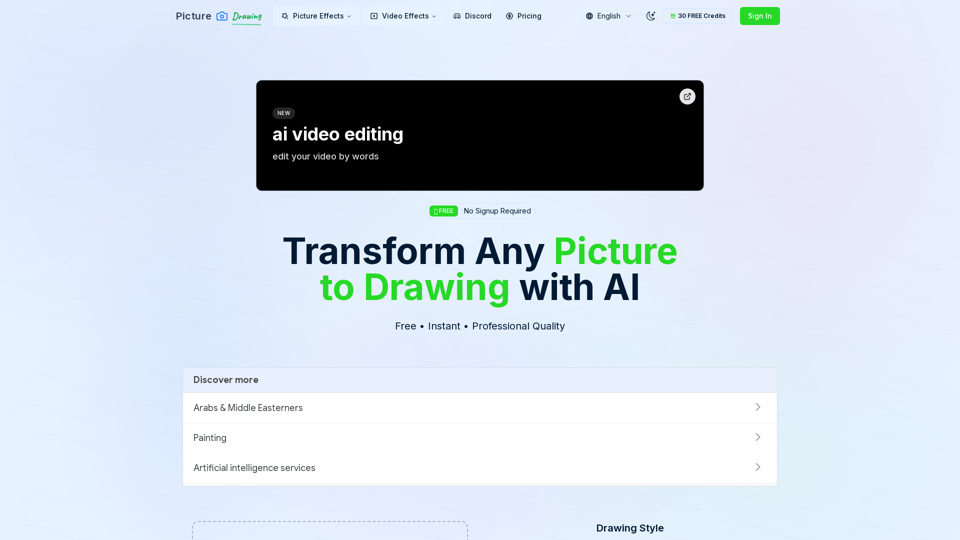
Picture to Drawing is a revolutionary AI-powered platform designed to transform any photograph into a stunning piece of art. Whether you are looking to create detailed pencil sketches, charcoal drawings, watercolor paintings, or ink illustrations, this tool provides professional-grade results in seconds. By leveraging advanced artificial intelligence, the platform allows users to convert images effortlessly without the need for complex software or technical design skills. Perfect for artists, designers, and social media enthusiasts, Picture to Drawing offers a seamless, user-friendly experience that requires no registration. Simply upload your image, select your preferred artistic style, and watch as the AI generates high-quality, creative renditions of your photos. With its fast processing and diverse range of artistic filters, it is the ultimate solution for anyone looking to turn everyday snapshots into unique, gallery-worthy masterpieces.

Picture to Drawing -Features

Picture to Drawing

Overview
Picture to Drawing is a cutting-edge, AI-powered platform designed to transform standard photographs into professional-grade artistic sketches and drawings. By leveraging advanced artificial intelligence, the tool provides a seamless bridge between digital photography and traditional art styles, allowing users to generate high-quality, creative imagery instantly.

Main Purpose and Target User Group
The primary purpose of this tool is to provide an accessible, free, and efficient way to convert photo to sketch and image to line art. It is designed for a diverse audience, including digital artists, graphic designers, social media managers, photography enthusiasts, and art educators.

Function Details and Operations
Interface and Compatibility
The platform offers a user-friendly, drag-and-drop interface that supports multiple file formats, including JPG, PNG, WEBP, and HEIC. It is a web-based tool compatible with all modern desktop and mobile browsers, requiring no software installation.

Artistic Styles
Users can select from a variety of artistic styles, including:

  • Pencil Sketch
  • Line Drawing
  • Charcoal Drawing
  • Color Pencil Drawing
  • Watercolor Painting
  • Ink Art
  • Crosshatch Drawing
  • Pastel Drawing

Workflow
The process is straightforward: upload the image, select the desired AI model and style, click generate, and download the high-resolution result.

User Benefits

  • Instant Results: The AI drawing generator processes images in seconds.
  • No Registration Required: Users can access the service immediately without creating an account.
  • High-Quality Output: Delivers professional-grade, high-resolution results suitable for digital sharing and physical printing.
  • Versatility: Offers over 8 distinct art styles for creative experimentation.
  • Cost-Effective: The service is free to use.

Access and Activation
Users can access the tool directly at https://picturetodrawing.org/. No activation or sign-up is required to begin the conversion process. Optional premium models are available for faster processing times and enhanced performance.

Picture to Drawing -Frequently Asked Questions

Frequently Asked Questions

What is Picture to Drawing and how does it work?

Picture to Drawing is an advanced AI-powered tool designed to convert photo to sketch and other artistic styles. By utilizing sophisticated machine learning algorithms, the platform analyzes your uploaded image and recreates it as a professional-grade drawing, such as a pencil sketch, charcoal piece, or watercolor painting, in just a few seconds.

Is it free to use the AI drawing generator?

Yes, Picture to Drawing offers a free tier that allows you to convert your images without any registration or hidden costs. While the free service is fully functional, we also offer premium models that provide faster processing speeds and higher-quality outputs for users who require more frequent or professional-grade results.

What types of images are best for an image to line art conversion?

While our AI can process a wide variety of photos, images with clear subjects, high contrast, and well-defined features—such as portraits or architectural shots—typically yield the most impressive results. The tool supports standard formats including JPG, PNG, WEBP, and HEIC.

Do I need to sign up to use the photo to art converter?

No registration is required to start using our tool. You can simply upload your photo, select your preferred artistic style, and generate your artwork immediately. We prioritize a seamless, user-friendly experience that allows you to get your results without the hassle of creating an account.

Picture to Drawing -Data Analysis

Latest Traffic Information

  • Monthly Visits

    -

  • Bounce Rate

    0.00%

  • Pages Per Visit

    0.00

  • Visit Duration

    00:00:00

  • Global Rank

    -

  • Country Rank

    -

Visits Over Time

Traffic Sources

  • direct:
    0.00%
  • referrals:
    0.00%
  • social:
    0.00%
  • mail:
    0.00%
  • search:
    0.00%
  • paidReferrals:
    0.00%
More data

Picture to Drawing - Alternative

Pixelcut | Free AI Photo Editor

Pixelcut is a free online design tool that makes it easy to create product photos, ads, and more for your online store. Easily remove background or eraser objects from images.

--
Photo Editor: Free Online Graphic Design Suite - Pixelied

Boost your creativity with our lightning-fast image editor and versatile online graphics editor. Perfect for marketing, e-commerce, and social media designs.

--
Pixelverse AI & Animate image AI

Pixelverseai.com: Effortlessly animate images using AI technology on Pixelverse AI. Convert your pictures into engaging animations and GIF emojis with ease. Ideal for elevating your social media content and marketing strategies with stunning effects.

--
Pix Flux AI

Pix Flux AI - Free AI Photo Editor, AI Image Generation & AI Art Tools

--
More Tags about: Picture to Drawing