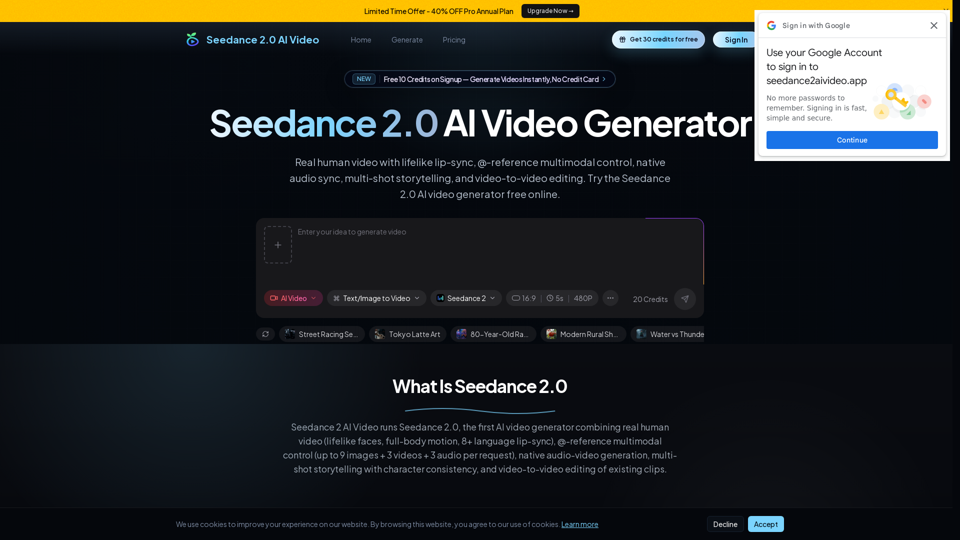
Seedance 2 AI Video Generator

Seedance 2 AI Video Generator - Free AI Video Creation Online | Seedance AI Video

Seedance 2 AI Video Generator

Seedance 2 AI Video Generator -Introduction

Discover the next generation of video creation with Seedance 2 AI Video Generator, your ultimate online solution for producing stunning cinematic content. This powerful AI Video Generator empowers creators, marketers, and businesses to effortlessly transform concepts into captivating visuals, redefining what's possible in digital storytelling. With Seedance AI, you can bypass traditional complexities and lengthy production times, accelerating your workflow and bringing your creative visions to life with remarkable speed and quality. Elevate your content and engage your audience like never before, making professional video creation accessible to everyone. Start generating your high-impact AI videos today and experience the future of video creation AI.

Seedance 2 AI Video Generator -Features

Seedance 2 AI Video Generator

Main Purpose and Target User Group

The main purpose of Seedance 2 AI Video Generator is to democratize cinematic video production, enabling users to create high-quality, engaging videos quickly and efficiently without requiring extensive editing skills or professional equipment.

Target User Groups

  • Content Creators (e.g., YouTubers, Influencers): For rapid content production, engaging visuals, and multi-language reach.
  • Social Media Managers: To generate dynamic ads and social content with native audio sync.
  • Small Business Owners & E-commerce Managers: For professional product demos, marketing videos, and boosted conversion rates.
  • Marketing Directors & Brand Managers: To create on-brand video ads and campaigns with consistent characters and visual identity.
  • Creative Directors & Freelance Designers: For rapid prototyping of video concepts and precise creative control.
  • Film Students & Photographers: To explore cinematic language, character consistency, and bring images to life.
  • Educators: For creating engaging and visually compelling educational content with multi-language support.
  • Startup Founders: To access cinematic video production without hiring a dedicated video team.

Function Details and Operations

  • Core Features

    • Text to Video Generation: Users describe their scene in detail, including camera movements, lighting cues, and sound descriptions, to generate cinematic videos with native audio.
    • Image to Video Conversion: Upload a reference image, and Seedance 2.0 animates it with realistic motion, camera movement, and synchronized sound effects.
    • Real Human Video Generation: Upload a portrait photo to generate videos with lifelike facial expressions, natural micro-expressions, full-body motion (including dance and athletics), and lip-synced dialogue in 8+ languages.
    • Native Audio-Video Generation: Audio and video are generated simultaneously using dual-channel stereo technology, ensuring perfect synchronization of sound effects, dialogue, and ambient noise with on-screen action without post-production audio work.
    • Multi-Shot Storytelling: Create cinematic multi-shot sequences from a single prompt by using "lens switch" keywords to trigger natural scene transitions while maintaining continuity of subject, style, and narrative.
    • Character Consistency & Video-to-Video (V2V) Editing: Upload a reference photo to lock facial features, clothing, and style across all shots, even through complex camera movements. V2V editing allows modification of specific segments, characters, or actions in existing videos without regenerating the entire clip.
    • @-Reference System (Multimodal Control): Tag uploaded files (e.g., @Image1, @Video1, @Audio1) directly in the prompt. The model extracts specific attributes like character appearance, camera paths, and audio rhythm. Users can combine up to 9 images, 3 video clips, and 3 audio files in a single generation for precise creative control.
    • Lip-Sync in 8+ Languages: Phoneme-level lip synchronization is supported in English, Chinese, Japanese, Korean, Spanish, French, German, and Portuguese, ideal for global content.
  • Operational Workflow (4 Simple Steps)

    1. Describe Your Video: Enter a detailed text prompt, including scene descriptions, camera movements, lighting, and audio cues. Use lens switch keywords for multi-shot sequences.
    2. Upload References (Optional): Add reference images, videos, or audio clips (up to 12 multimodal inputs) to guide the AI for character consistency, style, or sound matching.
    3. Seedance 2.0 Generates: The AI processes the prompt and creates a cinematic video with synchronized audio in an average of 30 to 40 seconds, handling multi-shot composition, character consistency, camera movements, and stereo sound design automatically.
    4. Download & Share: Preview the finished video in up to 2K resolution, download it in MP4 format, and share directly to platforms like YouTube, TikTok, or Instagram. Users can regenerate or refine if needed, with credits only charged on successful generations.

User Benefits

  • Ease of Use: No editing skills required; intuitive workflow from prompt to video.
  • Time Efficiency: Significantly reduces video production time, turning days of work into minutes.
  • Professional Quality: Generates cinematic, ultra-realistic videos with lifelike human elements and perfectly synced native audio.
  • Cost-Effectiveness: Provides access to advanced video production capabilities without the need for expensive equipment or hiring a video team.
  • Unprecedented Creative Control: The @-reference system and character consistency features offer precise control over visual style, characters, motion, and sound.
  • Versatility: Suitable for a wide range of applications, including marketing campaigns, product demos, social media content, educational materials, and creative storytelling.
  • Global Reach: Lip-sync in 8+ languages enables the creation of content for diverse audiences.
  • Iterative Production: Video-to-video editing and rapid generation times support agile workflows and quick iterations.
  • High-Resolution Output: Videos can be downloaded in up to 2K resolution, suitable for professional use.

Compatibility and Integration

  • Web-Based Platform: Accessible online, requiring no software installation.
  • Standard Output Format: Videos are generated in MP4 format, ensuring broad compatibility across devices and platforms.
  • Direct Sharing: Supports direct sharing to popular social media and video platforms such as YouTube, TikTok, and Instagram.
Seedance 2 AI Video Generator -Frequently Asked Questions

What is Seedance 2.0 and who made it?

Seedance 2.0 is a multimodal AI video generation model developed by ByteDance, released in February 2026. It is the first AI video model to generate synchronized audio and video in a single pass, with real human video support, multi-shot storytelling, and character consistency. You can access the Seedance 2.0 AI video generator free online through our platform without installing any software.

What is the @-reference system in Seedance 2.0?

The @-reference system lets you tag uploaded files directly in your text prompt — for example, @Image1, @Video1, @Audio1. The model extracts specific attributes from each tagged file: character appearance from images, camera paths and motion dynamics from videos, and beat and rhythm from audio tracks. You can combine up to 9 images, 3 video clips, and 3 audio files in a single request, giving you precise control over every dimension of the output — a capability unavailable in Sora 2, Kling 3.0, or Veo 3.1.

Can Seedance 2.0 generate realistic videos of real people?

Yes. The model fully supports real human video generation. Upload a portrait photo as a reference image and it generates video with lifelike facial expressions, natural micro-expressions, full-body motion including dance and athletics, and lip-synced dialogue in over 8 languages. This makes it the strongest Seedance 2.0 AI video generator option for face-led ads, spokesperson content, influencer-style creative, and realistic portrait storytelling.

Does Seedance 2.0 support video-to-video editing?

Yes. The model supports video-to-video (V2V) editing — upload an existing video and modify specific segments, characters, or actions without regenerating the entire clip. This is not available in Sora 2 or Kling 3.0, and makes the Seedance 2.0 AI video generator suitable for iterative production workflows and post-shoot corrections.

Is Seedance 2.0 free to use?

Yes, you can try the Seedance 2.0 AI video generator for free. New users receive free credits on signup, which is enough to generate several AI videos. For higher volume usage, we offer affordable Lite and Pro subscription plans with more credits, higher resolution output, and additional features like batch generation.

How does Seedance 2.0 generate audio with video?

The model uses a dual-branch architecture — one branch handles visual generation while the other generates audio waveforms. Both branches exchange temporal signals during inference, producing perfectly synchronized stereo sound effects, ambient noise, dialogue, and music that match the on-screen action. This is native audio-video generation, not post-processed audio layering.

What is multi-shot storytelling in Seedance 2.0?

Multi-shot storytelling allows you to create cinematic sequences with multiple camera angles and scene transitions from a single prompt. By including lens switch keywords in your text prompt, you signal where the model should create shot transitions. The AI maintains continuity of characters, visual style, and narrative flow across all shots automatically.

How does character consistency work in Seedance 2.0?

Upload one or more reference images to define your characters. The model locks facial features, clothing, body proportions, and visual style across the entire video. Characters remain consistent even through complex camera movements, scene changes, and multi-shot transitions — something most AI video generators struggle with.

Can I use Seedance 2.0 for text to video generation?

Absolutely. The Seedance 2.0 AI video generator excels at text to video generation. Simply enter a detailed text prompt describing your desired video — including scene descriptions, camera movements, lighting, and audio cues — and it generates a complete cinematic video with synchronized audio in 30 to 40 seconds.

Can I use Seedance 2.0 for image to video conversion?

Yes, the model supports image to video generation. Upload a reference image and describe the motion, camera movement, and audio you want. It animates your image with realistic motion, depth, and synchronized sound effects — perfect for product demos, photo animations, and social media content creation.

How fast is Seedance 2.0 video generation?

The generator produces videos in 30 to 40 seconds on average, significantly faster than competing AI video models that typically take 45 to 60 seconds. The exact generation time depends on video duration, resolution, and complexity of the prompt. You can track progress in real-time during generation.

What inputs does Seedance 2.0 accept?

The model is truly multimodal — it accepts text prompts, images, videos, and audio clips as inputs via the @-reference system. You can combine up to 9 images, 3 videos, and 3 audio files in a single generation to control characters, motion paths, camera work, visual style, and sound design. This gives you unprecedented creative control over AI video generation.

Is Seedance 2.0 better than Sora 2 or Veo 3?

Seedance 2.0 has three exclusive capabilities that Sora 2 and Veo 3.1 do not offer: (1) real human video generation from portrait photos with full-body motion and lip-sync; (2) the @-reference system for combining image, video, and audio references in one request; (3) video-to-video editing of existing clips. Sora 2 and Veo 3.1 have strengths in photorealism and prompt following, and all three models are available on our platform. For reference-driven production, real human video, or V2V editing, this is the recommended starting point.

Can I use Seedance 2.0 videos for commercial purposes?

Yes, all videos generated through our Pro plan can be used for commercial purposes. You retain full rights to your created content, whether it is for marketing campaigns, social media advertising, product demos, e-commerce listings, or any other business application. Free tier videos are for personal and non-commercial use.

How can I contact Seedance 2 AI Video Generator support?

A specific support email is not provided in the content. Please refer to the website's contact section for support.

Where can I log in to Seedance 2 AI Video Generator?

Seedance 2 AI Video Generator Login Link: https://seedance2aivideo.app/Log%20in

Where can I sign up for Seedance 2 AI Video Generator?

Seedance 2 AI Video Generator Sign up Link: https://seedance2aivideo.app/Sign%20up

Seedance 2 AI Video Generator -Data Analysis

Latest Traffic Information

  • Monthly Visits

    -

  • Bounce Rate

    0.00%

  • Pages Per Visit

    0.00

  • Visit Duration

    00:00:00

  • Global Rank

    -

  • Country Rank

    -

Visits Over Time

Traffic Sources

  • direct:
    0.00%
  • referrals:
    0.00%
  • social:
    0.00%
  • mail:
    0.00%
  • search:
    0.00%
  • paidReferrals:
    0.00%
More data

Seedance 2 AI Video Generator - Alternative

Mango AI Video Generator

Mango AI Video Generator - Transform Text to Video with Mango Animate

--
MemeGen AI

MemeGen AI - Ultimate AI Meme Generator for Hilarious Memes

--
More Tags about: Seedance 2 AI Video Generator