Suno Downloader Overview
Main Purpose and Target User Group
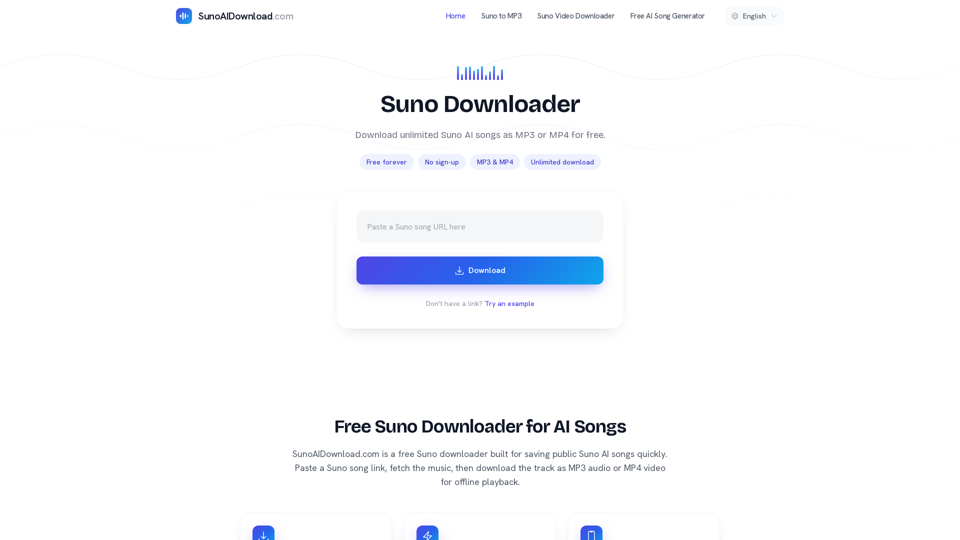
Suno Downloader is a dedicated, web-based utility designed to help users save public AI-generated tracks from Suno.ai. It serves as a reliable Suno music converter, allowing users to extract audio and video content directly from shareable links without the need for complex software or account registration. The primary purpose of this tool is to provide a seamless way to download Suno songs for offline listening or creative projects. It is designed for music enthusiasts, content creators, and AI art hobbyists who want to preserve their favorite AI-generated compositions as high-quality MP3 or MP4 files.
Function Details and Operations
- Format Conversion: Supports downloading tracks as MP3 (audio-only) or MP4 (video with visuals).
- Simple Workflow: Users simply copy a public Suno share link, paste it into the downloader’s input field, and click to fetch and save the file.
- Unlimited Access: There are no restrictions on the number of downloads, making it an efficient AI music downloader for bulk saving.
- Preview Feature: Allows users to verify the track before initiating the final download.
User Benefits
- Free Forever: The service is completely free to use with no hidden subscription fees.
- No Sign-up Required: Users can save Suno AI audio instantly without creating an account or providing personal information.
- Offline Playback: Enables users to listen to their favorite AI music anywhere, even without an internet connection.
- Versatile Media Options: Provides both audio and video formats to suit different playback needs, such as music players or video editing software.
Compatibility and Integration
- Cross-Platform Support: The tool is fully browser-based and works seamlessly on Chrome, Safari, Firefox, and Edge.
- Device Agnostic: Compatible with all major operating systems, including Windows, macOS, Linux, Android, and iOS.
- No Installation Needed: As a web-based tool, it requires no software downloads or browser extensions to function.
Access and Activation Method
Access the tool by visiting SunoAIDownload.com. No activation or account registration is required; simply navigate to the site, paste your public Suno song URL into the designated box, and select your preferred format to begin the download process immediately.