Free AI Tools

Video Compressor — VidPackit

Video Compressor — VidPackit - Online Video Size Reducer & Optimizer

Video Compressor — VidPackit

Video Compressor — VidPackit -Introduction

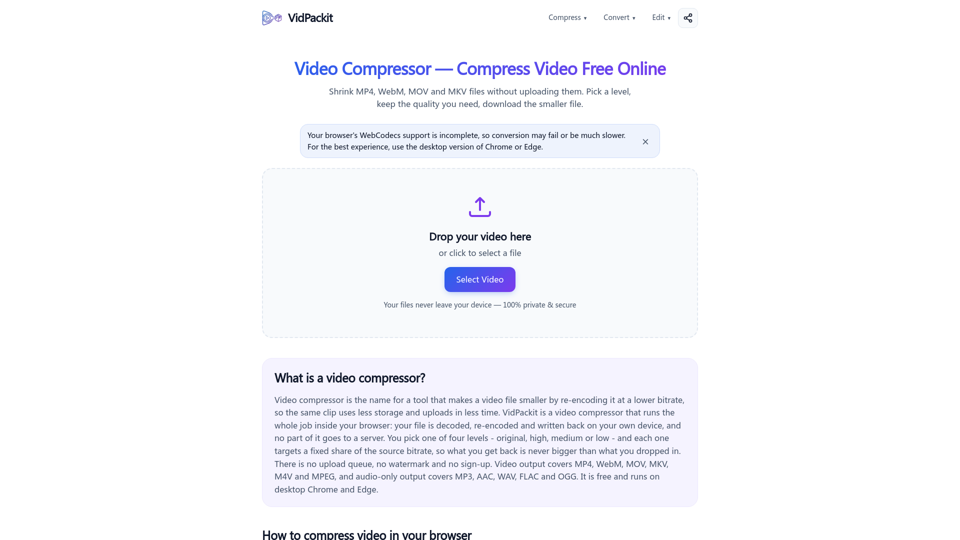
Video Compressor — VidPackit is a secure, browser-based tool designed to shrink video files without the need for server uploads. By leveraging local processing, it ensures your data remains 100% private and secure on your device throughout the entire compression process. Whether you need to reduce the size of MP4, WebM, MOV, or MKV files, this platform provides a transparent experience where you can select specific quality levels and view target bitrates before committing to a conversion. With no sign-ups, watermarks, or file queues, VidPackit offers a fast and efficient way to manage your media storage. It is the ideal solution for users who prioritize privacy and performance, allowing you to compress, convert, and edit videos directly within your desktop browser.

Video Compressor — VidPackit -Features

Video Compressor — VidPackit Features

  • Local Processing

    • Privacy-First Architecture: Utilizes WebCodecs technology to perform all encoding and decoding locally on the user's device. No files are uploaded to a server, ensuring sensitive data remains secure.
    • Offline Capability: Once the web page is loaded, the tool remains functional even without an active internet connection.
  • Compression and Optimization

    • Flexible Compression Levels: Choose from four distinct levels (Original, High, Medium, Low) with transparent bitrate targets.
    • Resolution Downscaling: Reduce file sizes further by adjusting output resolution to 720p, 480p, or 360p.
    • Transparent Performance: View target bitrates before processing to manage quality expectations.
  • Format Versatility

    • Video Output: Supports conversion to MP4, WebM, MOV, MKV, M4V, and MPEG.
    • Audio Extraction: Supports extracting audio-only files in MP3, AAC, WAV, FLAC, and OGG formats.
    • Broad Input Compatibility: Capable of reading any video or audio format supported by the browser, including AVI and MPEG-TS.
  • Editing Tools

    • Trimming: Easily cut and shorten video clips.
    • Frame Extraction: Capture specific frames from video files.
    • Content Cleanup: Tools available for removing watermarks or backgrounds.
  • User Experience

    • No Sign-up or Limits: Free access without the need for accounts, queues, or daily usage caps.
    • Watermark-Free: Delivers clean, professional-grade output without adding branding or logos.
    • Browser Optimization: Optimized for desktop versions of Chrome and Edge for full WebCodecs support.

Video Compressor — VidPackit -Frequently Asked Questions

What is Video Compressor — VidPackit?

Video Compressor — VidPackit is a powerful online video optimizer that allows you to compress video files directly in your browser. By re-encoding your clips at a lower bitrate, it reduces file size for faster uploads and storage without requiring you to upload your data to a server.

How does VidPackit ensure my privacy?

VidPackit is a 100% client-side tool. All processing happens locally within your browser using WebCodecs. Your files never leave your device, meaning no data is uploaded to a server, ensuring your content remains private and secure. You can verify this by checking your browser's Network tab or by using the tool while offline.

Is it free to compress video files with VidPackit?

Yes, VidPackit is completely free to use. There are no accounts to sign up for, no daily usage limits, and no watermarks added to your compressed videos.

Which file formats does the VidPackit video tool support?

VidPackit supports a wide range of formats. For video output, it supports MP4, WebM, MOV, MKV, M4V, and MPEG-TS. For audio-only output, it supports MP3, AAC, WAV, FLAC, and OGG. It can read any file format that your browser is capable of decoding.

Does compressing a video reduce its quality?

Because compression involves lowering the bitrate, some detail may be lost to achieve a smaller file size. However, VidPackit provides four distinct levels (Original, High, Medium, and Low) so you can choose the balance between quality and file size that best fits your needs. The tool displays the target bitrate before you begin, so you always know what to expect.

What are the system requirements for using VidPackit?

For the best experience, use the desktop version of Chrome or Edge, as these browsers provide the necessary WebCodecs support for in-browser encoding. Since the tool processes files locally, your device's memory (RAM) is the primary factor for handling large files.

How can I contact support?

If you have any questions or need assistance, you can reach out to the VidPackit team at: [email protected].

Video Compressor — VidPackit -Data Analysis

Latest Traffic Information

  • Monthly Visits

    -

  • Bounce Rate

    0.00%

  • Pages Per Visit

    0.00

  • Visit Duration

    00:00:00

  • Global Rank

    -

  • Country Rank

    -

Visits Over Time

Traffic Sources

  • direct:
    0.00%
  • referrals:
    0.00%
  • social:
    0.00%
  • mail:
    0.00%
  • search:
    0.00%
  • paidReferrals:
    0.00%
More data

Video Compressor — VidPackit - Alternative

Riverside: HD Podcast & Video Software | Free Recording & Editing

Riverside is your online studio for high-quality podcast and video recording and editing. Powered by AI, built for human conversations. Get started for free.

--
Vizard AI

Vizard.ai: Discover Vizard AI, the ultimate AI video editing platform that revolutionizes automated video creation. Transform a single long video into over 10 engaging clips in an instant with our AI-driven content creation tools. Experience the power of Vizard AI for free and elevate your video production effortlessly.

--
Free AI Art Generator & AI Enhance | neural.love

Use AI Image Generator for free or AI enhance, or access Millions Of Public Domain images | AI Enhance & Easy-to-use Online AI tools

--
Wondershare Filmora - Easy-to-Use Video Editing Software

Wondershare Filmora is a simple video editor that empowers you to edit video and audio on Windows and Mac. Download Filmora to create stunning videos with titles, transitions and creative visual effects.

--
More Tags about: Video Compressor — VidPackit