Overview
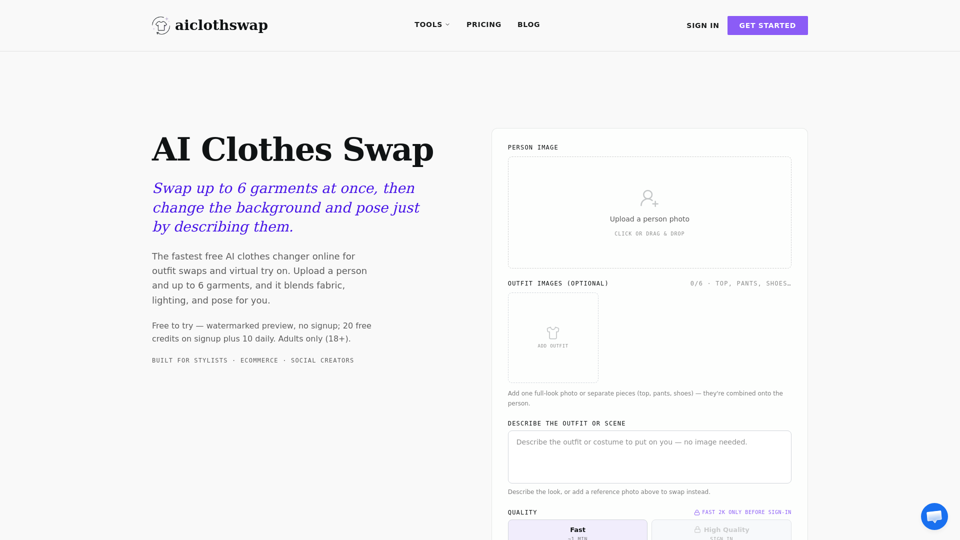
AI Cloth Swap is a professional-grade, AI-powered virtual try-on tool designed to revolutionize how users visualize fashion. By leveraging advanced generative AI, the platform allows users to swap garments, change outfits, and modify backgrounds or poses in a single, seamless workflow. It serves as a high-efficiency alternative to traditional photoshoots and manual photo editing.
Main Purpose and Target User Group
Main Purpose
To provide a fast, realistic, and automated solution for changing clothing on a person in a photo while maintaining natural skin texture, lighting, and body proportions.
Target User Group
- Ecommerce Sellers: Creating professional product lookbooks without the need for multiple models or physical samples.
- Fashion Stylists: Visualizing outfit combinations and styling concepts instantly.
- Social Media Creators: Experimenting with new looks, costumes, or trends for content creation.
- General Consumers: Trying on outfits virtually for special occasions like weddings, graduations, or job interviews.
Function Details and Operations
Multi-Garment Swapping
Swap up to 6 garments simultaneously (tops, bottoms, shoes, and accessories) for a complete head-to-toe transformation.
Text-to-Outfit Generation
If no garment photo is available, users can simply describe an outfit or occasion (e.g., "black-tie gala gown"), and the AI will generate the look.
Background and Pose Control
Beyond clothing, users can use text prompts to change the environment (e.g., "minimalist beige wall") or direct the model’s pose (e.g., "hands in pockets").
Smart Body Detection
The AI automatically identifies body contours and garment regions to ensure the new clothing fits naturally, respecting fabric folds, seams, and lighting.
Color Changing
Easily swap colors of existing garments to compare different versions of the same look.
User Benefits
- Time and Cost Efficiency: Eliminates the need for expensive studio rentals, photographers, and physical garment samples.
- Editorial-Grade Quality: Produces high-resolution, realistic results that maintain the original person’s identity and proportions.
- Versatility: Supports a wide range of styles, from swimwear and activewear to formal business and wedding attire.
- User-Friendly Workflow: Simple drag-and-drop interface that requires no advanced Photoshop skills.
Compatibility and Integration
Platform
Web-based tool accessible via browser on desktop and mobile devices.
Output Quality
Offers flexible resolution options, including 2K and 4K, suitable for professional commercial use.
Commercial Licensing
Paid plans include commercial use rights, making it ideal for business-scale operations.
Access and Activation Method
Free Access
Users can start for free with 20 initial credits and 10 daily credits upon sign-in (watermarked previews).
Subscription Plans
Offers flexible monthly and yearly subscriptions (Starter, Monthly, Yearly, and Studio Unlimited) for higher resolution, no watermarks, and increased credit limits.
Pay-As-You-Go
One-time credit packs are available for users who prefer not to commit to a subscription, with credits that never expire.