AI Photo Editor

AI Photo Editor - Free Online AI Image & Photo Editor with AI

AI Photo Editor

AI Photo Editor -Introduction

AI Photo Editor is a revolutionary online platform that harnesses the power of artificial intelligence to simplify and elevate your image editing experience. This intuitive tool allows users to effortlessly transform and enhance their photos, turning creative ideas into stunning visuals with remarkable speed and precision. Designed for both beginners and professionals, AI Photo Editor provides a streamlined workflow, ensuring consistent, high-quality results that meet your exact vision. Discover a new era of photo manipulation where complex edits become simple text prompts, making professional-grade image refinement accessible to everyone.

AI Photo Editor -Features

Overview

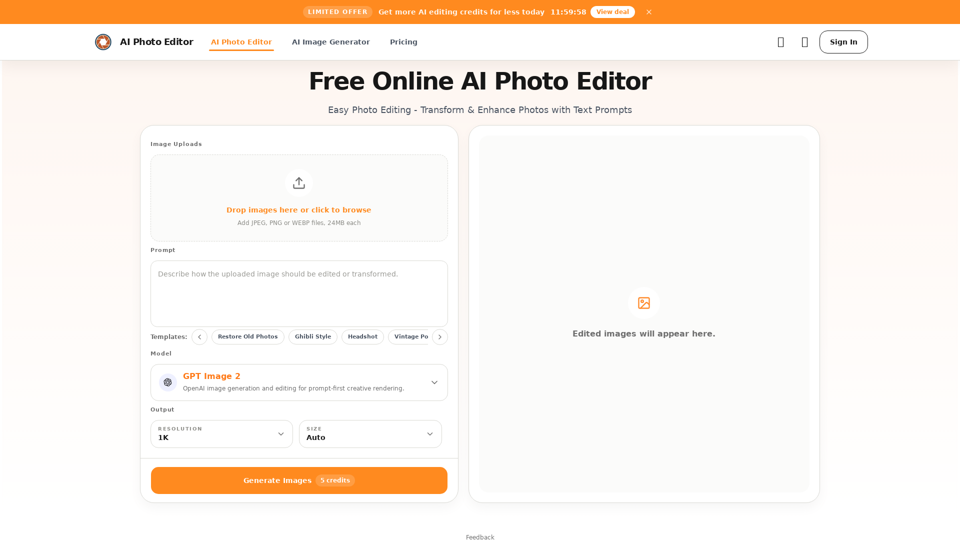
The AI Photo Editor is a free online tool designed for easy photo editing, transformation, and enhancement using artificial intelligence and text prompts. It offers a prompt-first creative rendering experience, allowing users to achieve professional-quality results quickly and efficiently. The platform supports various AI models for diverse creative needs and provides a streamlined workflow from upload to download.

Main Purpose and Target User Group

Main Purpose
To simplify and accelerate photo editing by leveraging AI for targeted changes, background replacement, detail improvement, stylization, and rapid iteration. It aims to provide a powerful yet accessible editing solution without requiring advanced design skills.

Target User Group

  • Personal Users: For cleaning up travel photos, street shots, and daily captures.
  • E-commerce Businesses: Store operators, brands, and independent sellers needing to improve product images and create consistent visuals.
  • Professionals & Individuals: For polishing profile photos, headshots, and personal branding images.
  • Marketing & Content Teams: For fast iteration of marketing assets, social visuals, and campaign pages.
  • Designers: To explore concepts and iterate on ideas more quickly.
  • Small Business Owners: To create professional-looking images without a photographer.
  • Content Creators: For generating engaging social media visuals.
  • Startups: For high-quality launch visuals and investor presentations on a budget.
  • Beginners & Non-designers: Due to its low learning curve and prompt-based interface.

Function Details and Operations

  • Prompt-Based Editing: Users upload an image and describe desired changes (remove, fix, replace, change) using simple text prompts.
  • Precise Content Control: Enables targeted adjustments to people, objects, areas, and small details, allowing for local element adjustments, subject focus improvement, and visual attention reorganization.
  • Background Replacement: Automatically replaces backgrounds with new settings based on prompts, maintaining natural subject edges, ideal for e-commerce and brand consistency.
  • Detail Enhancement: Improves lighting, refines skin texture, strengthens product details, and increases overall image clarity for portraits, product shots, and close-ups.
  • Multiple Reference Images: Supports using several reference images to unify style, borrow composition, or merge elements for consistent visual output.
  • Fast Stylization: Transforms original photos into various visual styles (e.g., Ghibli, Polaroid, vintage, illustration) for creative refresh and social content.
  • AI Models: Offers a choice of AI models including GPT Image 2 (flexible, iterative), Nano Banana Pro (premium, consistent), Seedream (advanced, specialized), and Qwen (intelligent, complex scenes).
  • Templates: Provides pre-defined templates for common tasks like "Restore Old Photos," "Ghibli Style," "Headshot," "Vintage Portrait," "Cinematic Portrait," and "Skin Enhancement."
  • Object Removal: Allows users to describe and remove unwanted objects, people, or distractions, with the AI rebuilding the background automatically.
  • Image Uploads: Supports JPEG, PNG, and WEBP files, up to 24MB each.
  • Output Settings: Offers resolution options like 1K and Auto size.
  • Workflow: Upload image -> Describe change with prompt -> Generate -> Review -> Download.

User Benefits

  • Accelerated Workflow: Significantly faster than traditional photo editing by automating repetitive tasks like cutouts, masking, and local cleanup.
  • Reduced Learning Curve: Accessible to non-designers and beginners as it requires no advanced retouching skills or knowledge of complex software like Photoshop.
  • Streamlined Process: A focused, single-page workflow from upload to export minimizes tool switching and context changes.
  • Enhanced Iteration & Consistency: Facilitates easier reuse of ideas, step-by-step refinement, and building repeatable editing processes and standards.
  • Professional Quality: Delivers high-quality, consistent, and natural-looking results suitable for commercial and personal use.
  • Cost-Effectiveness: Reduces the need for expensive photoshoots or professional designers for many tasks.
  • Quality Preservation: Designed to maintain key details, ensuring final images remain sharp and usable.

Compatibility and Integration

  • Supported Input Formats: JPEG, PNG, WEBP.
  • Output: High-quality images suitable for web, social media, e-commerce, and business use.
  • Platform: Online, browser-based tool, accessible from any device with internet access.
  • Commercial Use: Edited images can be used for various commercial purposes including e-commerce, marketing, social media, and websites.
AI Photo Editor -Frequently Asked Questions

What is AI Photo Editor?

AI Photo Editor is a free online AI Photo Editor that allows you to edit, transform, and enhance any photo in seconds using text prompts. It leverages AI to provide fast, consistent, and professional-quality results.

Do I need an account to use the AI Photo Editor?

Yes, you need to sign in to use the AI Photo Editor. You can click the "Sign In" button in the top navigation and use your Google account for one-click authorization to log in.

Is AI Photo Editor free to use?

Yes, AI Photo Editor offers free usage. Every 24 hours, you can manually claim 20 free credits for image editing and generation. If you require more credits, you have the option to purchase them directly.

How does the AI Photo Editor work?

To use the AI Photo Editor, you upload an image, enter a text prompt describing the changes you want, and then click the "Generate" button. After a short wait, the AI-edited image will appear in the preview window for you to review and download.

Why is AI Photo Editor good for beginners?

AI Photo Editor is designed to keep editing workflows simple. It does not require advanced retouching skills, layers, masking, or Photoshop knowledge. Beginners can simply upload an image, enter a prompt, and get a polished result fast, making it an attractive online AI Photo Editor for those new to photo editing.

What file formats does AI Photo Editor support?

AI Photo Editor supports common image formats including JPG, PNG, and WebP. After editing, you can download a high-quality result suitable for web, social, or business use.

Which AI models power this AI Image Editor?

You can use various models within the AI Image Editor, including GPT Image 2, Nano Banana Pro, Seedream, and Qwen. Each model offers a different balance of speed, detail, and consistency for edits and generation.

Can I use images edited with AI Photo Editor for commercial work?

Yes. Images created using the AI Photo Editor can be used for e-commerce, marketing, social media, websites, and other commercial projects based on your workflow needs.

Can AI Photo Editor change photos using a text prompt?

Yes, a core benefit of AI Photo Editor is its prompt-based editing capability. You can describe what to remove, improve, replace, or restyle in your image, and the system will automatically apply the change for fast and efficient editing.

Will AI Photo Editor maintain my photo quality?

Yes, AI Photo Editor is designed to preserve key details while making changes, ensuring your final image remains sharp, natural, and usable for everyday publishing and business tasks.

Is my data safe when using the AI Photo Editor?

We handle uploads through secure workflows and limit access to what is needed to operate the AI Photo Editor service. For exact details on storage and processing, please refer to the privacy policy.

Can AI Photo Editor remove objects from photos for free?

Yes. You can describe the object, person, or distraction you want removed, and the AI Photo Editor will rebuild the background automatically, providing a cleaner final result. This makes it a practical online AI Photo Editor for quick cleanup tasks.

How can AI Photo Editor help me edit photos faster?

AI Photo Editor streamlines your workflow by skipping repetitive steps like cutouts, masking, and local cleanup. You can finish frequent image changes in less time, especially when many visuals need daily updates, making it a highly efficient AI Image Editor.

How do I log in to AI Photo Editor?

To log in to AI Photo Editor, visit https://aiphotoeditor.io/ and click the "Sign In" button in the top navigation. You can use your Google account for quick access.

How do I sign up for AI Photo Editor?

To sign up for AI Photo Editor, visit https://aiphotoeditor.io/ and click the "Sign In" button in the top navigation. You can easily create an account using your Google account.

How can I get support or contact AI Photo Editor?

For support and customer service, please refer to the "Contact Us" link available in the footer of the website.

Where can I find the AI Photo Editor Refund Policy?

For information regarding refunds, please refer to the "Refund Policy" link available in the footer of the website.

AI Photo Editor -Data Analysis

Latest Traffic Information

  • Monthly Visits

    -

  • Bounce Rate

    0.00%

  • Pages Per Visit

    0.00

  • Visit Duration

    00:00:00

  • Global Rank

    -

  • Country Rank

    -

Visits Over Time

Traffic Sources

  • direct:
    0.00%
  • referrals:
    0.00%
  • social:
    0.00%
  • mail:
    0.00%
  • search:
    0.00%
  • paidReferrals:
    0.00%
More data

AI Photo Editor - Alternative

Newtype.ai:AI Image Generator Tool | Create Character with Newtype AI

Create a stunning AI character image with ease using NewtypeAI's intuitive web-based interface, requiring only a few clicks to bring your favorite character to life, offering unparalleled convenience and stability.

--
Nightmare AI

Nightmare-ai.com: Nightmare AI provides nightmareai/real-esrgan-based AI upscaling for enhancing images to HD resolution using AI technology. Enhance your images and add more details with this online tool.

--
Nodetool AI

Nodetool AI - AI-Powered Nodetool for Cassandra Management & Database Tools

--
More Tags about: AI Photo Editor