Free AI Tools

ManualFig AI

ManualFig AI - Automated Diagram Generation & AI Flowchart Creator for Technical Documentation

ManualFig AI

ManualFig AI -Introduction

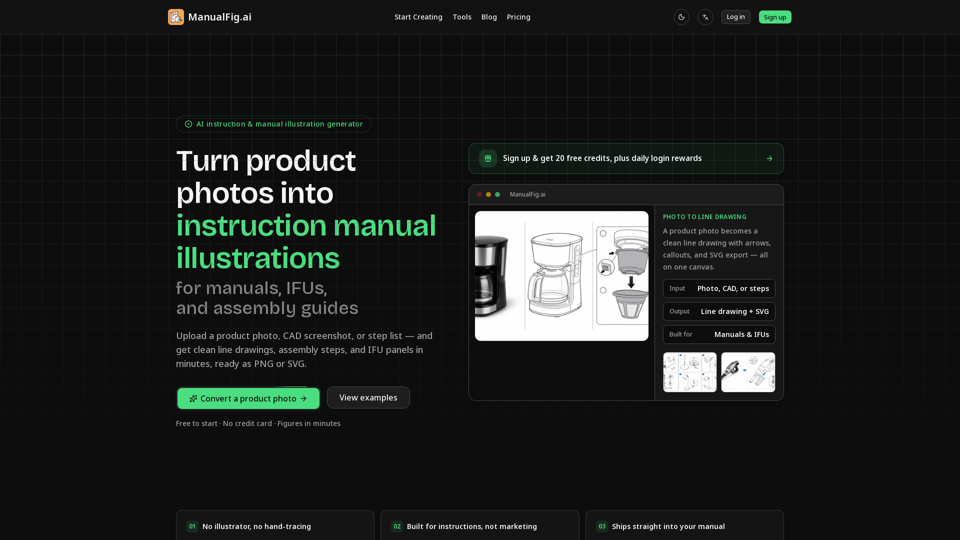
ManualFig AI is an innovative AI-powered platform designed to streamline the creation of professional instruction manuals, assembly guides, and IFUs. By transforming product photos, CAD screenshots, or simple step lists into clean, technical line drawings, the tool eliminates the need for expensive illustrators or time-consuming manual tracing. Users can generate precise assembly steps, part callouts, and safety panels in minutes, ensuring consistent visual quality across all documentation. Whether you are producing packaging inserts, troubleshooting guides, or complex technical manuals, ManualFig AI provides a fast, efficient solution to create clear, compliant, and easy-to-follow visuals that help reduce customer support inquiries and product returns. With support for PNG and SVG exports, it integrates seamlessly into any documentation workflow, allowing teams to maintain professional standards while significantly accelerating their production timeline.

ManualFig AI -Features

ManualFig AI

Overview

ManualFig AI is a specialized AI-powered technical documentation tool designed to transform product photos, CAD screenshots, and written step lists into professional-grade instruction manual illustrations. By automating the creation of clean line drawings, assembly steps, and IFU (Instructions for Use) panels, it eliminates the need for manual tracing or expensive technical illustrators, allowing teams to produce high-quality documentation in minutes.

Main Purpose and Target User Group

The main purpose of ManualFig AI is to streamline the production of technical visuals for manuals, packaging inserts, and work-instruction systems. It is built for technical writers, product designers, manufacturing teams, and e-commerce businesses that need to create clear, compliant, and consistent assembly guides, troubleshooting diagrams, and safety-focused IFUs without requiring advanced design skills.

Function Details and Operations

  • Automated Line Art Conversion: Converts complex product photos or CAD files into clean, technical line drawings while removing background clutter and reflections.
  • Instructional Element Integration: Automatically adds numbered steps, directional arrows, part callouts, zoom details, and warning symbols.
  • Compliance-Ready Panels: Generates "correct/incorrect" comparison panels, hazard symbols, and safety-focused visuals required for medical and industrial IFUs.
  • Reference-Guided Generation: Uses uploaded photos or sketches as a structural base to ensure proportions and part shapes remain accurate to the real product.
  • Interactive Editing: Allows users to refine figures using simple text prompts, enabling quick adjustments to steps or visual details without restarting the process.
  • Version Control: Keeps all project assets, prompts, and generated figures in one workspace, allowing for easy side-by-side comparison and consistent styling.

User Benefits

  • Cost and Time Efficiency: Reduces the cost and turnaround time associated with hiring external illustrators or agencies.
  • Visual Clarity: Produces functional, easy-to-follow illustrations that reduce customer support tickets and product returns.
  • Consistency: Maintains a uniform visual style across all documentation, from quick-start cards to comprehensive user manuals.
  • Scalability: Enables rapid updates to documentation; if a product design changes, users can simply update the reference and regenerate the figures.

Compatibility and Integration

  • File Formats: Supports high-quality exports in both PNG and SVG formats, ensuring compatibility with standard documentation software, layout tools, and print media.
  • Workflow Integration: Designed to fit into existing technical documentation pipelines, allowing for seamless insertion of visuals into help centers, packaging inserts, and digital manuals.

Access and Activation Method

Users can access the platform via the official website at http://manualfig.ai. The service offers a "Free to start" model, providing new users with 20 free credits upon sign-up and daily login rewards. Users can choose from various subscription tiers (Starter, Pro, Business) based on their monthly generation needs, with options for priority support and advanced enterprise compliance workflows.

ManualFig AI -Frequently Asked Questions

Frequently Asked Questions

What is ManualFig AI and how does it help with technical documentation?

ManualFig AI is an advanced visual diagramming software designed to streamline the creation of technical documentation. It uses AI to convert product photos, CAD screenshots, or simple step lists into clean, professional line drawings, assembly steps, and IFU (Instructions for Use) panels. It is specifically built to replace time-consuming hand-tracing or expensive illustration services, allowing you to generate clear, compliant visuals for manuals and guides in minutes.

Can ManualFig AI turn product photos into line art?

Yes. One of the core features of ManualFig AI is its ability to take a standard product photo or CAD screenshot and transform it into a clean, technical line drawing. The AI removes unnecessary clutter and reflections, focusing on the essential shapes and details required for effective assembly or maintenance instructions.

Can I create product manual pictures from step lists?

Absolutely. You don't need a visual reference to start. You can input a written procedure or a step list, and ManualFig AI will generate the corresponding numbered assembly steps, callouts, and visual panels needed for your documentation.

Is ManualFig AI only for medical device IFU illustrations?

No, while it is robust enough to handle the strict requirements of medical device IFUs (including warnings and correct/incorrect panels), it is a versatile tool for any industry. It is widely used for furniture assembly instructions, consumer electronics quick-start guides, appliance maintenance manuals, and manufacturing work instructions.

Does the app support editing an existing result?

Yes. ManualFig AI is designed for iteration. You can edit any generated figure using simple text prompts, compare different versions side-by-side on the same canvas, and keep your project history organized to ensure consistency across your entire manual.

How does SVG export work in ManualFig AI?

ManualFig AI allows you to export your final figures as PNG or SVG files. The SVG (Scalable Vector Graphics) export is particularly useful for technical documentation, as it ensures your diagrams remain crisp and clear at any scale, making them perfect for professional print layouts and digital help centers.

ManualFig AI -Data Analysis

Latest Traffic Information

  • Monthly Visits

    -

  • Bounce Rate

    0.00%

  • Pages Per Visit

    0.00

  • Visit Duration

    00:00:00

  • Global Rank

    -

  • Country Rank

    -

Visits Over Time

Traffic Sources

  • direct:
    0.00%
  • referrals:
    0.00%
  • social:
    0.00%
  • mail:
    0.00%
  • search:
    0.00%
  • paidReferrals:
    0.00%
More data

ManualFig AI - Alternative

Flux AI Image Generator

Flux AI Image Generator - Create High-Quality Images with Customizable Styles Using Flux.1 Models at FluxProweb

--
Free Image to Prompt AI

Free Image to Prompt AI - Online AI Prompt Generator by Fluxproweb

--
Google Nano Banana Pro AI

Google Nano Banana Pro AI - Free Fluxproweb AI Model: Banana Pro AI Technology

--
Fooocus

Fooocus - Free AI Image Generator Online

--
More Tags about: ManualFig AI