Myfakesnap.com: Easily add a fake image to your selfie with My Fake Snap. Utilize facial recognition and AI technology to create a realistic fake image to share with friends and have a good laugh.

Trick Your Friends with My Fake Snap - Prank App for Fun

Introduction

What is My Fake Snap?

My Fake Snap is a platform that allows users to trick their friends by creating fake Snapchat images.

How to use My Fake Snap?

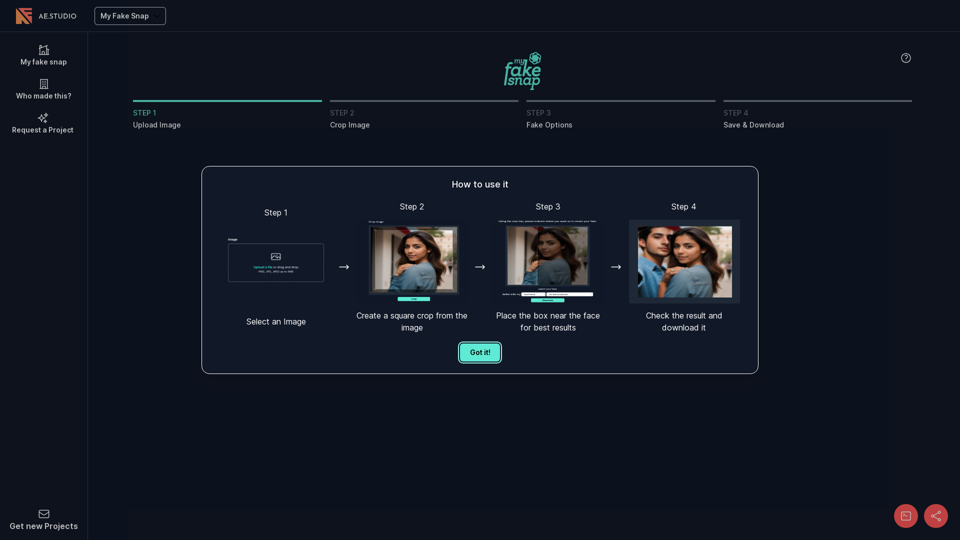
Step 1: Select an Image

Upload a file or drag and drop an image (PNG, JPG, JPEG up to 4MB) to get started.

Step 2: Create a Square Crop

Crop the image to create a square shape.

Step 3: Place the Box

Place the box near the face for the best results.

Step 4: Check and Download

Check the result and download the fake Snapchat image.

Features of My Fake Snap

My Fake Snap offers a user-friendly interface to create fake Snapchat images with ease.

Pricing of My Fake Snap

My Fake Snap is free to use, with no subscription or hidden fees.

Trick - Alternative

AI Product Photography Suite - Claid.ai

Generate AI product photos, remove background, enhance, edit, and more. Start for FREE.

--
Create stunning visuals in seconds with AI.

Remove background, cleanup pictures, upscaling, Stable diffusion and more…

--
ClipDrop - AI Background Removal Tool

Clipdrop.co: Easily remove backgrounds, upscale images, and uncrop photos with ClipDrop's AI-powered tools. Teleport anything, anywhere with this innovative text-to-image solution.

--
Reimagine Clipdrop - Stable Diffusion Technology

Clipdrop.co: Easily generate various versions from a single image with ClipDrop's Stable Diffusion tool.

--
More Tags about: Trick Your Friends with My Fake Snap - Prank App for Fun