Myfakesnap.com: Easily add a fake image to your selfie with My Fake Snap. Utilize facial recognition and AI technology to create a realistic fake image to share with friends and have a good laugh.

Trick Your Friends with My Fake Snap - Prank App for Fun

Introduction

What is My Fake Snap?

My Fake Snap is a platform that allows users to trick their friends by creating fake Snapchat images.

How to use My Fake Snap?

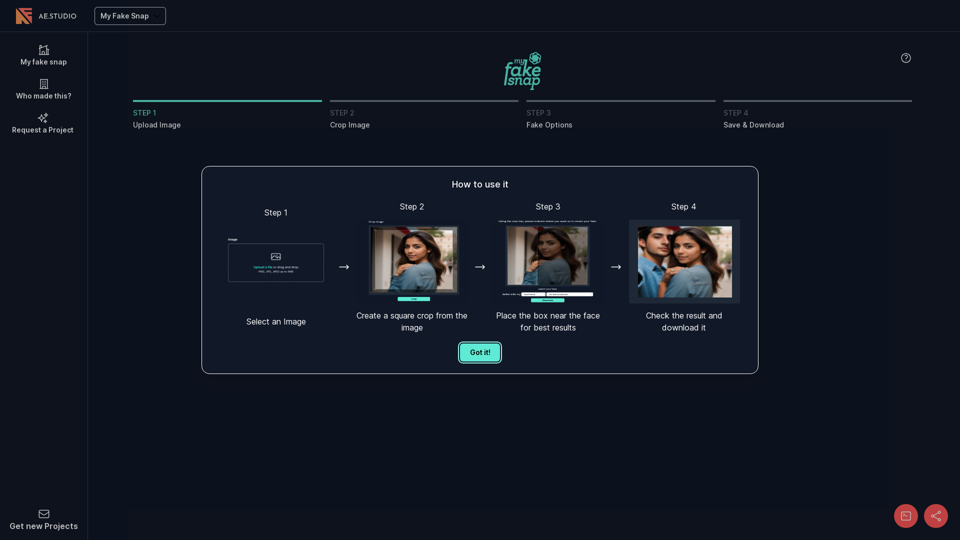
Step 1: Select an Image

Upload a file or drag and drop an image (PNG, JPG, JPEG up to 4MB) to get started.

Step 2: Create a Square Crop

Crop the image to create a square shape.

Step 3: Place the Box

Place the box near the face for the best results.

Step 4: Check and Download

Check the result and download the fake Snapchat image.

Features of My Fake Snap

My Fake Snap offers a user-friendly interface to create fake Snapchat images with ease.

Pricing of My Fake Snap

My Fake Snap is free to use, with no subscription or hidden fees.
Trick - Alternative

Scribble Diffusion

Turn your sketch into a refined image using AI

--
Create Viral Short Videos with AI - Shorts Generator

Shortsgenerator.com: Create viral short videos in minutes with Shorts Generator, an AI-powered online video maker. Explore pricing plans, FAQs, and streamline YouTube automation for your next viral video creation.

--
Stable Diffusion AI Image Generator - Sink In

Sinkin.ai: Run Stable Diffusion AI image generation models on cutting-edge infrastructure. Develop AI applications using our efficient, dependable, and affordable APIs.

--
AI Powered Image Prompter Tool for Creative Ideas Generation

Sites.google.com: Boost your design workflow with Image Prompter, a cutting-edge tool that revolutionizes the way you create and refine visual content.

--
More Tags about: Trick Your Friends with My Fake Snap - Prank App for Fun