Free AI Tools

Omni AI Video

Omni AI Video - Best AI Video Generator for Text to Video and Automated Video Production

Omni AI Video

Omni AI Video -Introduction

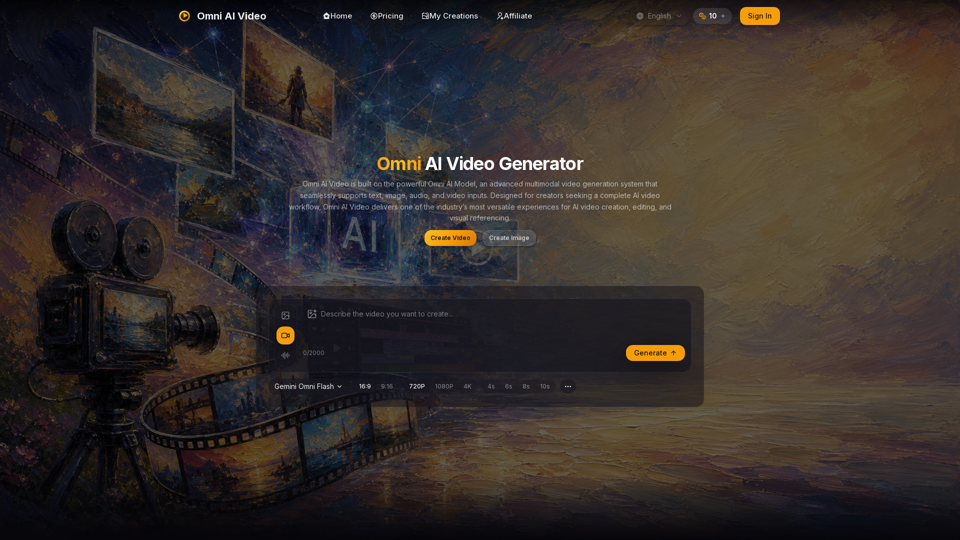
Omni AI Video is a cutting-edge, multimodal AI video generation platform designed to streamline the creative workflow for content creators. Powered by the advanced Omni Video Model, this unified system allows users to generate high-quality, production-ready videos from a diverse range of inputs, including text, images, audio, and reference clips. By consolidating these capabilities into a single, intuitive workspace, Omni AI Video eliminates the need for tool switching, enabling creators to move seamlessly from initial concepts to polished visual content. Whether you are producing social media assets, commercial advertisements, or professional product showcases, the platform provides the versatility and control needed to bring creative visions to life with precision and efficiency.

Omni AI Video -Features

Overview

Omni AI Video is a unified AI video generation platform powered by the proprietary Omni Video Model. It serves as a multimodal workspace that integrates text, image, audio, and video inputs into a single production pipeline.

Main Purpose and Target User Group

The platform simplifies AI video creation for:

  • Content Creators: Fast, high-quality social media and short-form video production.
  • Marketers: Efficient ad campaigns and product showcases.
  • Creative Professionals: Visual referencing and commercial-grade video experiments.

Function Details and Operations

Multimodal Generation

A single model that interprets text prompts, reference images, audio cues, and reference videos simultaneously for coherent output.

Flexible Inputs

Supports text-to-video, image-to-video, and reference-to-video workflows.

Customizable Parameters

Users can select aspect ratios (16:9 or 9:16), resolutions (720p, 1080p, or 4K), and clip durations (4s to 10s).

Unified Workspace

A centralized dashboard to manage prompts, upload reference media, and preview generations.

Synchronized Audio

Capability to describe ambience, dialogue, and sound effects to align with visual output.

User Benefits

  • Efficiency: One AI model for all tasks reduces workflow friction.
  • High-Quality Output: Delivers cinematic motion and professional-grade visuals.
  • Fast Iteration: Streamlined processes allow for quick drafts and refined exports.
  • Commercial Readiness: Paid plans include commercial usage rights.
  • Transparent Pricing: A credit-based system ensures predictable costs.

Compatibility and Integration

Omni AI Video is a web-based platform accessible via browser at omniaivideo.ai. It functions as a standalone ecosystem that integrates motion control, lip-syncing, and sound effects into one interface.

Access and Activation Method

  1. Visit: Navigate to omniaivideo.ai.
  2. Sign In: Create an account to access the dashboard.
  3. Claim Credits: Use daily free credits or purchase subscription plans (Basic, Pro, Max, or Pro Max) to unlock higher limits, priority processing, and commercial rights.
  4. Generate: Use the "Create Video" interface to input prompts, upload references, and generate content.
Omni AI Video -Frequently Asked Questions

What is Omni AI Video and how does it work?

Omni AI Video is an advanced AI video generator powered by the Omni Video Model. It is a unified, multimodal platform that allows you to create high-quality videos using text-to-video, image-to-video, and reference-to-video workflows. By integrating text, image, audio, and video inputs into a single pipeline, it simplifies the automated video production process without the need to switch between different tools.

Can I use Omni AI Video for commercial projects?

Yes. If you are on a paid subscription plan, you are granted commercial usage rights for the videos you generate. This makes Omni AI Video a suitable solution for marketing campaigns, social media content, product showcases, and professional client work. Please review the platform's Terms of Service for specific details regarding commercial usage.

What types of inputs does the Omni AI Video generator support?

The platform is designed to be highly versatile. You can use text prompts to describe your scene, upload up to 5 reference images to maintain visual consistency, or provide reference videos to guide the motion and style of your output. Additionally, the Gemini Omni Flash model supports synchronized audio, allowing you to describe specific sounds, ambience, or dialogue to enhance your video.

How does the credit system work?

Omni AI Video operates on a simple, unified credit-based system. Credits are used to generate videos, with the cost varying based on the resolution (720p, 1080p, or 4K), duration (4s to 10s), and whether you are using video inputs. You can choose from various subscription tiers that provide a monthly allotment of credits, or purchase one-time credit packs to suit your production needs.

Omni AI Video -Data Analysis

Latest Traffic Information

  • Monthly Visits

    -

  • Bounce Rate

    0.00%

  • Pages Per Visit

    0.00

  • Visit Duration

    00:00:00

  • Global Rank

    -

  • Country Rank

    -

Visits Over Time

Traffic Sources

  • direct:
    0.00%
  • referrals:
    0.00%
  • social:
    0.00%
  • mail:
    0.00%
  • search:
    0.00%
  • paidReferrals:
    0.00%
More data

Omni AI Video - Alternative

Photoleap App - Creative Photo Editing by Lightricks

Photoleapapp.com: Transform your iPhone photos with Photoleap, the all-in-one photo editor for stunning creations. Change backgrounds, remove objects, make collages, and apply filters & effects. Start your 7-day free trial today!

--
AI Video Generator by D-ID: Create Stunning Videos with AI Technology

Studio.d-id.com: Transform your concepts into videos featuring talking avatars through the power of Generative AI at Studio d-id.

--
AI Video Generator - Create Videos with HeyGen

Heygen.com: HeyGen is a cutting-edge video platform utilizing generative AI to simplify video creation. Explore your creative potential with HeyGen, the next frontier in video production.

--
AI Art Generator: Create Free AI Art | Stable Diffusion Online

Dreamlike.art: Create stunning AI Art in seconds with Stable Diffusion. Upscale your images, generate variations, enhance faces, and share your art effortlessly on Dreamlike Art.

--
More Tags about: Omni AI Video