Overview
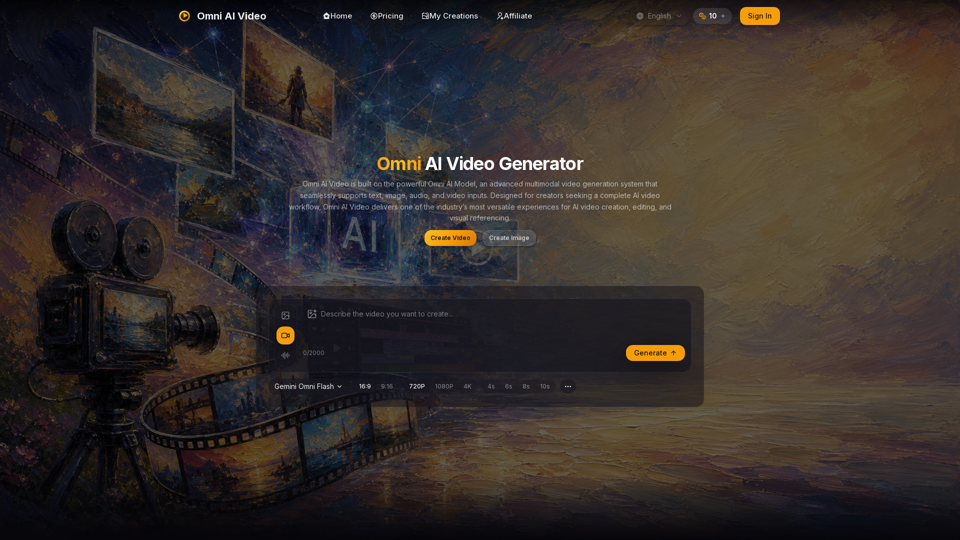
Omni AI Video is a unified AI video generation platform powered by the proprietary Omni Video Model. It serves as a multimodal workspace that integrates text, image, audio, and video inputs into a single production pipeline.
Main Purpose and Target User Group
The platform simplifies AI video creation for:
- Content Creators: Fast, high-quality social media and short-form video production.
- Marketers: Efficient ad campaigns and product showcases.
- Creative Professionals: Visual referencing and commercial-grade video experiments.
Function Details and Operations
Multimodal Generation
A single model that interprets text prompts, reference images, audio cues, and reference videos simultaneously for coherent output.
Flexible Inputs
Supports text-to-video, image-to-video, and reference-to-video workflows.
Customizable Parameters
Users can select aspect ratios (16:9 or 9:16), resolutions (720p, 1080p, or 4K), and clip durations (4s to 10s).
Unified Workspace
A centralized dashboard to manage prompts, upload reference media, and preview generations.
Synchronized Audio
Capability to describe ambience, dialogue, and sound effects to align with visual output.
User Benefits
- Efficiency: One AI model for all tasks reduces workflow friction.
- High-Quality Output: Delivers cinematic motion and professional-grade visuals.
- Fast Iteration: Streamlined processes allow for quick drafts and refined exports.
- Commercial Readiness: Paid plans include commercial usage rights.
- Transparent Pricing: A credit-based system ensures predictable costs.
Compatibility and Integration
Omni AI Video is a web-based platform accessible via browser at omniaivideo.ai. It functions as a standalone ecosystem that integrates motion control, lip-syncing, and sound effects into one interface.
Access and Activation Method
- Visit: Navigate to omniaivideo.ai.
- Sign In: Create an account to access the dashboard.
- Claim Credits: Use daily free credits or purchase subscription plans (Basic, Pro, Max, or Pro Max) to unlock higher limits, priority processing, and commercial rights.
- Generate: Use the "Create Video" interface to input prompts, upload references, and generate content.