Overview
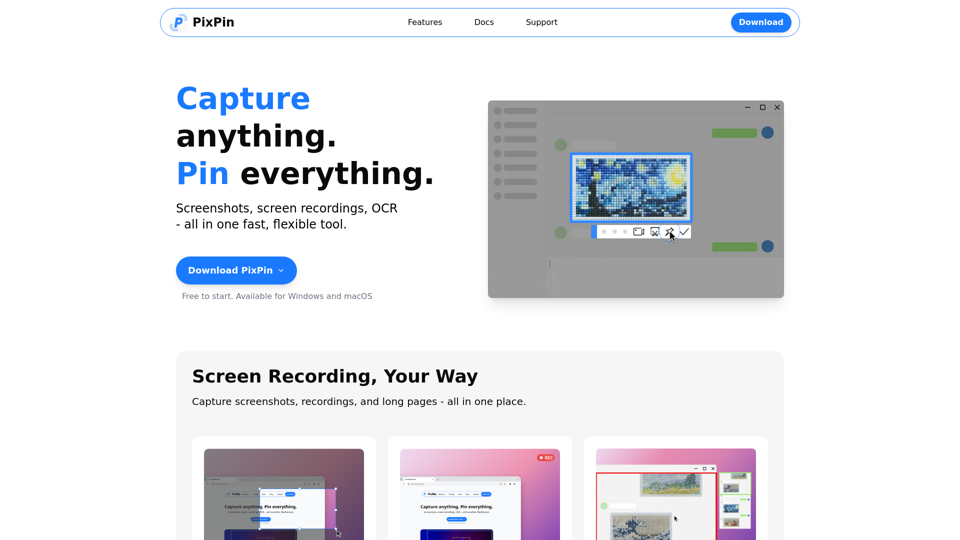
PixPin is a fast, flexible, and comprehensive desktop utility designed for Windows and macOS. It integrates essential tools for visual communication and information management, including advanced screenshot capabilities, screen recording, and optical character recognition (OCR). It aims to streamline workflows by allowing users to capture, annotate, and pin anything on their screen.
Main Purpose and Target User Group
Main Purpose
To provide an all-in-one solution for capturing visual information, annotating it for clarity, extracting text, and keeping essential references readily available on the desktop. It enhances documentation, communication, and productivity.
Target User Group
PixPin caters to a wide range of professionals and individuals who frequently work with visual content and need efficient tools for capturing, processing, and sharing information. This includes:
- Designers: For pinning mockups, UI references, and annotating design feedback.
- Developers: For keeping API documentation, logs, and errors on screen, and capturing bugs with screenshots or videos.
- Product Managers: For documenting user flows, feedback threads, and using long captures and OCR for organization.
- Customer Support: For recording issues step-by-step and highlighting screen areas to guide users visually.
- Writers & Researchers: For extracting quotes with OCR and pinning visual notes or references.
- Educators & Trainers: For creating annotated tutorials and demos using screenshots and GIFs.
Function Details and Operations
Screenshots
- Quick Capture: Easily capture specific windows, custom regions, or entire screens.
- Smart Screenshot: Precisely capture windows or specific UI elements with intelligent auto-detection and flexible selection tools.
- Long Captures: Stitch together scrolling pages, long chats, or multi-page documents into a single image.
Screen Recording
- Record screen activity as high-quality videos or animated GIFs.
- Integrate annotations directly into recordings for clearer explanations.
- Action Recording (PixPin Pro): Capture keystrokes and mouse clicks alongside screen recordings for detailed tutorials and demonstrations.
Pin to Screen
- Pin images, text snippets, color codes, or files directly onto the desktop as digital sticky notes for instant reference.
- Quick Pin Screenshot (PixPin Pro): Utilize a global mouse function (WIN + Drag Left Click) to rapidly capture a screenshot and pin it to the screen.
OCR (Extract Text from Image)
- Directly select and copy text from any pinned image or note.
- Instantly extract text from content during the screenshot process, offering fast, simple, and accurate text recognition.
Annotation Tools A comprehensive suite of tools to annotate screenshots and pinned notes, including:
- Circles and rectangles to highlight areas.
- Markers for emphasis.
- Sequence numbers to illustrate steps or order.
- Mosaic tool to blur or hide sensitive information.
- Text boxes, arrows, and more for clear visual communication.
User Benefits
- Enhanced Productivity: Streamlines workflows by combining multiple tools into one, saving time on capturing, editing, and organizing visual information.
- Improved Communication: Facilitates clear and precise visual communication through comprehensive annotation tools and detailed screen recordings.
- Instant Reference: The "Pin to Screen" feature provides immediate access to important information, fostering creativity and efficiency.
- Accuracy and Detail: Offers pixel-perfect capture and accurate OCR, ensuring high-quality documentation and reliable text extraction.
- Versatility: Supports a wide array of use cases, from creating tutorials and documenting bugs to extracting research quotes and managing design references.
- Reduced Manual Effort: Eliminates the need for manual retyping with its efficient OCR capabilities.
Compatibility and Integration
Operating Systems
Fully compatible with Windows and macOS operating systems.
Workflow Integration
Designed to seamlessly integrate into existing desktop workflows, making "everything on your screen part of your workflow" by providing tools that work across various applications and contexts.