Overview
The Video Compressor is a 100% free, online tool designed to significantly reduce video file sizes by up to 90% without requiring any uploads. It processes videos locally in your browser, ensuring complete privacy and security. Leveraging GPU acceleration, it offers fast compression, making it an efficient solution for shrinking video files for various platforms and purposes.
Main Purpose and Target User Group
Main Purpose
To compress video files, reduce their size, and optimize them for sharing on social media, messaging apps, email, or for saving storage space, all while maintaining visual quality.
Target User Group
- Content Creators who frequently need to compress videos for clients or online platforms.
- Gamers and Streamers who share video clips on platforms like Discord.
- iPhone users and other mobile device owners looking to reduce large video files.
- Anyone needing to send videos via email or messaging apps with size limits.
- Users prioritizing privacy, as no video data is uploaded to servers.
Function Details and Operations
Local Processing
All video compression occurs directly in your web browser on your device, ensuring 100% privacy with no data uploaded or shared with external servers.
GPU-Powered Acceleration
Utilizes your device's GPU for up to 10x faster compression compared to traditional CPU-based methods.
Wide Format Support
Supports all major video formats for input, including MP4, WebM, MOV, MKV, AVI, WMV, FLV, and more.
Optimized Output
Outputs optimized MP4 files using the H.264 codec for maximum compatibility.
Flexible Control & Presets
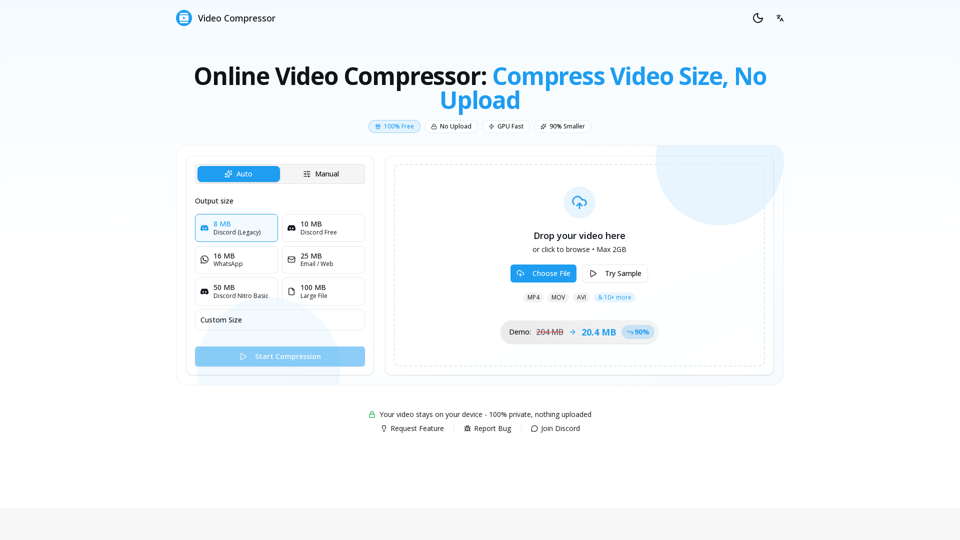
- Offers one-click presets for common platforms: 8MB Discord (Legacy), 10MB Discord Free, 16MB WhatsApp, 25MB Email / Web, 50MB Discord Nitro Basic, 100MB Large File.
- Allows custom size settings and fine-tuning of resolution, bitrate, and frame rate.
Quality Preservation
Employs smart algorithms to maintain visual clarity and minimize noticeable quality loss during compression.
No File Size Limit
Capable of compressing videos of any size (100MB, 1GB, 10GB, or larger), limited only by your device's available memory.
Simple 3-Step Operation
- Drop Your Video: Drag & drop or click to upload your video file.
- Pick Your Size: Choose a preset or set a custom target size.
- Download Compressed Video: Receive your compressed video in seconds, free and without watermarks.
User Benefits
Uncompromised Privacy
Your videos never leave your device, ensuring complete confidentiality and security.
Exceptional Speed
Benefit from GPU acceleration for rapid compression, delivering results in seconds.
Completely Free
Enjoy unlimited video compression without any sign-ups, watermarks, or hidden costs.
Significant Storage Savings
Reduce video file sizes by up to 90%, freeing up valuable storage space.
High-Quality Output
Smart algorithms ensure visual clarity is maintained, providing a good balance between file size and quality.
Effortless Convenience
Operate directly in your browser without any software downloads or installations.
Versatile Use Cases
Easily optimize videos for Discord, WhatsApp, email, social media, and other personal or professional needs.
Compatibility and Integration
Browser Compatibility
Works seamlessly across modern web browsers including Chrome, Safari, Firefox, and Edge.
Device Compatibility
Fully functional on both desktop and mobile devices.
Input Formats
Supports a wide array of video formats (MP4, WebM, MOV, MKV, AVI, WMV, FLV, etc.).
Output Standard
Produces optimized MP4 files with H.264 codec, ensuring broad compatibility across platforms and devices.
Platform Optimization
Built-in presets facilitate easy integration with specific platform requirements (e.g., Discord, WhatsApp, Email, Twitter, Telegram).