Video Compressor

Video Compressor - Online Video Compressor: Compress Video, Reduce Video Size, Shrink Video File

Video Compressor

Video Compressor -Introduction

Looking for an efficient way to reduce video size without compromising quality? Our Video Compressor is your go-to online solution for shrinking video files effortlessly. Whether you need to compress video for easier sharing, save storage space, or optimize content for various platforms, this tool provides a seamless experience. Say goodbye to large video files and hello to quick, manageable sizes. With our online video compressor, you can easily compress video and shrink video file sizes, making your digital life simpler and more efficient.

Video Compressor -Features

Overview

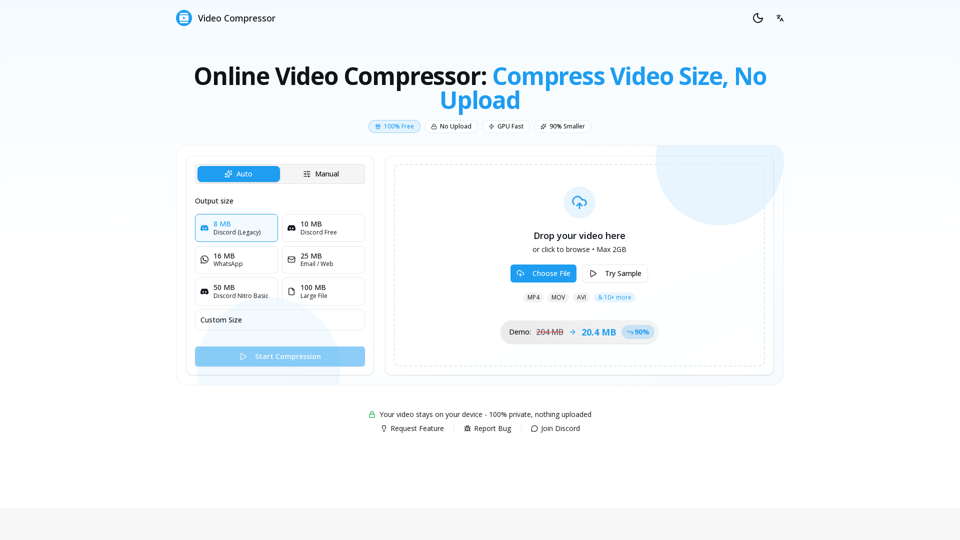
The Video Compressor is a 100% free, online tool designed to significantly reduce video file sizes by up to 90% without requiring any uploads. It processes videos locally in your browser, ensuring complete privacy and security. Leveraging GPU acceleration, it offers fast compression, making it an efficient solution for shrinking video files for various platforms and purposes.

Main Purpose and Target User Group

Main Purpose
To compress video files, reduce their size, and optimize them for sharing on social media, messaging apps, email, or for saving storage space, all while maintaining visual quality.

Target User Group

  • Content Creators who frequently need to compress videos for clients or online platforms.
  • Gamers and Streamers who share video clips on platforms like Discord.
  • iPhone users and other mobile device owners looking to reduce large video files.
  • Anyone needing to send videos via email or messaging apps with size limits.
  • Users prioritizing privacy, as no video data is uploaded to servers.

Function Details and Operations

Local Processing
All video compression occurs directly in your web browser on your device, ensuring 100% privacy with no data uploaded or shared with external servers.

GPU-Powered Acceleration
Utilizes your device's GPU for up to 10x faster compression compared to traditional CPU-based methods.

Wide Format Support
Supports all major video formats for input, including MP4, WebM, MOV, MKV, AVI, WMV, FLV, and more.

Optimized Output
Outputs optimized MP4 files using the H.264 codec for maximum compatibility.

Flexible Control & Presets

  • Offers one-click presets for common platforms: 8MB Discord (Legacy), 10MB Discord Free, 16MB WhatsApp, 25MB Email / Web, 50MB Discord Nitro Basic, 100MB Large File.
  • Allows custom size settings and fine-tuning of resolution, bitrate, and frame rate.

Quality Preservation
Employs smart algorithms to maintain visual clarity and minimize noticeable quality loss during compression.

No File Size Limit
Capable of compressing videos of any size (100MB, 1GB, 10GB, or larger), limited only by your device's available memory.

Simple 3-Step Operation

  1. Drop Your Video: Drag & drop or click to upload your video file.
  2. Pick Your Size: Choose a preset or set a custom target size.
  3. Download Compressed Video: Receive your compressed video in seconds, free and without watermarks.

User Benefits

Uncompromised Privacy
Your videos never leave your device, ensuring complete confidentiality and security.

Exceptional Speed
Benefit from GPU acceleration for rapid compression, delivering results in seconds.

Completely Free
Enjoy unlimited video compression without any sign-ups, watermarks, or hidden costs.

Significant Storage Savings
Reduce video file sizes by up to 90%, freeing up valuable storage space.

High-Quality Output
Smart algorithms ensure visual clarity is maintained, providing a good balance between file size and quality.

Effortless Convenience
Operate directly in your browser without any software downloads or installations.

Versatile Use Cases
Easily optimize videos for Discord, WhatsApp, email, social media, and other personal or professional needs.

Compatibility and Integration

Browser Compatibility
Works seamlessly across modern web browsers including Chrome, Safari, Firefox, and Edge.

Device Compatibility
Fully functional on both desktop and mobile devices.

Input Formats
Supports a wide array of video formats (MP4, WebM, MOV, MKV, AVI, WMV, FLV, etc.).

Output Standard
Produces optimized MP4 files with H.264 codec, ensuring broad compatibility across platforms and devices.

Platform Optimization
Built-in presets facilitate easy integration with specific platform requirements (e.g., Discord, WhatsApp, Email, Twitter, Telegram).
Video Compressor -Frequently Asked Questions

How to compress video online?

Compressing video online is simple with our tool: 1) Drop or click to upload your video file, 2) Choose your desired output size or quality settings, 3) Click "Start Compression," and 4) Download your compressed video. The entire process happens in your browser - no upload to servers required.

How can I compress video file size without losing quality?

To compress video without losing noticeable quality, use our "Auto" mode which intelligently adjusts bitrate while preserving visual quality. For manual control, keep resolution at 1080p or original, use H.264 codec, and aim for a bitrate of 5-8 Mbps for high quality or 2-4 Mbps for good quality.

How do I reduce video size on my iPhone?

To reduce iPhone video size: 1) Open our website in Safari on your iPhone, 2) Tap "Choose File" and select your video from Photos, 3) Select a preset like "25MB Email" or "16MB WhatsApp," 4) Tap "Start Compression," and 5) Save the compressed video to your Photos app.

Is there a file size limit for the Video Compressor?

No, there is no file size limit. You can compress videos of any size - 100MB, 1GB, 10GB or larger. Since all processing happens locally in your browser using your device's hardware, the only limit is your device's available memory.

Do I need to download or install any software to use the Video Compressor?

No downloads or installations are required. Our video compressor runs entirely in your web browser. Just open the website and start compressing - it works on any device with a modern browser (Chrome, Safari, Firefox, Edge).

Is this Video Compressor truly free?

Yes, our Video Compressor is 100% free. There's no sign-up, no watermarks, and you can compress video files unlimited times.

Is it safe to compress videos online, and is my video private?

Yes, it is 100% safe and private. Unlike most online video compressors that upload your files to remote servers, our tool processes videos entirely in your browser. Your video never leaves your device - we cannot see, access, or store your files because nothing is ever uploaded to our servers. This is the most private way to compress videos online.

What video formats are supported by the compressor?

We support all major video formats including MP4, WebM, MOV, MKV, AVI, WMV, FLV, and more. The output is always optimized MP4 with H.264 codec for maximum compatibility.

How long does video compression take?

Compression time depends on video length, resolution, and your device's capabilities. With GPU acceleration enabled, a 5-minute 1080p video typically compresses in 30-60 seconds. Longer videos or older devices may take more time.

Can I compress videos specifically for Discord?

Yes! We have built-in presets specifically for Discord: 8MB for Discord Legacy, 10MB for Discord Free, 25MB for Discord Nitro Basic, 50MB for Discord Nitro, and 100MB for large file sharing.

What if my compressed video is still too large?

If your compressed video is still too large, try: 1) Selecting a smaller target size preset, 2) Reducing resolution (e.g., 1080p → 720p), 3) Lowering the quality/bitrate setting, or 4) Trimming unnecessary parts of the video before compression.

Video Compressor -Data Analysis

Latest Traffic Information

  • Monthly Visits

    -

  • Bounce Rate

    0.00%

  • Pages Per Visit

    0.00

  • Visit Duration

    00:00:00

  • Global Rank

    -

  • Country Rank

    -

Visits Over Time

Traffic Sources

  • direct:
    0.00%
  • referrals:
    0.00%
  • social:
    0.00%
  • mail:
    0.00%
  • search:
    0.00%
  • paidReferrals:
    0.00%
More data

Video Compressor - Alternative

Addlly AI: 1st Complete AI Playground for Content Creation

The best all-in-one, no-prompt Gen AI Playground for enterprises. Generate SEO blogs, social media posts, ad copy, press releases, newsletters & more.

--
AI-based NDA (Non-Disclosure Agreement) checking service supervised by lawyers provided free of charge | GVA TECH Co., Ltd.

GVA NDA Check allows you to upload a Word or PDF NDA (Non-Disclosure Agreement) document, and an AI trained by lawyers visualizes the risks of each clause step by step, extracts points for revision, and provides revision examples from different perspectives such as 'in favor of the company' or 'equally advantageous'. Customers can use the results of GVA NDA Check as a reference to revise the clauses of the contract. GVA NDA Check aims to create a society where everyone can enter into contracts with peace of mind.

--
Enhance Photos with AI: Photo Restore, Image Upscaler, Colorize - Nero AI

Ai.nero.com: Nero AI offers advanced photo restoration and repair services. Utilizing AI technology, Nero AI can quickly eliminate scratches and enhance colors in old photos. Try our online tool now to restore and colorize your images effortlessly.

--
aicut.pro

Aicut.pro: Discover Aicut.pro, your go-to platform for innovative AI solutions that empower you to generate viral faceless short videos effortlessly. Our advanced automation tools streamline your content creation process, driving digital transformation for your channel. Elevate your video marketing strategy with Aicut and watch your audience grow!

--
More Tags about: Video Compressor