AI Toolbox Flip Video Online

AI Toolbox Flip Video Online - Mirror Videos Horizontally or Vertically with AI Video Editing Software

AI Toolbox Flip Video Online

AI Toolbox Flip Video Online -Introduction

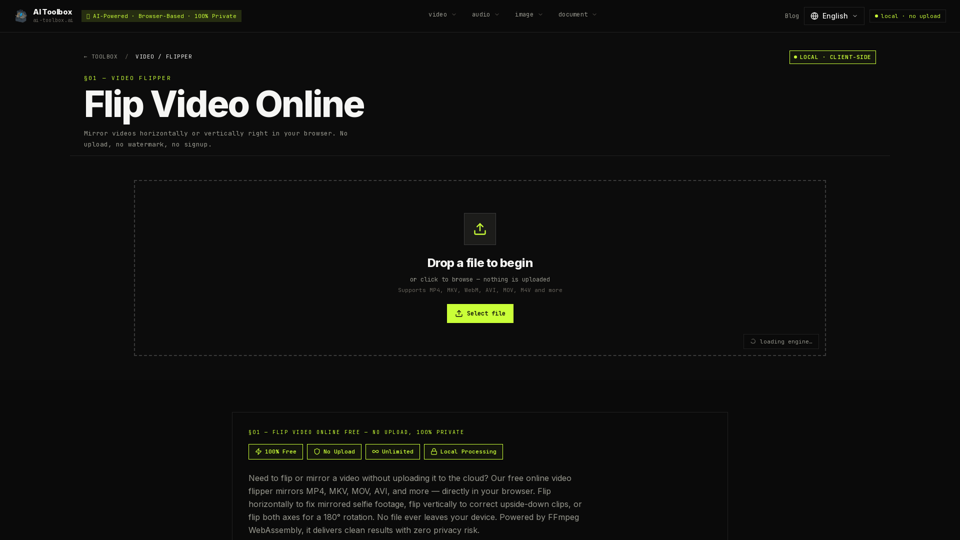
AI Toolbox Flip Video Online is a secure, browser-based utility designed to mirror your video files horizontally or vertically with ease. Whether you need to correct mirrored selfie footage, fix upside-down recordings, or create symmetrical visual effects, this tool provides a seamless solution without the need for software installations or account sign-ups. What sets this tool apart is its commitment to privacy; by utilizing FFmpeg and WebAssembly, all processing occurs locally within your browser. Your files are never uploaded to a cloud server, ensuring your sensitive or personal footage remains completely private and protected from start to finish. Supporting a wide range of formats including MP4, MKV, MOV, and AVI, AI Toolbox Flip Video Online delivers high-quality, watermark-free results instantly. It is the ideal choice for creators and professionals looking for a fast, private, and efficient way to adjust video orientation directly from their device.

AI Toolbox Flip Video Online -Features

AI Toolbox Flip Video Online

Overview
AI Toolbox Flip Video Online is a professional-grade, browser-based video utility designed to mirror footage horizontally or vertically. As a premier online video mirror tool, it leverages advanced WebAssembly and FFmpeg technology to perform all processing locally on your device. This ensures a 100% private, secure, and watermark-free experience without the need for cloud uploads or account registration.

Main Purpose and Target User Group
The primary purpose of this tool is to correct orientation issues in video files—such as mirrored selfie footage or upside-down recordings—and to facilitate creative symmetry effects. It is an essential utility for content creators, social media influencers, casual video editors, and professionals who need to flip video online quickly while maintaining strict data privacy.

Function Details and Operations

  • Flip Modes: Offers three distinct mirroring options: Horizontal Flip (HFLIP) to correct mirror-effect recordings, Vertical Flip (VFLIP) for upside-down clips, and Dual-Axis Flip for a 180° inversion.
  • Local Processing: Utilizes FFmpeg WebAssembly to execute all edits directly within the user's browser.
  • Format Support: Compatible with a wide range of video formats including MP4, MKV, WebM, AVI, MOV, M4V, and more.
  • Simple Workflow: Users simply drag and drop a file, select the desired flip direction, and download the processed MP4 file instantly.
  • Live Preview: Provides a real-time visual representation of the flip before the final download.

User Benefits

  • 100% Privacy: Since no data is uploaded to a server, sensitive or personal footage remains entirely on the user's local machine.
  • Zero Wait Times: By eliminating the need for cloud-based queues, the tool provides near-instant processing.
  • No Watermarks or Limits: Users enjoy unlimited usage without watermarks, logos, or subscription requirements.
  • High-Quality Output: Employs near-lossless encoding (CRF 18) to ensure that the visual integrity of the video is preserved during the re-encoding process.
  • Audio Preservation: Automatically preserves and re-encodes audio tracks to AAC, ensuring sound quality remains consistent.

Compatibility and Integration

  • Browser-Based: Works seamlessly on modern desktop browsers (Chrome, Firefox, Edge, Safari).
  • Cross-Platform: Accessible on both desktop and mobile devices, though desktop browsers are recommended for larger files.
  • Universal Output: All processed files are exported as H.264 MP4 files, ensuring maximum compatibility across all social media platforms and media players.

Access and Activation Method
AI Toolbox Flip Video Online is a free, web-based service. No installation, software download, or account creation is required. Users can access the tool directly via the official website, drop their files into the browser interface, and begin editing immediately.
AI Toolbox Flip Video Online -Frequently Asked Questions

How can I flip video online using AI Toolbox?

AI Toolbox Flip Video Online is a powerful online video mirror tool that allows you to flip video horizontally or vertically directly in your browser. Simply drag and drop your file, select your preferred flip mode (Horizontal, Vertical, or Both), and download your processed video instantly. No uploads are required, ensuring your data remains 100% private.

Is it safe to use this AI video editing software?

Yes, it is completely safe. Unlike other online tools, AI Toolbox processes your files locally on your device using FFmpeg WebAssembly. Your video files are never uploaded to a server, meaning there is no risk of data leaks or privacy breaches.

Can I flip video horizontally to fix selfie footage?

Absolutely. If your front-facing camera recorded a mirrored image, you can use our tool to flip video horizontally. This restores the natural orientation of text, logos, and gestures, making it perfect for social media content.

Does this tool support different video formats?

Yes, our online video mirror tool supports a wide range of formats, including MP4, MKV, WebM, AVI, MOV, M4V, and more. The final output is provided as a high-quality, universally compatible MP4 file.

Is there a cost or watermark when I rotate video online?

No. AI Toolbox is completely free to use. We do not add watermarks to your videos, and there are no hidden fees, account requirements, or daily limits on how many videos you can process.

AI Toolbox Flip Video Online -Data Analysis

Latest Traffic Information

  • Monthly Visits

    -

  • Bounce Rate

    0.00%

  • Pages Per Visit

    0.00

  • Visit Duration

    00:00:00

  • Global Rank

    -

  • Country Rank

    -

Visits Over Time

Traffic Sources

  • direct:
    0.00%
  • referrals:
    0.00%
  • social:
    0.00%
  • mail:
    0.00%
  • search:
    0.00%
  • paidReferrals:
    0.00%
More data

AI Toolbox Flip Video Online - Alternative

CapCut | All-in-one video editor & graphic design tool driven by AI

CapCut is an all-in-one creative platform powered by AI that enables video editing and image design on browsers, Windows, Mac, Android, and iOS.

--
CapCut Creative Suite: Video Editing, Graphic Design, and More

Capcut.com: Explore CapCut’s creative suite online for video editing, graphic design, smart AI-powered tools, team collaboration, and more.

--
Captions AI

Captions.ai: Unlock the future of storytelling with Captions AI, your go-to platform for AI-powered video creation. Effortlessly generate automatic video subtitles and enhance your content with our advanced AI video editor. Experience studio-grade video production like never before, all at your fingertips. Transform your videos today with Captions AI!

--
AI Powered Chatbot Development and Conversational AI Solutions

Revolutionize your Mac experience with Chaibar, a cutting-edge AI assistant that seamlessly integrates the power of ChatGPT and Dall-E, empowering you to unlock unprecedented creativity and productivity.

--
More Tags about: AI Toolbox Flip Video Online