Veo 4 AI Product Features
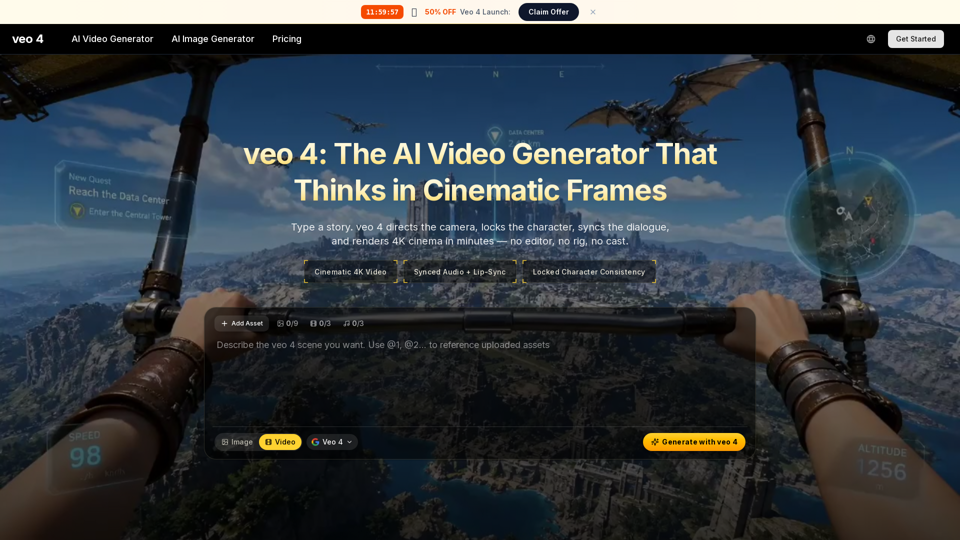
Veo 4 AI is an advanced AI video generator designed to create cinematic 4K video content from simple text prompts. It automates complex production tasks such as camera direction, character consistency, and dialogue synchronization, enabling users to render high-quality, broadcast-grade films rapidly without traditional film crews or extensive post-production.
Main Purpose and Target User Group
- Main Purpose: To democratize cinematic video production by enabling rapid, cost-effective creation of professional-grade AI-generated videos with advanced realism, audio integration, and directorial control, significantly reducing traditional production time and resources.
- Target User Group:
- Independent Filmmakers
- Brand and Performance Marketers
- E-commerce Teams
- Educators and Course Creators
- Founders and Solo Operators
- Content Creators and Streamers
Function Details and Operations
- Input Methods: Accepts text prompts (including cinematic shot language), single reference images, or multiple reference images.
- Output Quality: Generates cinematic 4K video output (MP4 format) with embedded audio, ready for broadcast.
- Video Length: Capable of generating clips up to 2 minutes in length.
- Cinematic Camera Language: Understands and renders professional directing vocabulary (e.g., dolly, crane, rack focus, orbital drone, whip pan, dutch angle) with believable physics.
- Synced Audio & Lip-Sync: Natively generates dialogue with natural emotional inflection, lip-sync, and Foley sound effects (footsteps, ambience, impacts) matching on-screen action.
- Locked Character Consistency (Character Anchoring): Maintains the face, wardrobe, and identity of characters consistently across multiple shots, aspect ratios, and reshoots.
- Multi-shot Storyboarding: Allows users to define wide, medium, and close-up shots within a single workflow, ensuring continuity across cuts.
- Director's Overlay Editor: Provides post-render controls to adjust camera path, motion intensity, or focal point without full re-generation.
- Generation Speed: 40% faster than its predecessor, Veo 3.
- AI Image Generator: Included as part of the creative suite.
- SynthID Watermarking: Embeds invisible SynthID provenance for AI traceability and safety.
- Creative Controls: Offers controls for aspect ratio, length, resolution, audio toggling, motion intensity (slider), and fixed-shot camera locking.
- Workflow: A three-step process: 1. Write or upload input (text/image), 2. Direct with Veo 4 controls, 3. Download in 4K.
- Concurrent Generations: Supports multiple concurrent generations (1, 4, or 10) depending on the chosen plan.
User Benefits
- Unprecedented Efficiency: Drastically reduces production time from days/weeks to minutes, enabling rapid iteration.
- Cost Reduction: Eliminates the need for expensive film crews, studio bookings, actors, and extensive post-production.
- Professional-Grade Output: Delivers high-resolution, cinematic quality video with realistic audio and consistent visuals.
- Simplified Creative Process: Transforms complex filmmaking into a prompt-based interaction, making advanced video creation accessible.
- Enhanced Creative Control: Offers granular control over camera work, character appearance, and narrative flow.
- Brand Consistency: Ensures character and brand identity remain uniform across all generated content.
- Versatile Application: Supports a wide range of use cases from marketing to education and independent filmmaking.
- Traceability and Trust: SynthID watermarking provides transparency for AI-generated content.
Compatibility and Integration
Veo 4 AI outputs broadcast-grade MP4 files with embedded audio, making them universally compatible for direct upload to platforms like YouTube, social media ad sets, investor decks, and client preview links.
Customer Feedback and Case Studies
- Community Statistics: Over 1 million creators, 40 million+ videos rendered, active in 180+ countries, with an average rating of 4.9/5.
- Testimonials highlight:
- Significant time savings in production workflows.
- Increased performance and higher click-through rates for marketing campaigns.
- Ability to produce professional-quality content without traditional resources.
- Improved workflow for storyboarding and pitching.
- Drastic reduction in production costs.
- Empowerment for creative visualization and rapid iteration from script to screen.
Access and Activation Method
- Website: Accessible via aiveo4.org.
- Pricing Plans: Offers Lite, Pro, and Ultra plans, available monthly or yearly, or via one-time credit packs.
- Included Features (all paid plans): 4K cinematic video, synced audio, character anchoring, AI image generator, and full commercial rights.
- Plan Variations: Differ in monthly credit allocation (400, 1,500, 4,400), generation speed (Fast, Priority, Fastest), concurrent generations (1, 4, 10), and support level.
- Cancellation: Users can cancel subscriptions anytime.
- Contact: Support inquiries can be directed to [email protected].