Free AI Tools

EZ Grader

EZ Grader - Online Grading Calculator for Teachers and Classroom Assessment

EZ Grader

EZ Grader -Introduction

EZ Grader is a streamlined, user-friendly digital tool designed to simplify the assessment process for educators. By automating the conversion of correct and incorrect answers into precise percentages and letter grades, this platform eliminates the need for manual calculations and time-consuming paperwork. Whether you are grading quizzes, tests, or comprehensive exams, EZ Grader provides an efficient, error-free solution that allows teachers to focus more on student instruction and less on administrative tasks. Accessible from any device, this versatile tool ensures that grading is fast, accurate, and consistent, making it an essential resource for modern classrooms.

EZ Grader -Features

Overview

EZ Grader is a premier digital grading calculator designed to streamline classroom assessment. By automating the conversion of raw scores into percentages, this educational software eliminates the need for manual arithmetic, allowing educators to grade tests, quizzes, and assignments with speed and precision.

Main Purpose and Target User Group
The primary purpose of EZ Grader is to provide a reliable, error-free alternative to manual grading. It is specifically engineered for K-12 teachers, university instructors, and private tutors who need to process large volumes of student assessments efficiently while maintaining high standards of accuracy.

Function Details and Operations

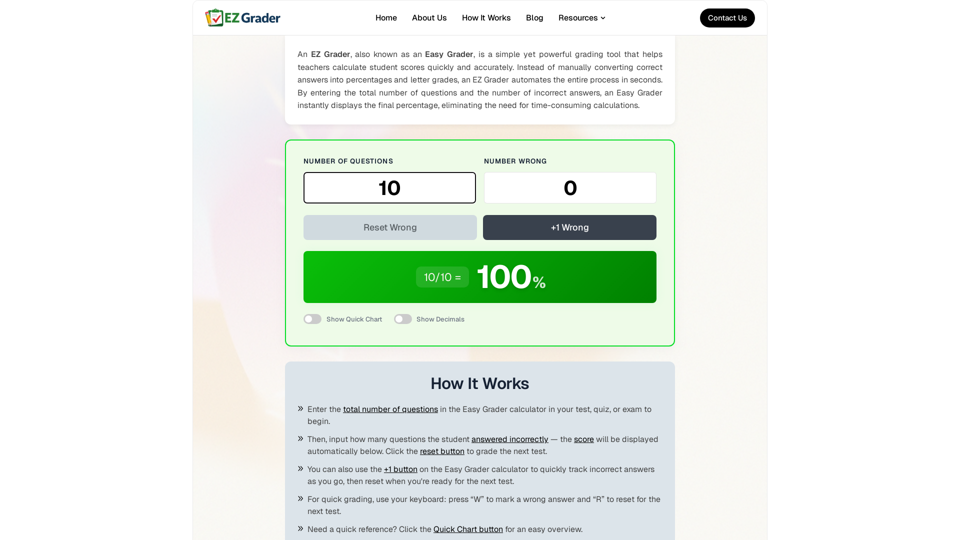
  • Automated Calculation: Instantly computes percentage scores based on the total number of questions and the number of incorrect answers.
  • Keyboard Shortcuts: Enhances workflow speed by allowing users to press “W” to mark a wrong answer and “R” to reset for the next student.
  • Quick Chart Feature: Provides a comprehensive reference table for any given test length, allowing for rapid visual scanning of grades.
  • Decimal Toggle: Offers the option to view scores with or without decimal precision.
  • Incremental Tracking: Features a “+1 Wrong” button for manual tallying of errors during the grading process.

User Benefits

  • Time Efficiency: Reduces grading time from hours to minutes, freeing up educators to focus on lesson planning and student feedback.
  • 100% Accuracy: Eliminates human calculation errors, ensuring consistent and fair grading across all student papers.
  • User-Friendly Interface: Requires no training or complex setup; the intuitive design allows for immediate use.
  • Stress Reduction: Removes the repetitive, tedious nature of manual score conversion.

Compatibility and Integration
EZ Grader is a web-based tool, ensuring full compatibility across all modern devices. Whether using a desktop computer, laptop, tablet, or smartphone, teachers can access the calculator anywhere. It functions as a standalone educational software solution that does not require complex software integration or installations.

Access and Activation Method
EZ Grader is accessible directly through the official website (ezgrader.co). It is a free-to-use online service, requiring no account creation, subscription, or software activation to begin grading immediately.
EZ Grader -Frequently Asked Questions

What is an EZ Grader and how does it help teachers?

An EZ Grader is an essential grading calculator designed to streamline classroom assessment. It allows teachers to input the total number of questions and the number of incorrect answers to instantly generate a percentage score. By automating these calculations, it serves as a vital piece of educational software that saves time and eliminates manual errors.

How can I use the EZ Grader for my classroom assessments?

Using the EZ Grader is simple: enter the total number of questions in your test or quiz, then input the number of incorrect answers. The tool will automatically display the final percentage. You can also use the "+1" button to track errors as you grade or use keyboard shortcuts like "W" to mark a wrong answer and "R" to reset for the next student.

Is the EZ Grader accurate for all types of tests?

Yes, the EZ Grader provides 100% accurate, error-free results. Whether you are grading short quizzes, midterms, or full-length exams, this tool ensures consistent scoring across all student papers, making it a reliable choice for any subject or grade level.

Can I access the EZ Grader on my mobile device?

Absolutely. The EZ Grader is fully optimized for mobile use. You can access the tool via your smartphone, tablet, or laptop, allowing you to grade assignments conveniently from anywhere, whether you are in the classroom, at home, or on the go.

EZ Grader -Data Analysis

Latest Traffic Information

  • Monthly Visits

    5.665K

  • Bounce Rate

    32.00%

  • Pages Per Visit

    1.53

  • Visit Duration

    00:00:02

  • Global Rank

    3503556

  • Country Rank

    138976

Visits Over Time

Traffic Sources

  • direct:
    0.00%
  • referrals:
    0.00%
  • social:
    0.00%
  • mail:
    0.00%
  • search:
    0.00%
  • paidReferrals:
    0.00%
More data

EZ Grader - Alternative

Slidebean AI Pitch Deck Creator + Pitch Deck Design Agency

We've helped startup founders raise over $500M in venture capital. Sign Up for our AI pitch deck creator, or book a call with our pitch deck design agency to enlist our team's help crafting your company pitch.

--
SlideModel AI

SlideModel AI - Professional AI Presentation Maker with PowerPoint Templates & Plans

--
Free AI Presentation Maker - Slidesgo

Slidesgo.com: Create a customizable template in seconds with our new AI Presentation Generator. Explore beyond PowerPoint with our free tool.

--
SlideSpeak - Your AI to create presentations powered by ChatGPT

One tool to create PowerPoint presentations with AI, design presentation slides, or summarize an entire presentation. Powered by ChatGPT. Master presentations and documents with AI.

--
More Tags about: EZ Grader