Free AI Tools

Img2threejs converter online

Img2threejs converter online - Convert Image to 3D Model for Three.js Web Development

Img2threejs converter online

Img2threejs converter online -Introduction

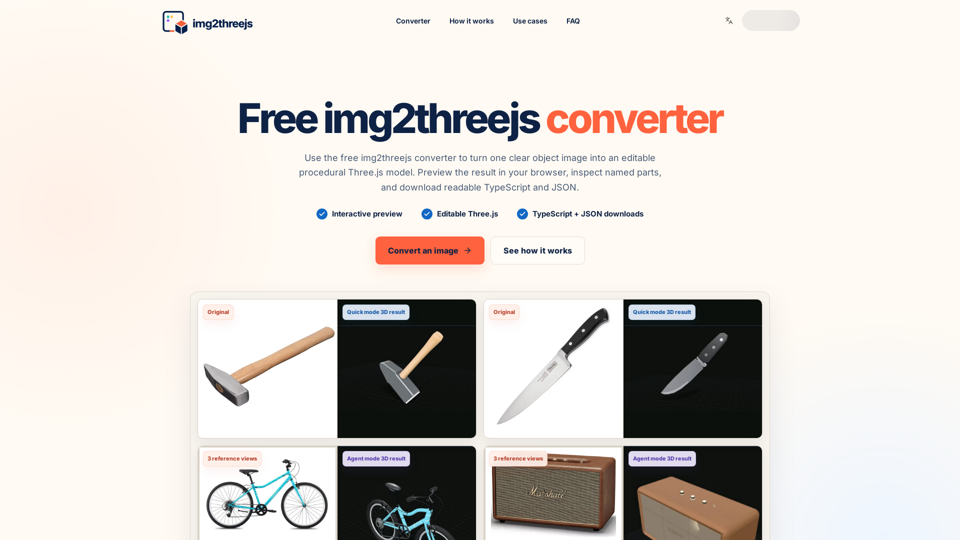
Img2threejs converter online is a powerful, free tool designed to transform static object images into editable, procedural Three.js models. By analyzing your uploaded images, the platform generates a structured 3D scene complete with named components, materials, and transforms. Unlike traditional tools that produce opaque, uneditable meshes, this converter provides readable TypeScript and JSON specifications, allowing developers to easily inspect, modify, and integrate 3D assets directly into their web projects. Whether you are building interactive product previews, game prop prototypes, or creative coding experiments, this tool offers a streamlined workflow for turning 2D references into functional, code-based 3D geometry. It is the ideal solution for developers who prioritize maintainable, browser-native 3D content that remains fully customizable within their existing Git workflows and application logic.

Img2threejs converter online -Features

Overview

Img2threejs converter online is a specialized, free web-based tool designed to transform 2D object images into editable, procedural Three.js models. It provides developers with a structured, code-first approach to web 3D development by generating readable TypeScript and JSON specifications.

Main Purpose and Target User Group

The tool serves as a practical starting point for programmable web 3D, catering to:

  • Web Developers: Building interactive product viewers, configurators, or technical explainers.
  • Creative Coders: Integrating 3D elements into Three.js projects that require programmatic control.
  • Game Prototypers: Blocking out props and assets quickly before final modeling.
  • Technical Designers: Creating inspectable, modular 3D components for web-based applications.

Function Details and Operations

  • Procedural Reconstruction: Analyzes image silhouettes, material cues, and component relationships to build a validated specification.
  • Editable Output: Generates named parts, materials, and transforms for deep customization.
  • Multi-Mode Generation: Offers "Quick Mode" for rapid, single-image generation and "Agent Mode" for complex, multi-pass analysis.
  • Interactive Browser Preview: Allows users to orbit, inspect, and switch material views directly in the browser.
  • Code-First Export: Provides reusable TypeScript factory functions (returning a THREE.Group) and structured JSON build instructions.

User Benefits

  • Maintainability: Code-based output fits into Git workflows and standard code review processes.
  • Flexibility: Enables developers to rename parts, adjust dimensions, swap materials, or attach event listeners to specific components.
  • Efficiency: Drastically reduces the time required to prototype 3D assets for web environments.
  • Semantic Hierarchy: Keeps components separate, allowing interaction with individual parts without flattening the object.

Compatibility and Integration

  • Three.js Native: Designed specifically for the Three.js ecosystem for seamless integration.
  • Format Support: Exports as TypeScript and JSON, ideal for models that must react to application state.
  • Workflow Integration: Designed to work alongside AI coding assistants by providing readable, constrained descriptions.

Access and Activation Method

  • Web Access: Accessible directly via https://img2threejs.com/.
  • Activation: Users upload a PNG or JPG file to begin the conversion process.
  • Pricing Model: Includes a free daily allowance for "Quick Mode" generations, with "Agent Mode" available via a credit-based system for complex tasks.

Img2threejs converter online -Frequently Asked Questions

Frequently Asked Questions

What is the Img2threejs converter online?

Img2threejs is a powerful, free tool designed for 3D web development. It allows you to convert an image to a 3D model by analyzing the object in your photo and rebuilding it as a procedural Three.js scene. Unlike traditional converters that produce opaque meshes, this tool provides named components, materials, and editable TypeScript, making it an ideal Three.js geometry generator for developers.

How can I convert an image to a 3D mesh using this tool?

To convert an image to a 3D mesh, simply upload a clear PNG or JPG of your object to the platform. Select "Quick Generate," and the tool will analyze the silhouette, components, and material cues to build a validated 3D hierarchy. You can then preview the model in your browser and download the resulting JSON specification or TypeScript factory.

Is the output from Img2threejs editable?

Yes. The primary goal of this tool is to provide a starting point for 3D web development that remains fully editable. Because the output is generated as a structured Three.js group with named parts, you can easily modify dimensions, swap materials, attach event listeners, or animate specific components directly within your code.

Can I use the generated 3D models for commercial projects?

You may use and modify the generated code in your own commercial projects, provided you have the rights to the original reference image. We recommend reviewing the generated output for any design or trademark considerations before publishing your work. Please refer to our Terms of Service for full details regarding usage rights.

Does Img2threejs export files like GLB or OBJ?

Currently, the tool focuses on code-first integration. It exports editable Three.js TypeScript and a structured JSON build specification rather than standard 3D file formats like GLB, OBJ, or FBX. This format is specifically designed for developers who need their 3D assets to live within a web application, participate in version control, and be easily manipulated via code.

Img2threejs converter online -Data Analysis

Latest Traffic Information

  • Monthly Visits

    -

  • Bounce Rate

    0.00%

  • Pages Per Visit

    0.00

  • Visit Duration

    00:00:00

  • Global Rank

    -

  • Country Rank

    -

Visits Over Time

Traffic Sources

  • direct:
    0.00%
  • referrals:
    0.00%
  • social:
    0.00%
  • mail:
    0.00%
  • search:
    0.00%
  • paidReferrals:
    0.00%
More data

Img2threejs converter online - Alternative

AI Logo Generator - Create Professional Logos with AI Technology

Appintro.io: Generate unique logos with the AI Logo Generator from Appintro.io. Explore a wide range of artificial intelligence templates and customize them to create the perfect logo with Logo Maker.

--
Neurona AI Image Creator

Neurona AI Image Creator - Free AI Image Generator & Face Swap Online by Art-Neurona

--
Revolutionizing AI Image Generation with Stable Diffusion and DALL-E

Artificial-art.eu: Generate AI art with ease using Stable Diffusion technology like DALL-E on ARTificial Art. Revolutionizing image generation with a user-friendly interface, this AI tool is available as a desktop app for Mac, Windows, and Linux. Developed by the European ARTificial Intelligence Lab, this platform is at the forefront of Artificial Intelligence Art, in line with the EU AI Act. Discover Findup.ai for all your AI image creation needs.

--
API for Automated Image and Video Generation - Bannerbear

The Bannerbear API helps you and your team auto-generate social media visuals, ecommerce banners, podcast videos and more

--
More Tags about: Img2threejs converter online