Free AI Tools

Make 3D Map

Make 3D Map - 3D Terrain Generator & Custom Elevation Models Tool

Make 3D Map

Make 3D Map -Introduction

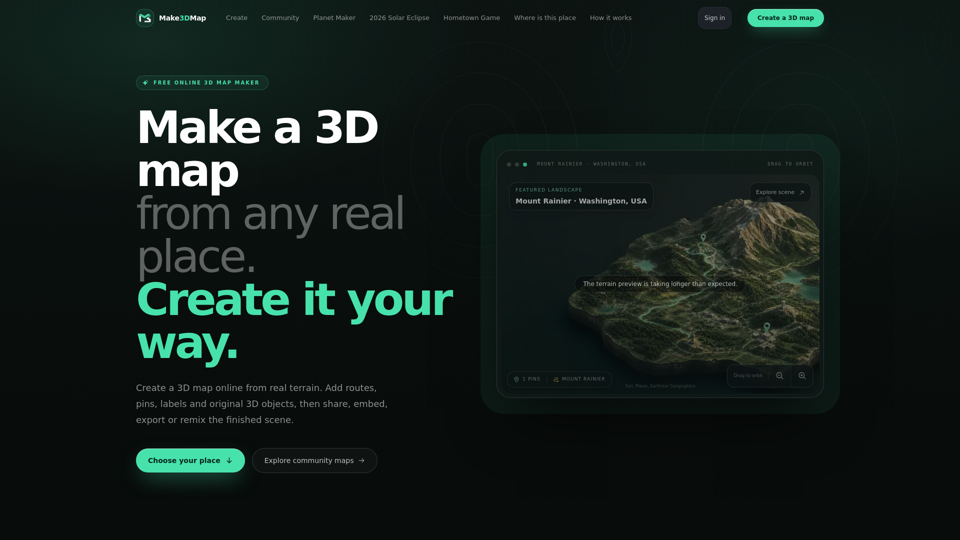
Make 3D Map is an innovative, browser-based platform that empowers users to transform real-world terrain into immersive, interactive 3D dioramas. By leveraging actual elevation data from anywhere on Earth, the tool allows creators to move beyond blank canvases and build detailed, tactile landscapes with ease. Whether you are documenting travel routes, designing game worlds, or creating educational exhibits, this platform provides the essential infrastructure to bring geography to life. Users can enhance their scenes by adding custom pins, labels, and 3D objects, or by uploading their own assets for a personalized touch. Designed for seamless sharing and collaboration, Make 3D Map enables you to publish your creations via clean URLs, embed them into websites, or export files for 3D printing and professional pipelines. It is the ultimate solution for turning local landmarks, memories, and global locations into living, shareable 3D stories.

Make 3D Map -Features

Overview

Make 3D Map is a powerful, browser-based 3D terrain generator that transforms real-world geographic data into immersive, interactive 3D landscapes. By bridging the gap between GIS data and creative design, it allows users to lift elevation data from any location on Earth to create tactile 3D dioramas, shareable stories, and production-ready assets.

Main Purpose and Target User Group

The platform serves as an interactive mapping tool designed for creators who need to visualize real-world geography. It is ideal for:

  • Educators and historians: Creating explorable cultural heritage exhibits.
  • Game developers and worldbuilders: Prototyping terrain and atmosphere.
  • Travel bloggers and storytellers: Documenting routes and journeys.
  • Designers and hobbyists: 3D printing terrain or creating custom 3D landscape visualizations.

Function Details and Operations

Real-World Terrain Extraction

Search any location globally to frame and lift actual elevation data into a 3D workspace.

Map Assistant

Utilize AI-driven assistance to research locations, analyze visual references, and place recognizable 3D objects accurately.

Custom Asset Library

Upload and store custom 3D models (up to 250 MB), textures, and images in a reusable library for future projects.

Interactive Editing

Features surface-aware tools for dragging, scaling, and rotating objects directly onto the terrain.

Storytelling Layers

Add routes, pins, labels, and atmospheric effects to create narrative-driven maps.

Export & Production

Export files in 3MF or STL formats for 3D printing, or use GLB files for integration into professional pipelines like Blender, Unity, or Unreal Engine.

User Benefits

  • Accessibility: No complex software installation required; the entire workflow is browser-based.
  • Creative Freedom: Transform static geography into living, interactive scenes that can be remixed by the community.
  • Efficiency: Save time by using real-world data as a foundation rather than building from a blank canvas.
  • Versatility: Seamlessly transition from a web-based interactive map to a physical 3D print or a professional game development asset.

Compatibility and Integration

Web Integration

Easily embed finished 3D maps into websites via clean URLs.

Asset Compatibility

Supports standard 3D formats including GLB, JPEG, PNG, and WebP.

Ecosystem Synergy

Integrated with the Tripo API for advanced 3D generation, allowing users to generate models and bring them directly into their map scenes.

Access and Activation Method

Users can access the tool directly at https://make3dmap.com/. To unlock advanced features—such as uploading custom 3D models, embedding maps on external sites, and exporting files for 3D printing—users simply need to sign in to their creator account.

Make 3D Map -Frequently Asked Questions

How can I make a 3D map using this tool?

Make 3D Map is an intuitive 3D terrain generator that allows you to search for any real-world location. Simply frame the area you want to capture, and the tool will lift the actual elevation data to create a tactile 3D diorama. From there, you can customize your scene by adding routes, pins, labels, and 3D objects.

Can I use Make 3D Map for professional 3D landscape visualization?

Yes. Make 3D Map is designed for various use cases, including worldbuilding for games, educational exhibits, and professional design. You can export your finished scenes as 3MF or STL files for 3D printing, or use GLB files to continue your work in software like Blender, Unity, or Unreal Engine.

Is this an interactive mapping tool?

Absolutely. Once you create your custom elevation models, your scene becomes a permanent, shareable, and interactive URL. Viewers can orbit, zoom, and explore the terrain, and you can embed these interactive maps directly into your own website or portfolio.

Can I upload my own assets to my 3D maps?

Yes, signed-in creators can upload their own 3D models (up to 250 MB), as well as custom surface textures and terrain images. These assets are saved to your personal library, allowing you to reuse them across multiple map projects.

Make 3D Map -Data Analysis

Latest Traffic Information

  • Monthly Visits

    -

  • Bounce Rate

    0.00%

  • Pages Per Visit

    0.00

  • Visit Duration

    00:00:00

  • Global Rank

    -

  • Country Rank

    -

Visits Over Time

Traffic Sources

  • direct:
    0.00%
  • referrals:
    0.00%
  • social:
    0.00%
  • mail:
    0.00%
  • search:
    0.00%
  • paidReferrals:
    0.00%
More data

Make 3D Map - Alternative

Live3D - #1 VTuber Software Suite

Live3D is the best VTuber Software Suite for you to become a VTuber, dedicated to building fun VTuber avatars and engaging animations with VTuber Maker.

--
Coohom

Coohom.com: Generate impressive 3D visualizations and renderings quickly with Coohom's all-inclusive interior design software. Discover an extensive selection of furniture in the catalog to effortlessly realize your design concepts.

--
Leonardo AI

Leonardo.ai: Transform your projects with Leonardo AI, the leading AI image generator. Create high-quality, AI-generated images swiftly and stylishly to enhance your creative vision using cutting-edge AI technology for image editing and visual content.

--
Opus Pro - AI Video Repurposing Tool

Opus.pro: Opus Clip transforms lengthy videos into top-notch viral clips suitable for sharing on TikTok, YouTube Shorts, and Reels, boosting your social media presence.

--
More Tags about: Make 3D Map