Free AI Tools

OpenSubs

OpenSubs - Free AI Subtitle Downloader for Movies and TV Shows

OpenSubs

OpenSubs -Introduction

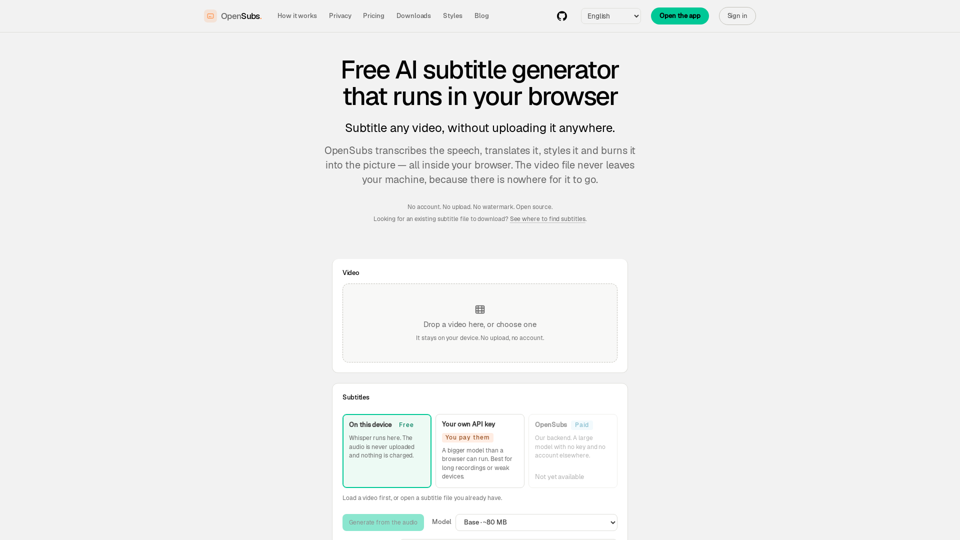
OpenSubs is a powerful, privacy-focused AI subtitle generator that operates entirely within your web browser. By leveraging local processing, it allows users to transcribe, translate, style, and burn subtitles into videos without ever uploading files to a server. This ensures complete data security, as your video content never leaves your device. Designed for efficiency and ease of use, OpenSubs supports multiple languages and offers professional-grade styling presets, making it an ideal solution for creators who prioritize privacy and high-quality output. Whether you need to generate subtitles for social media or long-form content, OpenSubs provides a seamless, watermark-free experience that runs directly on your machine.

OpenSubs -Features

OpenSubs

OpenSubs is a powerful, privacy-first AI subtitle generator that operates entirely within your browser. By leveraging WebAssembly and local machine processing, it allows users to transcribe, translate, style, and burn subtitles into videos without ever uploading files to a server.

Overview

  • Privacy-first AI subtitle generation in the browser
  • Uses WebAssembly and local machine processing
  • Supports transcription, translation, styling, and subtitle burning
  • No file uploads required

Function Details and Operations

  • Local AI Transcription: Uses the Whisper model to transcribe speech directly on your device, ensuring audio files never leave your machine.
  • Multi-Language Translation: Supports translation into 20 languages, including Chinese (Simplified/Traditional), Japanese, Korean, Spanish, French, and more.
  • Advanced Styling: Offers 12 professional presets, ranging from clean broadcast captions to dynamic social media styles with word-by-word highlighting.
  • Video Burning: Exports finished MP4 files with subtitles permanently burned into the pixels using WebCodecs.
  • Flexible Export Options: Supports standard subtitle formats including .srt, .vtt, and .ass for use in external video editing software.
  • No-Upload Processing: Operates via object URLs, meaning no video data is sent to a server, eliminating the risk of footage leaks.

User Benefits

  • Privacy Guaranteed: Since the software runs locally, your video files remain on your device.
  • Cost-Effective: All local processing is free forever. Optional cloud translation is available via a transparent credit-based system.
  • No Watermarks: OpenSubs does not add watermarks to your exported videos.
  • No Account Required: You can start using the tool immediately without signing up or logging in.
  • High Compatibility: Bundled fonts ensure that non-Latin scripts, like Arabic or Chinese, render perfectly.

Compatibility and Integration

  • Browser-Based: Works directly in modern web browsers, including Chrome, Edge, and Firefox.
  • Cross-Platform: Available as a desktop application for macOS, Windows, and Linux.
  • Command Line Interface (CLI): Provides a CLI tool for developers and power users to automate subtitle generation in scripting or CI/CD pipelines.
  • Browser Extension: Offers an extension to generate subtitles for videos playing in your browser tabs in real time.
  • Open Source: The entire engine is open source (AGPL-3.0), allowing users to inspect the code and ensure transparency.

Access and Activation Method

  • Web App: Simply visit the official website to start using the tool immediately—no installation or account creation is required.
  • Desktop/CLI: Download the latest builds from the official website or GitHub repository.
  • API Integration: Users can bring their own API keys (OpenAI, Claude, DeepL) for enhanced translation capabilities, which are used directly in the browser and never stored or sent to OpenSubs servers.
OpenSubs -Frequently Asked Questions

How does OpenSubs ensure my video privacy?

OpenSubs is designed with a "local-first" approach. Your video file is never uploaded to a server; it is processed directly in your browser using WebAssembly and WebGPU. Because the video never leaves your machine, it is impossible for your footage to be leaked or stored by third parties.

Is OpenSubs really free to use?

Yes. All core features—including speech transcription, on-device translation, subtitle styling, and burning subtitles into MP4 files—are completely free. You do not need an account to use these tools. We only charge for optional cloud-based translation services, and the cost is clearly displayed before you start any job.

Do I need to create an account to generate subtitles?

No. You can use the OpenSubs subtitle generator, style your captions, and export your files without signing in or creating an account. An account is only required if you choose to purchase credits for our cloud translation backend.

Can I burn subtitles directly into my video file?

Yes. OpenSubs allows you to burn subtitles directly into the pixels of your MP4 file using browser-based encoding. You can also export your work as .srt, .vtt, or .ass files if you prefer to keep the subtitles separate.

Does OpenSubs support multiple languages?

Yes, OpenSubs supports transcription and translation for over 20 languages, including English, Chinese (Simplified and Traditional), Japanese, Korean, Spanish, French, German, and more. The tool includes bundled fonts for non-Latin scripts to ensure that characters render correctly without errors.

Is my API key safe when using OpenSubs?

Absolutely. If you choose to bring your own API key for translation services, it is stored only in your browser’s memory. It is never sent to our servers, never written to disk, and is cleared as soon as you close or reload the tab.

OpenSubs -Data Analysis

Latest Traffic Information

  • Monthly Visits

    -

  • Bounce Rate

    0.00%

  • Pages Per Visit

    0.00

  • Visit Duration

    00:00:00

  • Global Rank

    -

  • Country Rank

    -

Visits Over Time

Traffic Sources

  • direct:
    0.00%
  • referrals:
    0.00%
  • social:
    0.00%
  • mail:
    0.00%
  • search:
    0.00%
  • paidReferrals:
    0.00%
More data

OpenSubs - Alternative

Wondershare

Wondershare.com: Discover Wondershare's range of software tools and solutions for multimedia creativity, productivity, and utility on the official website.

--
Wordtune: Free AI Writing Assistant | Write Better Today

Wordtune is the AI writing assistant that helps you write high-quality content across emails, blogs, ads, and more. Use it to get results you can trust every time.

--
More Tags about: OpenSubs